KTC
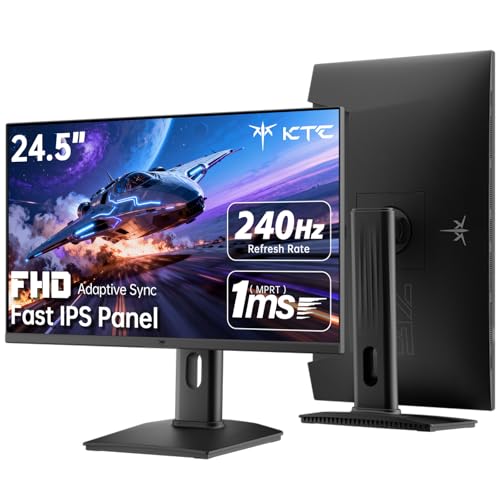
KTC 24.5 Inch 240Hz Gaming Monitor, FHD Fast IPS Computer Monitor, H25T7-3
Disclosure: We may earn a commission when you buy through links on this page, at no extra cost to you. As an Amazon Associate I earn from qualifying purchases. Learn more
Highlights
- 【25" FHD & Fast IPS Panel】This 25-inch Full HD 1080p (1920 x 1080) monitor has Fast IPS panel, delivering crisp colors and a wide 178° viewing angle for clear viewing from any angle.
- 【240Hz Refresh Rate & 1MS Response Time】240Hz refresh rate and 1ms (MPRT) response time, delivers ultra-smooth gaming experience. FreeSync technology motion blur and ghosting.
- 【Excellent Color with HDR400】114% sRGB color gamut, 1000:1 contrast ratio, and 16.7M colors deliver vibrant colors. HDR400 lets you enjoy premium color. 350cd/m² 8-bit delivers crisp, detailed visuals.
- 【Flexible Connectivity】This 25-inch gaming desktop monitor features HDMI 2.0×2 , DisplayPort 1.4×1 and USB2.0×1. 100*100mm Vesa wall mount ensures consistent image quality from any angle, providing all-round viewing performance for work and entertainment.
- 【Ergonomic Stand】Pivot, tilt, and height adjustment monitor, suit your ideal gaming setup. Low blue light and flicker-free ensure complete comfort even during marathon gaming sessions.
Why You'll Love It
- A 240Hz refresh rate and 1ms MPRT response time support fast, fluid on-screen gaming
- Fast IPS technology combines Full HD resolution with wide 178-degree viewing angles
- HDR400 support and 114% sRGB color coverage bring vibrant color to games and everyday content
- Two HDMI ports and one DisplayPort offer flexible connections for compatible devices
- Height, tilt, and pivot adjustments make it easier to arrange a comfortable viewing position
- Low blue light and flicker-free features support a more comfortable viewing setup
Pros
- +Fast 240Hz refresh rate
- +Fast IPS panel
- +HDR400 and 114% sRGB
- +Adjustable ergonomic stand
- +Multiple video connections
Cons
- -Full HD resolution rather than higher-resolution output
- -25-inch screen size may feel restrictive for some setups
Detailed Review
The KTC H25T7-3 gaming monitor is a 24.5-inch Full HD display built around a 240Hz refresh rate, making it particularly appealing to gamers who prioritize smooth on-screen motion. Its combination of a Fast IPS panel and a 1ms MPRT response time gives it a clear gaming focus, while the 1920 x 1080 resolution keeps the display straightforward for everyday computer use. It is a practical option for someone who wants a high-refresh-rate desktop monitor without moving to a larger screen.
The refresh rate is the main attraction. At 240Hz, the monitor is designed to refresh the displayed image frequently, while the stated 1ms MPRT response time addresses motion presentation. These specifications make the screen worth considering for games where quick visual updates matter to the player. FreeSync technology is also included as part of its motion-focused feature set. Together, these features give the monitor a clear purpose beyond simply displaying desktop applications, although the benefit of its high refresh rate depends on the capabilities of the connected computer and the content being displayed.
The Fast IPS panel adds versatility to the gaming-focused design. It provides a 178-degree viewing angle, which is useful when viewing the screen from different positions rather than sitting directly in front of it. Color is another consideration: the monitor lists 114% sRGB coverage, an 8-bit display, 16.7 million colors, and HDR400 support. Its 350cd/m² brightness and 1000:1 contrast ratio round out the picture specifications. This combination makes it suitable for shoppers who want their gaming display to handle general visual content as well, rather than focusing exclusively on refresh rate.
Connectivity and positioning are also considered. Two HDMI 2.0 ports, one DisplayPort 1.4 connection, and one USB 2.0 port provide several connection options. The included stand supports height adjustment, tilt, and pivot, giving users flexibility when arranging their desktop viewing position. There is also 100 x 100mm VESA mounting support for buyers who prefer a compatible mounting arrangement. Low blue light and flicker-free features complete the everyday-use considerations, alongside the monitor's gaming-oriented specifications.
The main trade-off is the combination of a 25-inch screen and Full HD resolution. Buyers who specifically want a larger display or a higher-resolution workspace may prefer a different screen configuration. Its strongest features are concentrated around fast gaming, so shoppers primarily interested in a general-purpose display should consider whether the 240Hz refresh rate and gaming-oriented specifications are priorities in their setup. Verdict: This gaming monitor is a strong candidate for players who want a 240Hz Fast IPS screen, adjustable positioning, and flexible video connections in a compact desktop format. Choose another type of monitor if a larger screen or higher resolution matters more to your everyday work and entertainment.
Specifications
- Brand: KTC
- Model: H25T7-3
- Screen size: 24.5 inches (listed as 25 inches in the feature description)
- Resolution: Full HD, 1920 x 1080
- Panel: Fast IPS
- Refresh rate: 240Hz
- Response time: 1ms (MPRT)
- Viewing angle: 178 degrees
- Color gamut: 114% sRGB
- Contrast ratio: 1000:1
- Brightness: 350cd/m²
- Color depth: 8-bit
- Color support: 16.7 million colors
- HDR: HDR400
- Video connections: 2 x HDMI 2.0, 1 x DisplayPort 1.4
- Additional connection: 1 x USB 2.0
- VESA mounting: 100 x 100mm
- Stand adjustments: Height, tilt, and pivot
- Additional features: FreeSync, low blue light, flicker-free
Who Should Buy It
A great fit if you:
- You play fast-paced games and want a monitor with a 240Hz refresh rate and 1ms MPRT response time.
- You prefer an IPS display with wide viewing angles for different desktop seating positions.
- You want a gaming screen that also offers HDR400 and broad sRGB color coverage for everyday visual content.
- You regularly adjust your screen position and appreciate height, tilt, and pivot options in the stand.
- You need multiple video inputs to accommodate compatible desktop equipment and other connected devices.
Consider something else if you:
- You prefer a larger viewing area, in which case a larger-screen desktop monitor may suit your workspace better.
- You need more desktop detail or workspace, in which case a higher-resolution monitor would be a better direction.
Before You Buy
Confirm on the listing:
- Check the physical dimensions of the monitor and measure your available desk space before choosing a 24.5-inch screen.
- Confirm that your computer or gaming device supports the desired refresh rate and has a compatible HDMI 2.0 or DisplayPort 1.4 connection.
- Check what comes in the box, including the stand, connection cables, and any other accessories you expect to receive.
- If you plan to use a VESA mounting arrangement, confirm that your intended mounting equipment matches the 100 x 100mm specification.
How to compare your options: Start with refresh rate, response time, resolution, and panel type, since these determine whether a monitor matches your gaming priorities. This KTC model combines 240Hz, 1ms MPRT, Fast IPS, and Full HD resolution. Then compare color specifications, available connections, and stand adjustments. If you also use your display for general desktop tasks, consider whether its screen size and resolution provide the viewing area you prefer. Finally, consider how you intend to position the monitor and whether its adjustment options suit that arrangement.
Getting the Most From It
Start by choosing a position that makes the screen comfortable to view from your usual desktop seating position. Use the height and tilt adjustments to arrange the display, and consider the pivot function if a rotated screen orientation better suits your work. The adjustable stand gives you several ways to organize your viewing position.
Next, choose the appropriate video connection for your computer or gaming device. The monitor provides two HDMI 2.0 ports and one DisplayPort 1.4 connection, so identify the compatible output on your connected equipment before setting everything up.
For gaming, check the display settings on your connected system and the available game settings to make sure you are using the refresh rate supported by your equipment. The monitor's 240Hz capability is a central reason to choose this model, so it makes sense to pay attention to the available display configuration.
For general viewing, explore the available display features, including HDR400, FreeSync, and low blue light settings. If you need to clean or maintain the screen, follow the manufacturer's care instructions rather than assuming a particular cleaning method. Keeping your cables organized and choosing a consistent screen position can also help maintain a tidy desktop arrangement.
FAQ
Is the KTC H25T7-3 a 240Hz gaming monitor?
Yes. It has a 240Hz refresh rate and a stated 1ms MPRT response time, making high-refresh-rate gaming its main focus. Your connected equipment also needs to support the display configuration you want.
Does this monitor have an IPS panel?
Yes. It uses a Fast IPS panel with a 178-degree viewing angle, 114% sRGB color gamut, and support for 16.7 million colors.
Can I mount this monitor on a wall or monitor arm?
Yes. It supports a 100 x 100mm VESA mounting arrangement. Check that your intended mounting equipment uses the matching mounting specification.
What connections does this gaming monitor have?
It has two HDMI 2.0 ports, one DisplayPort 1.4 port, and one USB 2.0 port. Check that your computer or gaming device has a compatible connection.
Does the stand allow height adjustment?
Yes. The stand supports height adjustment, tilt, and pivot, giving you several options for arranging the screen. It also includes low blue light and flicker-free features.
Product Details
| Brand | KTC |
| ASIN | B0FX217P7K |