Lemorele
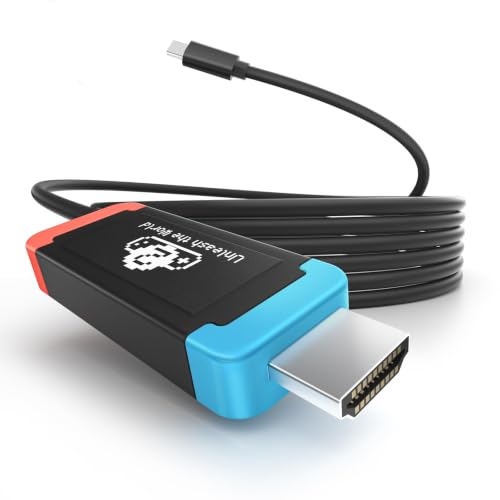
Lemorele 100W PD USB‑C to HDMI Adapter Cable for Switch 2, 4K@60Hz | Compatible with Switch OLED/Original, MacBook, Steam Deck, ROG Ally. DP Alt Mode required. 3.28ft Plug-and-Play Cable
Disclosure: We may earn a commission when you buy through links on this page, at no extra cost to you. As an Amazon Associate I earn from qualifying purchases. Learn more
Highlights
- 4K@60Hz HDMI 2.0 Output: HDMI 2.0 outputs crisp 4K@60Hz visuals, delivering fluid gaming and vivid media playback on monitors and televisions.
- 100W PD3.0 Pass-Through Charging: 100W PD3.0 pass-through powers your device during screen casting; fully compatible with original Switch PD chargers and 45W/60W/100W USB-C power adapters.
- Wide Compatibility: Works with all DP Alt Mode USB-C gadgets: Switch/Switch OLED/Switch 2, MacBook, USB-C laptops, tablets and mobile phones. If your Switch 2 running firmware 22.1.0 fails to recognize this adapter, follow the fix: disconnect the adapter from Switch 2 first, go to Switch 2 settings to update dock firmware, reconnect the adapter when the system prompts to attach a dock, wait for 3 minutes then unplug and re-plug the adapter for re-recognition.
- Plug & Play Operation: Driver-free setup, plug in directly to activate screen mirroring or extended display instantly.
- Premium Portable Construction: Heat-dissipating aluminum casing paired with 6.56ft flexible cable, ideal for travel, home and daily office use.
Why You'll Love It
- Send compatible USB C device video to a TV or monitor with HDMI 2.0 output at 4K and 60Hz
- Keep a compatible device powered while displaying content through 100W PD3.0 pass through charging
- Connect supported Switch models, MacBooks, laptops, tablets, phones, and handheld gaming devices
- Start mirroring or using an extended display without installing drivers
- Use the aluminum cased cable for gaming, media playback, office displays, or travel setups
Pros
- +4K output at 60Hz
- +100W PD3.0 charging pass through
- +Broad compatibility with DP Alt Mode devices
- +Driver free setup
- +Aluminum casing and flexible cable
Cons
- -Requires USB C DisplayPort Alt Mode support
- -Switch 2 firmware recognition may require troubleshooting
- -HDMI connection and USB C charging require compatible equipment
Detailed Review
The Lemorele USB C to HDMI adapter cable is aimed at people who want to display compatible device content on a television or monitor without installing drivers. Its main appeal is the combination of HDMI output, pass through charging, and support for several kinds of USB C devices in one cable. It can suit a gaming setup built around a compatible Nintendo Switch, Steam Deck, or ROG Ally, as well as a desk where a MacBook or another supported laptop connects to a larger display.
Video output is a central selling point. The HDMI 2.0 connection supports output at 4K and 60Hz, making the cable worth considering for buyers whose display setup calls for that resolution and refresh rate. It also supports screen mirroring or an extended display, so the intended use can be showing the device's screen or working with a separate display arrangement. The important condition is that the connected USB C device must support DisplayPort Alt Mode. A matching connector alone is not enough to establish compatibility.
Charging pass through is another useful part of the design. The cable supports 100W PD3.0 pass through and is described as compatible with original Switch PD chargers and USB C power adapters rated at 45W, 60W, or 100W. That lets a compatible device receive power while its display output is in use, rather than treating video and charging as entirely separate jobs. Buyers should still check that their particular device and power adapter suit the intended setup.
The cable uses an aluminum casing and a flexible cable, with plug and play operation intended to keep setup straightforward. There are no drivers to install according to the seller, which makes the basic connection process appealing for people who move between compatible devices. However, the Switch 2 compatibility instructions include a specific firmware recognition workaround for systems running firmware 22.1.0. This is a meaningful qualification for buyers planning to use it with that console. The stated cable length is also worth checking carefully on the product listing before arranging a particular desk or entertainment setup.
Verdict: This USB C to HDMI adapter cable is a reasonable fit for shoppers who need 4K at 60Hz output and charging pass through from a device that supports DisplayPort Alt Mode. Choose it if your device, charger, and display match those requirements; consider a different connection solution if your device lacks that video output support or you want to avoid the Switch 2 firmware workaround.
Who Should Buy It
A great fit if you:
- You want to connect a compatible Nintendo Switch, Switch OLED, or Switch 2 to a television or monitor using HDMI.
- You use a supported MacBook, USB C laptop, tablet, or phone and want to mirror its display or extend it.
- You play on a compatible Steam Deck or ROG Ally and want an HDMI display connection for your setup.
- You want video output and charging pass through together instead of planning the setup around video alone.
- You prefer a driver free connection and want to avoid installing software before using a compatible display.
Consider something else if you:
- Your device does not support DisplayPort Alt Mode and you need an adapter designed for a different video output method.
- You need a connection arrangement with a different cable length or a different charging and display configuration.
Before You Buy
Confirm on the listing:
- Check that your exact device supports DisplayPort Alt Mode over USB C, particularly if you plan to connect a phone, tablet, or laptop.
- Confirm the cable length shown in the current product details and make sure it suits the distance between your device and display.
- Check whether your existing power adapter is compatible with the intended setup and whether its stated output matches your charging needs.
- Review the included items and connection requirements so you know whether your existing HDMI display and charging equipment are sufficient.
How to compare your options: Start with compatibility, because USB C video output depends on DisplayPort Alt Mode rather than the connector shape alone. Next, compare HDMI resolution and refresh rate support, then check whether charging pass through is important for your use. This cable lists 4K at 60Hz output and 100W PD3.0 pass through, alongside driver free operation. Finally, compare cable length and the devices you intend to connect, especially if the same cable will move between a handheld console and a computer. Prioritize the specifications that match your actual setup instead of choosing by connector type alone.
Getting the Most From It
Begin by confirming that your source device supports DisplayPort Alt Mode through its USB C connection. Connect the cable to the compatible device and the HDMI display, then follow the device's normal display connection prompts if needed. The adapter is described as driver free, so a separate driver installation is not part of its intended setup.
If you want to charge while displaying content, plan the connection around a compatible USB C power adapter. The listed charging support includes 100W PD3.0 pass through and compatibility with original Switch PD chargers and 45W, 60W, and 100W USB C adapters. Check that the equipment you already own fits the setup before relying on charging during use.
Choose screen mirroring or an extended display according to how you want to use the connected screen. If you move the cable between a gaming device and a laptop, confirm compatibility each time rather than assuming that every USB C port supports video output.
For Switch 2 running firmware 22.1.0, the seller provides a recognition workaround: disconnect the adapter, open the console settings, update the dock firmware, and reconnect when prompted to attach a dock. Wait three minutes, then unplug and reconnect the adapter for recognition. For routine care, follow any supplied care instructions and avoid assuming that the aluminum casing changes the connection requirements.
FAQ
Does this adapter support 4K at 60Hz?
Yes, it supports HDMI 2.0 output at 4K and 60Hz. Your connected device must support DisplayPort Alt Mode for USB C video output.
Will it work with Switch 2?
Yes, Switch 2 is listed as compatible. For firmware 22.1.0, the seller describes a dock firmware update and reconnection procedure if the adapter is not recognized.
Can I charge my device while using HDMI?
Yes, the adapter supports 100W PD3.0 pass through charging. It is described as compatible with original Switch PD chargers and 45W, 60W, and 100W USB C power adapters.
Does it work with MacBook, Steam Deck, and ROG Ally?
Yes, these devices are listed as compatible, provided the USB C connection supports DisplayPort Alt Mode. The seller also lists USB C laptops, tablets, and mobile phones.
Do I need to install a driver?
No, the adapter is described as plug and play and driver free. Confirm that your device supports the required video output mode before connecting it.
Product Details
| Brand | Lemorele |
| ASIN | B0H3TXHSXW |