LG
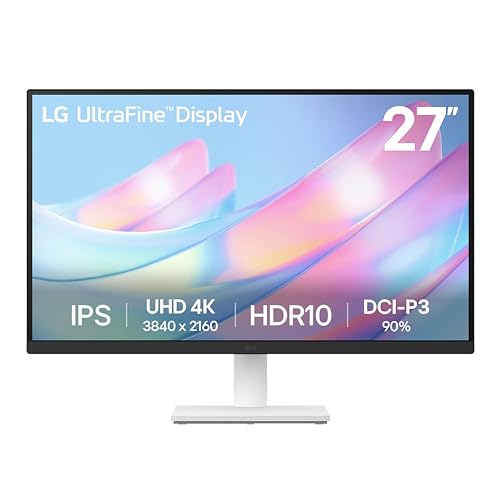
LG 27US500-W Ultrafine Monitor 27-Inch 4K UHD (3840x2160) HDR10 IPS Borderless Design Reader Mode Flicker Safe Switch App HDMI DisplayPort - White
Disclosure: We may earn a commission when you buy through links on this page, at no extra cost to you. As an Amazon Associate I earn from qualifying purchases. Learn more
Highlights
- 4K UHD with 1000:1 Contrast Ratio - This UltraFine display with a 1000:1 contrast ratio displays deeper blacks and vivid colors in UHD clarity. With wide viewing angles, it gives creative professionals the ability to view and work with highly-detailed, digital imagery.
- 4K HDR10 DCI-P3 - Explore HDR10 content the way it was meant to be seen with up to 90% DCI-P3 color gamut expression—an elevated color spectrum that brings brilliant color to life.
- Onscreen Control - You can customize the workspace by splitting the display or adjusting basic monitor options with just a few mouse clicks.
- Ergonomic Stand - The ergonomic stand makes it easy to flexibly adjust the tilt of the screen in the optimal position for you.
- What's In The Box - Stand Body, Stand Base, Screws, Power Adapter, HDMI Cable, Quick Start Guide, Registration Card, Warranty.
Why You'll Love It
- Ultra-high-definition 3840x2160 screen resolution delivers sharp clarity for digital artwork and detailed imagery
- Wide color coverage reaches up to 90 percent DCI-P3 with HDR10 for accurate creative work
- IPS panel with wide viewing angles maintains consistent visuals across the screen
- Onscreen Control utility lets you split the screen and adjust settings using your mouse
- Ergonomic stand provides smooth tilt adjustment to match your desk posture
- Includes essential setup accessories such as an HDMI cable, power adapter, and stand hardware
Pros
- +Sharp 3840x2160 4K UHD resolution
- +IPS panel with wide viewing angles
- +Up to 90 percent DCI-P3 color expression
- +OnScreen Control mouse-based display splitting
- +HDMI and DisplayPort connection options
- +Includes HDMI cable in the box
Cons
- -Stand adjustment is limited to tilt
- -DisplayPort cable is not included in the box
Detailed Review
A 4K UHD monitor serves users who need expansive visual detail, making the LG 27US500-W an appealing display for creative professionals working with fine digital graphics. Bringing 3840x2160 pixels into a 27-inch borderless frame, it offers the pixel density required to inspect detailed assets, organize complex windows, and enjoy crisp text throughout the workday.
Visual quality centers on an IPS panel paired with a 1000:1 contrast ratio and wide viewing angles. This panel choice ensures colors and deep blacks stay consistent across the entire viewing area without shifting when you adjust your position. The screen supports HDR10 content and reproduces up to 90 percent of the DCI-P3 color gamut, giving digital designers and video editors a rich color spectrum to work with directly out of the box.
Everyday operation is made simpler through LG Onscreen Control software. Instead of reaching for physical buttons behind or under the frame, you can partition your desktop workspace into multiple split layouts and adjust core monitor options with basic mouse clicks. The display also features dedicated modes such as Reader Mode and Flicker Safe, alongside connection flexibility via both HDMI and DisplayPort inputs.
Physical adjustments do come with one notable trade-off. The included ergonomic stand only provides tilt adjustment, meaning you can alter the vertical viewing angle but cannot adjust height, swivel the base, or pivot the monitor into a portrait orientation using the factory mount. Users requiring a DisplayPort connection will also need to supply their own cord, as only an HDMI cable is packaged in the box.
Verdict: The LG 27US500-W is a dependable 4K UHD monitor for creative professionals and general multitaskers who want sharp 3840x2160 visuals and wide color coverage. It is an excellent choice for desktop users who prioritize clean imagery and mouse-driven controls, though shoppers who require full height adjustments out of the box may need a different mounting setup.
Specifications
- Screen Size: 27-Inch
- Resolution: 4K UHD (3840x2160)
- Panel Type: IPS
- Contrast Ratio: 1000:1
- Color Gamut: Up to 90% DCI-P3
- High Dynamic Range: HDR10
- Video Inputs: HDMI, DisplayPort
- Color: White
Who Should Buy It
A great fit if you:
- Need crisp 3840x2160 4K UHD resolution for editing detailed graphics, photos, or digital imagery on a compact 27-inch display.
- Rely on color fidelity and wide viewing angles provided by an IPS panel with up to 90 percent DCI-P3 gamut expression.
- Prefer organizing split windows and altering monitor settings directly with your mouse through on-screen software.
- Want a clean white exterior with a borderless design that fits neatly on a modern home or office workspace.
Consider something else if you:
- Require built-in mechanical height adjustment, swivel, or vertical pivot rotation straight from the included desktop stand.
- Need a bundled DisplayPort cable included in the box for an immediate out-of-the-box DisplayPort connection.
Before You Buy
Confirm on the listing:
- Check your computer hardware outputs to confirm whether you plan to connect through HDMI or DisplayPort.
- Confirm your desk depth to ensure the stand base and tilt angles suit your natural seated eye level.
- Verify whether your existing cables are sufficient if you plan to utilize the DisplayPort input, as only an HDMI cable comes in the package.
- Check whether any specific software version requirements apply to run the Onscreen Control app on your operating system.
How to compare your options: When evaluating 27-inch monitors, focus primarily on panel technology, resolution, and ergonomic flexibility. This model pairs 4K UHD clarity with an IPS panel and up to 90 percent DCI-P3 color support, making it especially strong for visual clarity. Balance those visual attributes against the stand mechanics to ensure tilt-only movement matches your workstation arrangement.
Getting the Most From It
Begin your setup by assembling the stand body and stand base using the provided screws, taking care to place the screen on a clean, soft surface to protect the IPS panel during assembly. Connect the included power adapter and route the included HDMI cable directly to your computer output.
Download and install the Onscreen Control application to quickly partition your workspace. Splitting the 3840x2160 canvas into distinct zones allows you to cross-reference documents and monitor digital tools without opening overlapping windows. Use the software menu to explore basic settings without fumbling for physical chassis switches.
Adjust the ergonomic stand tilt forward or backward until the screen surface sits perpendicular to your line of sight. Take advantage of Reader Mode when reviewing long documents to modify display properties, and rely on Flicker Safe operation during extended productivity sessions to maintain comfortable viewing.
FAQ
What items come included in the box?
The box contains the display screen, stand body, stand base, assembly screws, power adapter, HDMI cable, quick start guide, registration card, and warranty document.
Does this monitor support DisplayPort connections?
Yes, the display features both HDMI and DisplayPort inputs, though only an HDMI cable is packaged in the box.
Can I adjust the stand height?
No, the included stand is designed specifically to adjust the tilt of the screen, so it does not offer mechanical height adjustment.
How do I change monitor settings without using hardware buttons?
You can adjust basic monitor settings and manage screen-splitting layouts directly on your desktop using the downloadable Onscreen Control app with your mouse.
What is the native resolution of this screen?
It features a native 4K UHD resolution of 3840x2160 pixels, offering high pixel density across its 27-inch IPS panel.
Product Details
| Brand | LG |
| ASIN | B0D9R7Q449 |