Logitech G
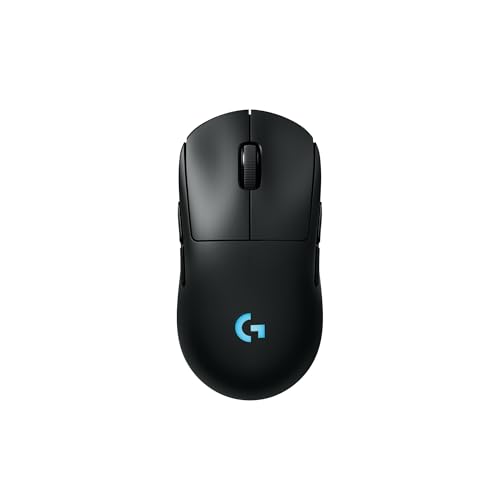
Logitech G PRO 2 Lightspeed Ambidextrous Wireless Gaming Mouse - Black
Disclosure: We may earn a commission when you buy through links on this page, at no extra cost to you. As an Amazon Associate I earn from qualifying purchases. Learn more
Highlights
- Designed With Pros, Engineered to Win: Enhanced with heightened speed and precision, the PRO 2 LIGHTSPEED wireless gaming mouse helps you hone the competitive edge for a step closer to victory
- Champion-Level Precision: The most advanced sensor in gaming, the HERO 2 delivers pro-precision at up to 44K DPI with tracking up to 88 g-force of acceleration at over 888+ IPS (1)
- Undisturbed Gaming, Wherever You Play: Our LIGHTSPEED wireless is tested to deliver a responsive and reliable tournament-grade experience (1)
- Pro in Every Click, Mastery in Every Move: LIGHTFORCE switches combine the speed and reliability of optical switches with the satisfying click of mechanical switches
- Next-Level Ready: This championship-winning gaming mouse offers up to 95-hour battery life, USB-C charging, and 8 kHz polling rate with PRO LIGHTSPEED RECEIVER, sold separately (2)
- Player Ready: Customizable for any gaming style and grip, the PRO 2 LIGHTSPEED can be right- and left-handed mouse with an ambidextrous, modular design and programmable, switchable magnetic side buttons
- (1) Advanced features require Logitech G HUB Software; tested on G640 mousepad (2) Battery life may vary based on user and computing conditions when in constant motion
- Note: In case of Wireless mouse, the USB receiver will be provided inside or along with the mouse
Why You'll Love It
- Modular ambidextrous shape fits left- or right-handed play with switchable magnetic buttons
- HERO 2 sensor tracks up to 44K DPI, 888+ IPS, and 88G acceleration
- LIGHTFORCE hybrid optical-mechanical switches offer rapid response with tactile feedback
- Internal battery runs up to 95 hours between USB-C charges
- Upgradable to an 8 kHz polling rate using a separate receiver
Pros
- +True ambidextrous modular layout
- +Up to 95 hours of battery life
- +High-speed 44K DPI HERO 2 sensor
- +Tactile hybrid optical-mechanical switches
- +Modern USB-C recharging port
Cons
- -8 kHz polling requires a separately sold receiver
- -Software download needed for advanced features
- -Higher tier investment for casual players
Detailed Review
Competitive players who demand symmetrical ergonomics will find the Logitech G PRO 2 Lightspeed ambidextrous wireless gaming mouse built specifically for ambidextrous flexibility and high-end tracking. Rather than forcing left-handed gamers into an offset ergonomic shell, this design features an adaptable layout that lets you configure magnetic buttons on either side or both sides. It combines this modular chassis with low-latency LIGHTSPEED wireless connectivity to ensure fast, reliable input transfer during intense tournament matches.
Sensor performance relies on the HERO 2 sensor, which delivers tracking speeds beyond 888 IPS, up to 88 g-force of acceleration, and sensitivity levels climbing to 44K DPI. For flick shots, fast swipes, and micro-adjustments, this optical engine captures every movement without smoothing or artificial filtering. To access and tune these deep customization layers, users pair the device with the Logitech G HUB software, which manages sensitivity profiles and surface calibrations.
Input execution uses LIGHTFORCE hybrid switches under the primary triggers. These switches blend optical actuation speed and reliability with the tactile mechanical click gamers expect from traditional mice. Because optical triggering operates without mechanical contacts for actuation, debounce delays are minimized while the physical mechanism retains a crisp, responsive feel under the fingers during rapid clicks.
Power management is centered around a built-in battery capable of delivering up to 95 hours of continuous motion on a single charge. When power runs low, replenishment happens via a standard USB-C port, phasing out older micro-USB cables. Additionally, while the standard configuration provides tournament-grade wireless response, the hardware can step up to an ultra-fast 8 kHz polling rate if paired with the optional PRO LIGHTSPEED receiver.
A notable trade-off involves unlocking its maximum capabilities. The 8 kHz polling rate demands an add-on receiver sold separately, and full adjustment of the 44K DPI sensor relies strictly on installing companion software on your machine. Gamers who prefer purely plug-and-play hardware without software downloads might not utilize its entire technical feature set.
Verdict: The Logitech G PRO 2 Lightspeed wireless gaming mouse is an exceptional pick for both left- and right-handed esports enthusiasts who want top-tier tracking specs and adaptable physical buttons. Players seeking an ultra-basic peripheral without companion software or extra accessory paths may prefer a simpler alternative.
Who Should Buy It
A great fit if you:
- Need a true ambidextrous gaming mouse with swappable magnetic side buttons that accommodate left-handed or right-handed grips.
- Play fast-paced competitive esports games that benefit from high-speed optical switches and tracking up to 888+ IPS.
- Want extensive wireless runtimes up to 95 hours paired with modern USB-C charging convenience.
- Plan to configure deep sensitivity settings and custom macros using companion software.
Consider something else if you:
- Want maximum polling rates out of the box without purchasing an additional specialty receiver.
- Prefer an asymmetrical, right-hand-only ergonomic shape with fixed thumb rests.
- Seek a straightforward casual mouse that does not require companion desktop software to adjust settings.
Before You Buy
Confirm on the listing:
- Check whether the USB receiver is stored inside an internal compartment or packaged alongside the mouse in the retail box.
- Verify that your computer operating system is compatible with the Logitech G HUB software download required for advanced sensor tuning.
- Check whether you require the optional 8 kHz polling receiver, which is sold as an independent accessory.
- Ensure you have an available USB port or standard USB-C cable setup ready for ongoing battery recharging.
How to compare your options: Focus closely on grip orientation, sensor limits, and button flexibility. This model differentiates itself by offering modular magnetic side buttons that adjust for either hand, whereas many competitive alternatives force a static right-handed layout. When weighing wireless options, compare stated battery endurance and whether peak performance modes require supplementary hardware investments.
Getting the Most From It
Begin your initial setup by locating the wireless USB receiver, which is packed either inside the mouse or included separately in the product packaging. Plug the receiver into an easily accessible USB port close to your playing area to maintain an unobstructed LIGHTSPEED connection.
Download and install the Logitech G HUB software to calibrate the HERO 2 sensor and customize DPI increments. The sensor and tracking capabilities are documented based on use with a G640 mousepad, so pairing the mouse with a quality cloth surface helps maintain consistent tracking dynamics.
Configure the physical layout by attaching or removing the switchable magnetic side buttons to match your left- or right-handed grip. Use the software to program distinct macro actions or button disablements on unused sides to eliminate accidental clicks during gameplay.
Keep your battery ready for long sessions by connecting the mouse via its USB-C port whenever you take breaks. Remember that actual battery life extends up to 95 hours in constant motion, though real-world figures adjust depending on active computing conditions and personal usage styles.
FAQ
Can left-handed gamers use this mouse comfortably?
Yes, it features an ambidextrous modular chassis with switchable, programmable magnetic side buttons that can be arranged specifically for left-handed or right-handed players.
Where is the wireless USB receiver located?
The wireless USB receiver is provided either inside the mouse body or packaged directly alongside it in the retail box.
Does the mouse support an 8 kHz polling rate out of the box?
No, unlocking the 8 kHz polling rate requires the PRO LIGHTSPEED receiver, which is sold separately.
How long does the battery last on a single charge?
It offers up to 95 hours of battery life during constant motion, though overall endurance varies based on computing conditions and individual usage.
Do I need extra software to adjust the HERO 2 sensor?
Yes, unlocking and configuring advanced sensor features up to 44K DPI requires downloading and installing the Logitech G HUB software.
Product Details
| Brand | Logitech G |
| ASIN | B0CJ4TPLRM |