Microsoft
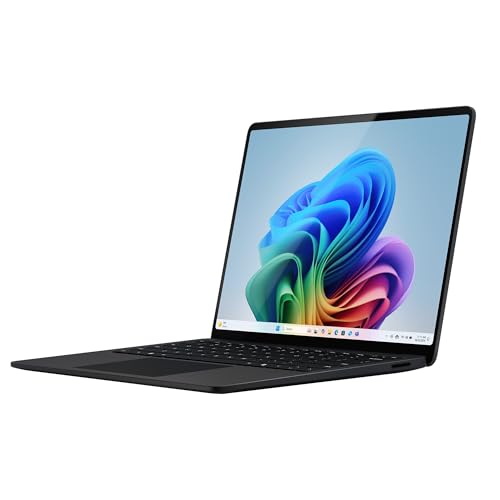
Microsoft Surface Laptop (2026), 13.8-inch Premium Performance Laptop, Snapdragon X2 Elite Processor, Touchscreen Display, 16GB RAM, 512GB SSD Storage, Windows 11 Copilot+ PC Built for AI, Black
Disclosure: We may earn a commission when you buy through links on this page, at no extra cost to you. As an Amazon Associate I earn from qualifying purchases. Learn more
Highlights
- A PREMIUM PERFORMANCE LAPTOP — Ready for work, school, and creativity. Built for busy days, big projects, and nonstop multitasking. Run video calls, school and work apps, 20+ browser tabs, and AI tools at the same time without slowing down.
- WITH AI BUILT IN — With a dedicated AI chip (Qualcomm Snapdragon X2 Elite), this Copilot+ PC[5] on Windows 11 helps you work smarter and faster. Prompt, create, and automate with ease - ready for even your most demanding tasks.
- A 13.8" TOUCHSCREEN YOU'LL ACTUALLY USE — Sharp colors, real detail, smooth 120Hz scrolling on the PixelSense touchscreen[1] with LCD display[2]. Tap, scroll, or pinch to zoom - whichever feels right for streaming, editing photos, or daily work.
- 20 HOURS OF BATTERY (LEAVE THE CHARGER) — Up to 20 hours of video playback[3] on a single charge. Work from a coffee shop, take it to class/work, or binge an entire season on a long flight — it'll keep up.
- THE PORTS YOU NEED — Two USB-C / USB4[4] ports for fast charging, big file transfers, or hooking up to three 4K monitors when you want a full desktop. Wi-Fi 7 keeps you online and fast wherever you are.
- TWO DISPLAY SIZES, YOUR CHOICE — The 13.8" weighs just 3 lbs (1.36 kg) and lasts up to 20 hours[3]—light enough to forget it’s in your bag. Want more screen for movies, design work, or big spreadsheets? Go with the 15".
- FOUR COLORS TO MATCH YOUR STYLE — Choose from sleek Black, classic Platinum, warm Dune, or bold new Jade[6]. Crafted from premium anodized aluminum that feels as good as it looks.
- ADD MICROSOFT 365 PERSONAL — Everything you need to write, create, and stay organized - Word, Excel, PowerPoint, Outlook, Copilot features and OneNote, plus 1TB of OneDrive cloud storage and built-in Microsoft Defender security.[7]
Why You'll Love It
- Handles work, school, and creative tasks with Snapdragon X2 Elite processing power
- Adds built in AI features through Windows 11 Copilot+ PC capabilities
- Offers a responsive touchscreen with smooth scrolling for everyday interaction
- Provides long battery life for work sessions away from the charger
- Supports fast connections and external displays through USB-C USB4 ports
Pros
- +AI focused Windows 11 features
- +Lightweight aluminum laptop design
- +120Hz touchscreen display
- +Long battery life
- +Wi-Fi 7 connectivity
Cons
- -Only one listed display size
- -Limited port selection
Detailed Review
Microsoft Surface Laptop 13.8-inch brings a capable laptop experience for buyers who want a portable computer for work, school, creativity, and AI assisted tasks. Its combination of a Snapdragon X2 Elite processor, touchscreen display, and Windows 11 Copilot+ PC features makes it a fit for people who want modern tools in a compact design.
The standout feature is the built in AI capability powered by the Qualcomm Snapdragon X2 Elite processor. For everyday use, this means the laptop is designed around Windows 11 Copilot+ PC features that help with prompting, creating, and automating tasks. It is also positioned for busy multitasking, including video calls, school and work apps, browser tabs, and AI tools running together.
The 13.8 inch PixelSense touchscreen gives users another way to interact with the computer. The LCD display offers sharp colors, detail, and 120Hz scrolling, making touch controls useful for browsing, streaming, editing photos, and moving through daily tasks. The aluminum construction gives the laptop a sleek appearance, while the Black color option provides a simple style choice.
Battery life is another important part of the design. Microsoft lists up to 20 hours of video playback on a single charge, which can help buyers who want to spend more time working or enjoying content without keeping the charger nearby. The two USB-C/USB4 ports support charging, file transfers, and connections to up to three 4K monitors when a larger workspace is needed.
The main trade off is that this model focuses on a 13.8 inch screen size, which favors portability over the larger viewing area some buyers may want for design work or larger spreadsheets. Buyers who need more screen space may prefer a larger size option. Verdict: This laptop is a strong choice for shoppers who want a lightweight Windows computer with AI features, touchscreen use, and long battery life. Buyers who need a bigger display should consider a larger laptop option instead.
Who Should Buy It
A great fit if you:
- Need a computer for school, work apps, video calls, and multitasking throughout busy days.
- Want AI features built into your Windows experience for creating and automating tasks.
- Prefer a portable laptop with a touchscreen for flexible everyday interaction.
- Need a computer that can connect to multiple external displays for expanded workspace.
Consider something else if you:
- Need a larger screen for big spreadsheets or design work and want a larger display model.
- Prefer a computer without touchscreen features and AI focused Windows capabilities.
Before You Buy
Confirm on the listing:
- Check whether the 13.8 inch display size matches your preferred workspace and viewing needs.
- Check compatibility with the accessories and external displays you already plan to use.
- Review what is included with your purchase before placing an order.
- Check whether Microsoft 365 Personal features match the services you want to use.
How to compare your options: Focus on the features that matter most for your daily tasks, including screen size, processor, storage, memory, battery life, and connectivity. This model stands out for its Snapdragon X2 Elite processor, 16GB RAM, 512GB SSD storage, touchscreen display, USB-C/USB4 ports, and Windows 11 Copilot+ PC features.
Getting the Most From It
Set up Windows 11 and the included features according to your preferences so the laptop works well for your daily tasks. Explore the Copilot+ PC features if AI tools are part of how you work or create.
Use the touchscreen when tapping, scrolling, or zooming feels more natural than using a keyboard or other controls. Connect external displays through the USB-C/USB4 ports when you want a larger workspace.
Keep the laptop organized by using storage thoughtfully and following the recommended care guidance provided with the device. If you add Microsoft 365 Personal, use the included apps and cloud storage features according to your needs.
FAQ
Does this laptop have AI features?
Yes, it includes Windows 11 Copilot+ PC features powered by a Qualcomm Snapdragon X2 Elite processor. These features are designed to help with prompting, creating, and automating tasks.
Does Microsoft Surface Laptop 13.8-inch have a touchscreen?
Yes, it has a 13.8 inch PixelSense touchscreen with an LCD display and 120Hz scrolling. The touchscreen supports tapping, scrolling, and pinch to zoom actions.
How much storage and memory does it have?
It has 16GB RAM and 512GB SSD storage. These specifications support the listed work, school, creative, and multitasking uses.
Can it connect to external displays?
Yes, the laptop has two USB-C/USB4 ports and can connect to up to three 4K monitors. Check your display setup requirements before buying.
What comes with Microsoft 365 Personal?
Microsoft 365 Personal includes Word, Excel, PowerPoint, Outlook, Copilot features, OneNote, 1TB of OneDrive cloud storage, and built in Microsoft Defender security.
Product Details
| Brand | Microsoft |
| ASIN | B0GWFGCMHH |