Nikon
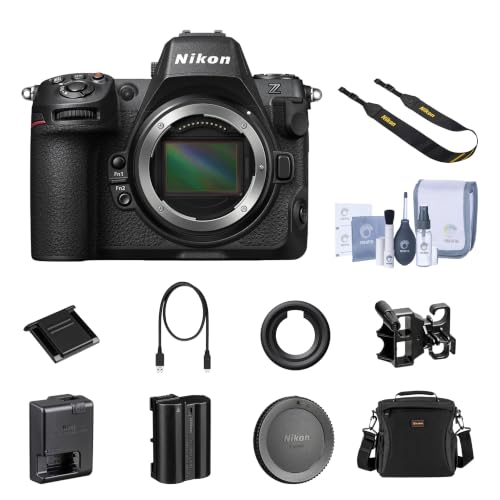
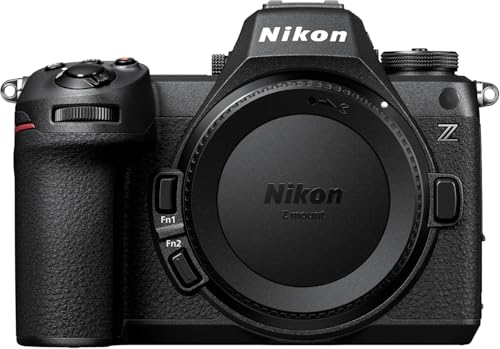
Nikon Z6 III, Black | Full-Frame Mirrorless Stills/Video Camera with 6K/60p Internal RAW Recording | USA Model
Disclosure: We may earn a commission when you buy through links on this page, at no extra cost to you. As an Amazon Associate I earn from qualifying purchases. Learn more
Highlights
- VIDEO - 6K/60p Internal N-RAW video recording + oversampled 4K UHD, 4K/120p, Full HD/240p slow motion, Hi-Res Zoom up to 2x digital zoom during HD recording, 1.4x during 4K recording, line-in audio, professional monitoring tools and more.
- BEST IN CLASS EVF - Max brightness of 4000 nits gives a clear, vibrant view even in very bright conditions; 5760k-dot resolution and premium viewfinder optics mean clear detailed viewing; 120 fps maximum refresh rate gives natural, lifelike motion even when shooting fast action; and an expanded color gamut equivalent to DCI-P3 ensures more accurate reproduction of delicate tones.
- WIDE ISO RANGE - ISO sensitivity range of 100-64000, with extended range up to Hi 1.7 (equivalent to ISO 204800).
- IMPROVED AUTOFOCUS - AF detection down to -10EV, with sophisticated multi-subject recognition, enhanced by Nikon's Deep Learning technology. AF is approx. 20% faster than the Z6II and accurate detection of human faces as small as ~3% of the frame.
- FLEXIBLE PICTURE CONTROL - Get the look you want–create your desired color profile in NX Studio and upload it as a Custom Picture Control directly to your Z6III.
Why You'll Love It
- Record internal 6K/60p RAW video for projects that benefit from detailed footage and flexible postproduction
- Capture fast motion with 4K/120p and Full HD/240p recording options for slow motion work
- Frame subjects through a bright, detailed electronic viewfinder with a 120 fps maximum refresh rate
- Use autofocus with multi subject recognition and detection down to minus 10 EV for challenging shooting conditions
- Choose ISO sensitivity from 100 to 64000, with extended settings available up to the equivalent of 204800
- Create personalized color profiles in NX Studio and upload them directly as Custom Picture Controls
Pros
- +Internal 6K RAW video recording
- +Multiple high frame rate video modes
- +Bright, high resolution electronic viewfinder
- +Deep learning enhanced subject recognition
- +Customizable color profiles
Cons
- -Digital zoom is limited to specified recording modes
- -Extended ISO settings go beyond the standard sensitivity range
- -Advanced video features may exceed casual shooting needs
Detailed Review
The Nikon Z6 III full frame mirrorless camera is designed for photographers and video creators who want one camera for detailed stills work and advanced video production. Its defining attraction is the combination of internal 6K/60p RAW recording, high frame rate video options, and an electronic viewfinder built around detailed image presentation. Rather than focusing on a single type of shooting, it gives creators several ways to approach moving subjects, changing light, and personalized color. It is particularly worth considering if your work includes both photography and video, or if you want recording options that support more involved creative projects.
Video flexibility is a major part of the appeal. The camera supports internal N-RAW recording at 6K/60p, along with oversampled 4K UHD, 4K/120p, and Full HD/240p slow motion. These options let you choose a recording approach according to the project, whether you want high resolution footage or footage intended for slower playback. Hi-Res Zoom also provides up to 2x digital zoom during HD recording and 1.4x during 4K recording. Line-in audio and professional monitoring tools round out the listed video capabilities, making this a relevant option for creators who consider sound and monitoring part of their recording workflow.
The electronic viewfinder is another central feature. Its 5760k-dot resolution, maximum brightness of 4000 nits, and maximum refresh rate of 120 fps are intended to provide a detailed view with motion that remains natural when following action. The expanded color gamut equivalent to DCI-P3 is also relevant to photographers who pay attention to how delicate tones appear while composing. Autofocus adds multi subject recognition enhanced by Nikon's Deep Learning technology, detection down to minus 10 EV, and a stated improvement in speed of approximately 20 percent compared with the Z6II. The ability to detect human faces occupying about 3 percent of the frame may be especially useful when a person is relatively small within the composition.
ISO sensitivity ranges from 100 to 64000, with extended settings reaching the equivalent of ISO 204800. That broad range gives photographers more sensitivity choices when adapting to different lighting conditions, although the extended settings should be treated as options to consider for specific situations rather than a guarantee of a particular image result. Custom Picture Controls add another creative choice: you can create a desired color profile in NX Studio and upload it directly to the camera. This approach is appealing if you want to establish a preferred color treatment instead of relying entirely on a default look.
Verdict: The Nikon Z6 III is a strong candidate for shoppers seeking a full frame mirrorless camera with internal 6K RAW video, flexible slow motion options, detailed viewfinder viewing, and advanced autofocus features. It makes the most sense for creators who will actively use its video and customization capabilities. If you mainly take straightforward still photos or do not need the listed recording options, a simpler camera that matches your actual workflow may be a more practical choice.
Who Should Buy It
A great fit if you:
- You create video projects and want internal 6K/60p N-RAW recording alongside several lower resolution, high frame rate options.
- You photograph moving subjects and value autofocus with multi subject recognition and detection designed for very low light conditions.
- You regularly compose through an electronic viewfinder and care about resolution, brightness, refresh rate, and color presentation.
- You want to shape your color workflow by creating profiles in NX Studio and transferring them to the camera.
Consider something else if you:
- You primarily take casual still photos and would rather choose a simpler camera without advanced video features you will rarely use.
- Your work does not benefit from internal RAW recording or high frame rate footage, making a stills focused camera a more suitable alternative.
Before You Buy
Confirm on the listing:
- Check which items are included in the box, especially if you expect accessories or additional recording equipment to be supplied.
- Confirm that your intended workflow supports the camera's N-RAW, 6K/60p, 4K/120p, or Full HD/240p recording modes.
- Check compatibility with your existing equipment and any software you intend to use, including your planned NX Studio color workflow.
- Review the exact product variant and recording requirements before ordering, particularly if you are buying specifically for a video project.
How to compare your options: Start with the work you actually do, then compare recording formats, available frame rates, autofocus features, viewfinder specifications, and color customization. The Z6 III combines internal 6K RAW recording with high frame rate options, a detailed electronic viewfinder, and deep learning enhanced subject recognition. Give the greatest weight to the features you will use regularly rather than choosing solely for the largest recording specification. If you mainly photograph still subjects, prioritize the functions that improve your own composition and focusing workflow. If video is central to your work, verify that the named recording modes and monitoring capabilities match your production needs.
Getting the Most From It
Begin by matching your recording mode to the project. Internal 6K/60p N-RAW, oversampled 4K UHD, 4K/120p, and Full HD/240p serve different creative purposes, so decide whether resolution, motion capture, or slow motion is the priority before choosing a mode. Check the recording settings and monitoring options before an important shoot.
Make autofocus choices around the subject and scene. The camera offers multi subject recognition, Deep Learning enhanced detection, and low light AF detection down to minus 10 EV. Learn how its recognition options fit the subjects you photograph, and review focus behavior in the situations that matter to your work.
Use the electronic viewfinder deliberately when composing. Its resolution, brightness, refresh rate, and expanded color gamut are key parts of the viewing experience. Take time to find a viewing approach that suits your subject, especially when following fast action or assessing delicate tones.
For a more personal color workflow, create your desired profile in NX Studio and upload it as a Custom Picture Control. Keep your chosen profile and recording settings aligned with the look you want for the finished project. For setup and ongoing care, follow the manufacturer's instructions and review the camera's available settings before changing an established workflow.
FAQ
Can the Nikon Z6 III record RAW video internally?
Yes, it supports internal N-RAW recording at 6K/60p. This is a key feature for creators who want RAW video as part of their recording workflow.
Does it support slow motion video?
Yes, the listed modes include 4K/120p and Full HD/240p slow motion. These give you different recording options when planning footage with slower playback.
How good is the electronic viewfinder specification?
The viewfinder has 5760k-dot resolution, maximum brightness of 4000 nits, and a maximum refresh rate of 120 fps. Its expanded color gamut is equivalent to DCI-P3.
Can I customize the camera's color profile?
Yes, you can create a desired color profile in NX Studio and upload it directly as a Custom Picture Control. This supports a more personalized color workflow.
What comes in the box, and will it work with my existing equipment?
The supplied features do not establish the full box contents or compatibility with your particular equipment. Check the product listing for included items and verify compatibility with your existing setup before purchasing.
Product Details
| Brand | Nikon |
| ASIN | B0D77SL8CY |