Samsung
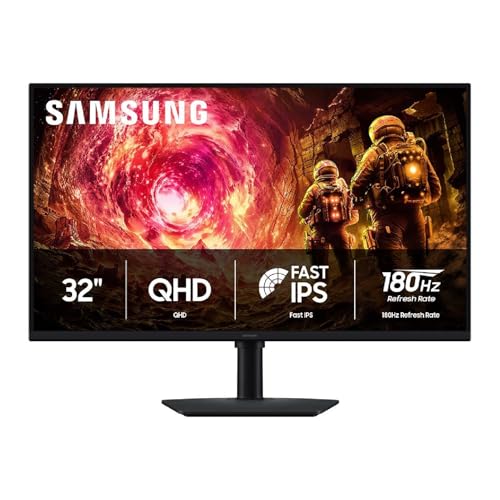
Samsung 32” Odyssey G5 (G50F) Series QHD Gaming Monitor
Disclosure: We may earn a commission when you buy through links on this page, at no extra cost to you. As an Amazon Associate I earn from qualifying purchases. Learn more
Highlights
- Samsung’s 32” Odyssey G5 QHD Gaming Monitor delivers brilliant visuals for exhilarating gameplay that’s more immersive than ever before.
- QHD resolution (2560 x 1440) boasts incredibly detailed, pin-sharp images.
- With a wide 178° viewing angle, the IPS panel consistently delivers crisp, clear hues from various viewpoints.
- 180Hz Refresh Rate and 1ms response time (GtG) allow fast reactions for ultra-smooth gaming, plus G-Sync compatibility syncs the GPU and panel to reduce choppiness, screen lag, and image tearing.
- HDR10 provides brighter highlights and nuanced shadows for added depth.
- Black Equalizer improves visibility in the deepest shadows, while Virtual Aim Point increases the accuracy of the player’s aim.
- Auto Source Switch+ allows instantaneous switching between connected devices and the height-adjustable Ergonomic Stand easily pivots, tilts, and swivels for the perfect view.
Why You'll Love It
- QHD resolution sharpens every detail so textures and text look noticeably clearer than 1080p
- 180Hz refresh rate keeps motion fluid, so fast-paced games feel smooth rather than blurry
- 1ms response time and G-Sync compatibility cut lag and tearing during competitive play
- IPS panel holds accurate color from wide angles so the image stays consistent wherever you sit
- Black Equalizer lifts shadow detail so dark corners in games reveal enemies rather than hiding them
- Height-adjustable stand pivots, tilts, and swivels so you can dial in a comfortable viewing position
Pros
- +Sharp QHD image on a large 32-inch screen
- +180Hz refresh suits fast-paced competitive gaming
- +Wide 178-degree viewing angle, consistent color
- +Flexible ergonomic stand with height adjustment
- +G-Sync compatible, reduces screen tearing
Cons
- -Large 32-inch footprint needs a spacious desk
- -HDR10 support listed but peak brightness not specified
- -No built-in speaker or USB hub mentioned
Detailed Review
The Samsung Odyssey G5 is a 32-inch gaming monitor aimed at players who want a noticeably sharper picture and smoother motion than a standard 1080p display can offer. Its QHD resolution (2560 x 1440) spreads more pixels across a large screen, which keeps images looking crisp rather than soft, whether you are exploring an open-world game or reading small interface text. It suits a wide range of players, from competitive shooters to story-driven gamers who care about visual quality.
The IPS panel is one of the stronger choices here. A 178-degree viewing angle means color and contrast hold up even when you are sitting off to one side, which matters on a 32-inch screen where slight head movements can shift your sightline. The 180Hz refresh rate paired with a 1ms GtG response time keeps motion tight and readable during fast gameplay. G-Sync compatibility adds another layer by syncing the monitor's refresh rate to your GPU's output, which reduces the choppiness and image tearing that can appear during frame-rate fluctuations.
A few gaming-focused extras round out the feature set. HDR10 support adds brighter highlights and deeper shadows to compatible content, giving scenes more visual depth. The Black Equalizer tool specifically brightens the darkest areas of a game without washing out the rest of the image, useful for spotting opponents in shadowed environments. A Virtual Aim Point overlay can be toggled on for precision targeting. The ergonomic stand supports height adjustment, pivot, tilt, and swivel, so finding a comfortable position is straightforward rather than a compromise. Auto Source Switch+ lets the monitor detect and jump to an active input automatically.
A few things to keep in mind: the listing does not specify peak brightness figures, so it is hard to judge how impactful the HDR10 implementation will be in practice. The 32-inch size is generous but requires a desk with meaningful depth and width. No speakers or USB hub are mentioned, so you will need separate audio and may need extra ports on your PC.
Verdict: This monitor is a strong pick for PC gamers who want a large, sharp display with genuinely fast refresh performance and flexible ergonomics. If you are upgrading from a 1080p screen or a slower panel and have the desk space for 32 inches, it covers the core bases well. Buyers who need confirmed high-brightness HDR or built-in audio should check those needs against what the listing confirms before purchasing.
Specifications
- Screen size: 32 inches
- Resolution: 2560 x 1440 (QHD)
- Panel type: IPS
- Refresh rate: 180Hz
- Response time: 1ms (GtG)
- Viewing angle: 178 degrees
- HDR: HDR10
- Sync technology: G-Sync compatible
- Stand adjustments: Height, pivot, tilt, swivel
Who Should Buy It
A great fit if you:
- Play fast-paced games and want a high refresh rate with low response time to stay competitive
- Are stepping up from a 1080p monitor and want a noticeably sharper image on a large screen
- Sit slightly off-center from your monitor and need consistent color across wide angles
- Want ergonomic flexibility to adjust the screen height and angle throughout long sessions
Consider something else if you:
- Have a small or shallow desk where a 32-inch monitor would feel cramped or overwhelming
- Need built-in speakers or a USB hub integrated into the monitor itself
FAQ
Does this monitor work with AMD graphics cards as well as Nvidia?
The listing confirms G-Sync compatibility, which is an Nvidia-focused feature. It does not specify FreeSync support, so check AMD compatibility separately before purchasing if that matters to you.
Can the stand be adjusted for height, or is it fixed?
The stand is described as height-adjustable and also supports pivot, tilt, and swivel adjustments, giving you several ways to position the screen comfortably.
Does it support HDR content?
Yes, the monitor includes HDR10 support, which adds brighter highlights and more nuanced shadow detail in compatible games and media. Peak brightness figures are not listed, so the depth of the HDR effect is not confirmed by the available data.
What is the Virtual Aim Point feature?
Virtual Aim Point places a targeting overlay on screen to help with aiming accuracy in games. It is a software feature built into the monitor's settings.
Product Details
| Brand | Samsung |
| ASIN | B0G1DZM5QW |