TP-Link
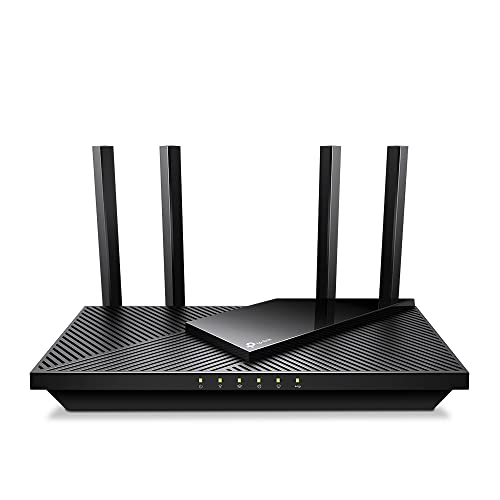
TP-Link AX3000 WiFi 6 Router, 2 x 2.5 Gbps Ports (Archer AX55 Pro)
Disclosure: We may earn a commission when you buy through links on this page, at no extra cost to you. As an Amazon Associate I earn from qualifying purchases. Learn more
Highlights
- Dual-Band AX3000 WiFi 6 Router - Experience incredible WiFi 6 speeds up to 2402 Mbps at 5GHz Band and 574 Mbps at 2.4GHz Band on the 160 MHz channel. Stream stutter-free 8K/4K videos, enjoy lag-free online gaming ¹ ²
- 2x 2.5 Gbps Multi-Gigabit Connectivity - Archer AX55 Pro features a 1x 2.5 Gbps WAN/LAN port, a 1x 2.5 Gbps LAN port, and 3x 1 Gbps LAN ports for all your expansion needs.
- Vast Coverage - 4 x high-performance antennas boost WiFi signals throughout your home and Beamforming technology detects devices to concentrate signals towards them, providing a strong and reliable WiFi to every corner of your house.
- Boosted Throughput – MU-MIMO delivers multiple data streams to several devices at once, while OFDMA splits a single stream across multiple devices. Together, they enhance overall WiFi efficiency and support simultaneous connections.
- Support for VPN Client & Server - Allow devices in your home network to access remote VPN servers without needing to install VPN software on every device.
- TP-Link HomeShield - Provides comprehensive home network protection, robust parental controls, and real-time IoT security when you are at home or on the go. A safer internet experience enhances your smart living and adds armor to your network.
- Works with EasyMesh - Expand your Wi-Fi into a seamless mesh network by connecting the RE715X (not included) with any EasyMesh-compatible router or extender. Enjoy one network name, smooth roaming, and unified control.
- ISP Compatibility - Works with all internet service providers, such as Comcast, Charter, AT&T, Verizon, Xfinity, Spectrum, RCN, Cox, CenturyLink, Frontier, Starlink, etc. (a modem is required for most internet service providers)
- Compatible with Alexa and Google Assistant - Control your router via voice commands such as turning on and off your guest WiFi. Make your life smarter and easier with Amazon Alexa compatibility
Why You'll Love It
- Dual band WiFi supports demanding streaming and gaming alongside everyday connections across both frequency bands
- Two 2.5 Gbps ports give wired networks more multi gigabit connectivity options
- Four antennas and beamforming direct wireless signals toward connected devices around your home
- MU MIMO and OFDMA help multiple devices share wireless capacity more efficiently
- VPN client and server support lets home devices connect to remote VPN services through the router
- HomeShield adds network protection, parental controls, and IoT security, with EasyMesh expansion available
Pros
- +Two 2.5 Gbps ports
- +Four antennas with beamforming
- +WiFi 6 dual band connectivity
- +VPN client and server support
- +EasyMesh expansion compatibility
Cons
- -Only one 2.5 Gbps port is dedicated to WAN or LAN flexibility
- -EasyMesh expansion requires a compatible additional device
- -Most internet providers require a separate modem
Detailed Review
The TP-Link Archer AX55 Pro WiFi 6 router is designed for households that want capable wireless networking alongside faster wired connections. Its AX3000 dual band design combines advertised wireless speeds of up to 2402 Mbps on the 5 GHz band and 574 Mbps on the 2.4 GHz band, with two 2.5 Gbps ports for compatible wired equipment. That combination makes it worth considering for homes balancing video streaming, online gaming, and connections from multiple devices.
Wireless coverage is another important part of its design. Four antennas work with beamforming technology, which detects connected devices and concentrates wireless signals toward them. The goal is to distribute connectivity throughout the home rather than simply broadcast in every direction equally. Actual suitability will depend on your home's layout and where you use your devices, so households with specific coverage challenges should consider their space before choosing a router.
The Archer AX55 Pro also includes MU MIMO and OFDMA. These technologies help the router handle simultaneous wireless connections by supporting multiple data streams and dividing a stream across several devices. For a household where people stream video, play online games, and connect smart devices at the same time, that combination is relevant because it focuses on how network capacity is shared. The advertised WiFi speeds are maximum specifications, not a promise that every device will achieve those speeds.
Its wired connectivity is a key reason to look beyond the wireless specifications alone. One 2.5 Gbps port can serve as a WAN or LAN connection, another provides a 2.5 Gbps LAN connection, and three additional LAN ports support 1 Gbps connections. The router also offers VPN client and server functionality, HomeShield network protection and parental controls, voice control compatibility, and EasyMesh support. These features give buyers several ways to manage and extend a home network, although some benefits depend on compatible equipment and the configuration chosen.
The main trade off is that a router cannot replace every component of an internet connection. A modem is required for most internet service providers, and extending coverage through EasyMesh means adding a compatible device that is not included in the stated expansion example. The advertised wireless speeds also should not be confused with guaranteed internet speeds, since the router's stated figures describe its wireless capabilities.
Verdict: Choose this WiFi 6 router if you want dual band wireless networking, multi gigabit wired connections, and useful network management features in one device. It is particularly relevant to households with compatible wired equipment and several connected devices, while buyers seeking a standalone modem or a complete mesh setup should consider what additional equipment they need.
Who Should Buy It
A great fit if you:
- Want a home network that can support streaming, online gaming, and everyday internet use across wireless devices.
- Own compatible wired equipment and want two 2.5 Gbps ports alongside additional 1 Gbps LAN connections.
- Have several devices connecting at once and value technologies designed to manage shared wireless capacity.
- Want parental controls, IoT security, or VPN functionality as part of your home networking setup.
- May want to expand coverage later using an EasyMesh compatible router or extender.
Consider something else if you:
- Need a combined modem and router, in which case an internet gateway with both functions may suit you better.
- Want a complete mesh system in the box, in which case a bundled multi device networking kit may be more appropriate.
Before You Buy
Confirm on the listing:
- Check whether your internet service requires a separate modem and whether you already have a compatible one available.
- Confirm that your wired devices can use the available 2.5 Gbps or 1 Gbps LAN connections as intended.
- Check exactly which accessories are included and whether you need to purchase an EasyMesh compatible extender separately.
- Review the available HomeShield features and controls to make sure they match the network management options you want.
How to compare your options: Start with the connection types you need, especially if you want both multi gigabit networking and several wired LAN connections. Then compare the advertised wireless bands and speeds with the demands of your connected devices. Coverage features, simultaneous connection technologies, VPN support, parental controls, and future mesh compatibility are also useful comparison points. Prioritize the features you will actually use instead of choosing solely by the largest speed figure.
Getting the Most From It
Begin by checking your internet service requirements and making sure any necessary modem is available. If a manual or setup guide is included, follow its instructions for connecting the router and configuring your network rather than assuming every home connection uses the same arrangement.
Consider your wired devices when assigning connections. The router provides one 2.5 Gbps WAN or LAN port, one additional 2.5 Gbps LAN port, and three 1 Gbps LAN ports. Matching compatible equipment to the appropriate connection helps you make practical use of the available ports.
For wireless coverage, think about where devices are used throughout your home and how the four antennas and beamforming features fit your needs. If some areas require additional coverage, check compatibility before adding an EasyMesh device. The stated expansion arrangement supports a unified network name and roaming between compatible devices.
Review the available HomeShield controls, parental controls, and VPN settings to decide which network management features you want to configure. If you use voice control, check the supported Alexa or Google Assistant functions. Revisit your settings when your connected devices or household requirements change.
FAQ
Does the Archer AX55 Pro work with my internet provider?
It is listed as compatible with providers including Comcast, AT&T, Verizon, Spectrum, Cox, and Starlink. Most providers require a separate modem, so confirm your connection requirements before buying.
What wired ports does this router have?
It has one 2.5 Gbps WAN or LAN port, one 2.5 Gbps LAN port, and three 1 Gbps LAN ports. Check which devices need wired connections before deciding whether this layout suits your home.
Can I expand its WiFi coverage?
Yes, it supports EasyMesh with compatible equipment. The stated example uses an RE715X, which is not included, and compatible devices can support one network name and roaming.
Does it support VPN connections?
Yes, it supports both VPN client and server functions. The client feature allows devices on your home network to access remote VPN servers without installing VPN software on every device.
Can I control it with Alexa or Google Assistant?
Yes, it is compatible with both assistants. Listed voice control examples include turning guest WiFi on or off, so check the supported commands for the functions you want to use.
Product Details
| Brand | TP-Link |
| ASIN | B0BTD7V93F |