TP-Link
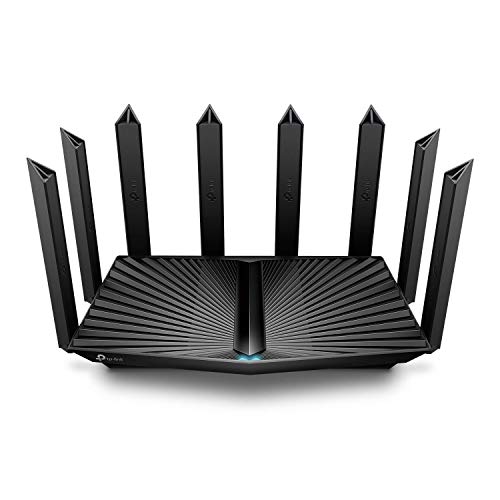
TP-Link AX5400 WiFi 6 Router (Archer AX73)
Disclosure: We may earn a commission when you buy through links on this page, at no extra cost to you. As an Amazon Associate I earn from qualifying purchases. Learn more
Highlights
- 𝐆𝐢𝐠𝐚𝐛𝐢𝐭 𝐖𝐢𝐅𝐢 𝐟𝐨𝐫 𝟖𝐊 𝐒𝐭𝐫𝐞𝐚𝐦𝐢𝐧𝐠 – Up to 5400 Mbps WiFi for faster browsing, streaming, gaming and downloading, all at the same time. Performance varies by conditions, distance to devices, & obstacles such as walls.
- 𝐅𝐮𝐥𝐥 𝐅𝐞𝐚𝐭𝐮𝐫𝐞𝐝 𝐖𝐢𝐅𝐢 𝟔 𝐑𝐨𝐮𝐭𝐞𝐫 – Equipped with 4T4R and HE160 technologies on the 5 GHz band to enable max 4.8 Gbps ultra-fast connections.Power:12 V 2.5 A
- 𝐂𝐨𝐧𝐧𝐞𝐜𝐭 𝐌𝐨𝐫𝐞 𝐃𝐞𝐯𝐢𝐜𝐞𝐬 – Supports MU-MIMO and OFDMA to reduce congestion and 4X the average throughput
- 𝐄𝐱𝐭𝐞𝐧𝐬𝐢𝐯𝐞 𝐂𝐨𝐯𝐞𝐫𝐚𝐠𝐞 - Covers up to 2,000 sq. ft. High-Power FEM, 6× Antennas, Beamforming, and 4T4R structures combine to adapt WiFi coverage to perfectly fit your home and concentrate signal strength towards your devices.
- 𝐌𝐨𝐫𝐞 𝐕𝐞𝐧𝐭𝐬, 𝐋𝐞𝐬𝐬 𝐇𝐞𝐚𝐭 – Improved vented areas help unleash the full power of the router
- 𝐔𝐒𝐁 𝐒𝐡𝐚𝐫𝐢𝐧𝐠 – 1× USB 3.0 port enables easy media sharing and private cloud storage
- 𝐓𝐏-𝐋𝐢𝐧𝐤 𝐇𝐨𝐦𝐞𝐒𝐡𝐢𝐞𝐥𝐝 - TP-Link's premium security service keeps your home network safe with cutting-edge network and IoT protection. Free features: 1. Basic Network Security including Security Scan and IoT Device Identification 2. Basic Parental Controls 3. Quality of Service 4. Basic Weekly/Monthly Reports. Visit TP-Link website for more information.
- 𝐔𝐧𝐢𝐯𝐞𝐫𝐬𝐚𝐥 𝐂𝐨𝐦𝐩𝐚𝐭𝐢𝐛𝐢𝐥𝐢𝐭𝐲 - Works with all internet service providers, such as AT and T, Verizon, Xfinity, Spectrum, RCN, Cox, CenturyLink, Frontier, etc.( a modem is required for most internet service providers)
Why You'll Love It
- Combines dual band WiFi 6 capabilities with speeds up to 5400 Mbps for streaming, gaming, browsing, and downloads
- Uses MU-MIMO and OFDMA to help manage network congestion when multiple devices connect
- Six antennas, beamforming, and high power signal components support coverage across spaces up to 2,000 square feet
- Includes a USB 3.0 port for sharing media and setting up private cloud storage
- Offers basic network security, parental controls, quality of service, and usage reports through HomeShield
- Works with internet providers including AT&T, Verizon, Xfinity, Spectrum, and Cox when the required modem is available
Pros
- +WiFi 6 with up to 5400 Mbps
- +MU-MIMO and OFDMA for multiple devices
- +Six antennas with beamforming
- +USB 3.0 media sharing
- +Free basic HomeShield features
Cons
- -Coverage depends on walls and device distance
- -Requires a separate modem for most internet providers
- -Advanced HomeShield features may require a premium service
Detailed Review
The TP-Link Archer AX73 WiFi 6 router is designed for households that want a single network to support streaming, gaming, browsing, and downloads across multiple connected devices. Its headline capability is a combined wireless speed of up to 5400 Mbps, making it worth considering if your household regularly has several people using the internet at once. That figure describes the router's advertised maximum, not a guarantee of the speed every device will receive. Your results depend on conditions, distance, and obstacles such as walls, so the layout of your home remains important.
WiFi 6 features are central to the AX73's appeal. On the 5 GHz band, its 4T4R configuration and HE160 technology enable advertised connection speeds of up to 4.8 Gbps. MU-MIMO and OFDMA are designed to help the router handle multiple devices and reduce congestion. For a household where one person streams video while another plays games or downloads files, those capabilities provide a reason to consider this model rather than choosing solely by the maximum speed printed on the box. Actual results still depend on the connected devices and network conditions.
Coverage is another major consideration. TP-Link lists coverage of up to 2,000 square feet, supported by six antennas, beamforming, high power FEM components, and a 4T4R structure. Beamforming is intended to concentrate wireless signal toward connected devices, while the antenna arrangement supports the router's coverage design. This makes the AX73 a candidate for shoppers who want to serve several areas of a home from one router. However, the stated coverage is an upper figure, not a promise that every room will receive the same signal strength. Walls, distance, and the placement of the router can affect the outcome.
Beyond wireless networking, the AX73 includes a USB 3.0 port for media sharing and private cloud storage. That provides an additional use for the router beyond connecting devices to the internet. Its vented design is intended to help release heat during operation. HomeShield adds basic network security features, IoT device identification, parental controls, quality of service, and weekly or monthly reports at no extra charge for those basic functions. These tools may appeal to households that want some network oversight alongside their wireless connection, although the free feature set should be distinguished from the premium security service.
Verdict: This WiFi 6 router is a strong candidate for households with several connected devices, substantial streaming or gaming activity, and an interest in USB sharing and basic network management. Consider another type of networking solution if your home needs coverage beyond what a single router can reasonably provide or if you require a guaranteed connection speed in every room. Before choosing it, check your internet service, modem requirements, home layout, and the HomeShield features you actually intend to use.
Specifications
- Brand and model: TP-Link Archer AX73
- Wireless standard: WiFi 6
- Advertised maximum WiFi speed: Up to 5400 Mbps
- 5 GHz connection capability: Up to 4.8 Gbps
- Wireless technologies: 4T4R, HE160, MU-MIMO, OFDMA, and beamforming
- Antennas: 6
- Advertised coverage: Up to 2,000 square feet
- USB port: 1 USB 3.0 port
- Power specification: 12 V, 2.5 A
- Network management: TP-Link HomeShield basic features
Who Should Buy It
A great fit if you:
- Share your home internet connection with several people who stream, play games, browse, and download at overlapping times.
- Want WiFi 6 features and high advertised wireless speeds for compatible devices throughout your everyday home network.
- Need a router with coverage designed for spaces up to 2,000 square feet and multiple antennas supporting signal distribution.
- Would use a USB connection to share media or create private cloud storage through the router.
- Prefer having basic network security, parental controls, device identification, and usage reports available through one service.
Consider something else if you:
- Need consistent coverage across a larger or particularly difficult layout, in which case a multi-unit mesh networking system may suit you better.
- Require a simpler network with fewer features, in which case a basic router matched to your internet needs may be more appropriate.
Before You Buy
Confirm on the listing:
- Check whether the advertised coverage of up to 2,000 square feet suits your home's layout, including the rooms and areas where you use connected devices.
- Confirm that your internet provider and existing equipment are compatible with your planned setup, and whether you need to obtain a separate modem.
- Review what is included in the box, including the power supply and any accessories needed for your intended installation.
- Check which HomeShield features are included for free and whether any functions you want require a premium service.
How to compare your options: Start with your internet plan, the number of devices you expect to connect, the size and layout of your home, and the wireless features your devices can use. The AX73 combines advertised speeds up to 5400 Mbps with WiFi 6, MU-MIMO, OFDMA, six antennas, and USB sharing. Compare those capabilities with your actual needs rather than treating the maximum speed or coverage figure as a guarantee. If your priority is whole-home coverage, consider the layout and possible obstacles as carefully as the speed specification.
Getting the Most From It
Start by reviewing the setup instructions supplied with the router and checking your internet provider's equipment requirements. Most providers require a modem, so confirm that your existing equipment is suitable before planning the connection. Follow the manufacturer's directions for connecting the power supply and configuring the network.
Choose the router's position with your home layout in mind. Because walls, distance, and other obstacles can affect WiFi performance, consider where your regularly used devices are located and whether the router can serve those areas effectively. The advertised coverage is a guide, not a guarantee of identical reception throughout your home.
Make use of the wireless capabilities that suit your connected devices. MU-MIMO and OFDMA are intended to help manage multiple connections, while the 5 GHz band supports the listed HE160 capability. If a device or activity does not benefit from a particular feature, focus instead on the connection quality and requirements that matter for that device.
If media sharing or private cloud storage appeals to you, review the instructions for using the USB 3.0 port. You can also explore HomeShield's free security scan, IoT identification, parental controls, quality of service, and usage reports. Keep your configuration aligned with your household's needs and consult TP-Link's guidance before changing settings or performing maintenance.
FAQ
Does the TP-Link Archer AX73 work with my internet provider?
Yes, it is listed as compatible with providers including AT&T, Verizon, Xfinity, Spectrum, RCN, Cox, CenturyLink, and Frontier. Most providers require a modem, so check your existing equipment before purchasing.
How much area can this router cover?
Its advertised coverage is up to 2,000 square feet. Six antennas, beamforming, and high power signal components support coverage, but distance, walls, and other conditions can affect reception.
Can I use it for gaming and streaming?
Yes, the router is designed for browsing, gaming, streaming, and downloading. It advertises up to 5400 Mbps WiFi and includes MU-MIMO and OFDMA to help manage multiple connected devices.
Does it have a USB port?
Yes, it has one USB 3.0 port. The listed uses include media sharing and private cloud storage, making it useful for shoppers who want those functions alongside wireless networking.
Are HomeShield security features included?
Yes, basic features are free, including security scanning, IoT device identification, basic parental controls, quality of service, and weekly or monthly reports. Check TP-Link's service details if you want additional premium security functions.
Product Details
| Brand | TP-Link |
| ASIN | B08TH4D3QV |