
Best Long Range Routers for Home in 2026: Wall Penetration, Yard Reach, and Buyer Guide
Disclosure: We may earn a commission when you buy through links on this page, at no extra cost to you. As an Amazon Associate I earn from qualifying purchases. Learn more

Dead zones upstairs or on the patio? Match the best long range routers for home to your floor plan, wall materials and yard, from standalone to mesh.
Inside a real house filled with foil backed insulation, brick fireplaces, cast iron plumbing stacks, and kitchen appliances, wireless radio waves weaken rapidly with every wall they cross. A basic router that hits 800 Mbps on the couch ten feet away can drop to an unusable few Mbps in an upstairs corner bedroom or out on the back patio. Choosing the best long range routers for home environments means matching antenna design, sensitive receive amplifiers, and mesh placement to your floor plan's square footage and wall materials.
Whether you live in a sprawling single story ranch or a three level townhouse, eliminating dead zones starts with picking the right antenna design. The picks in the product table are chosen from specs, materials and buyer feedback in aggregate, so use this guide to match them to your layout.

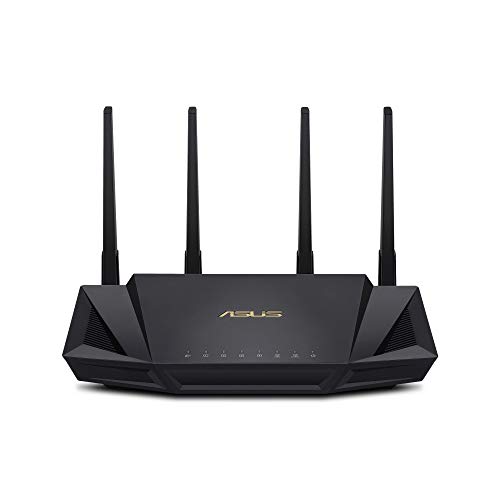
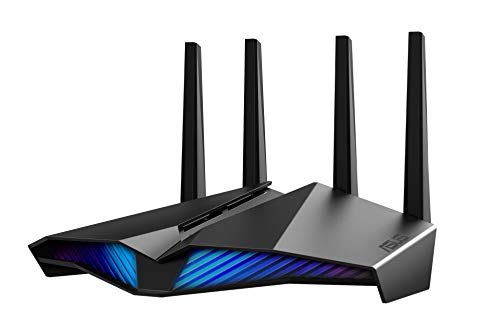


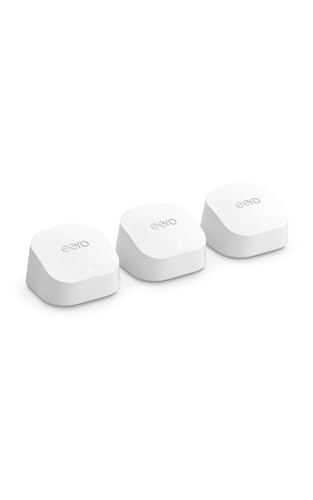

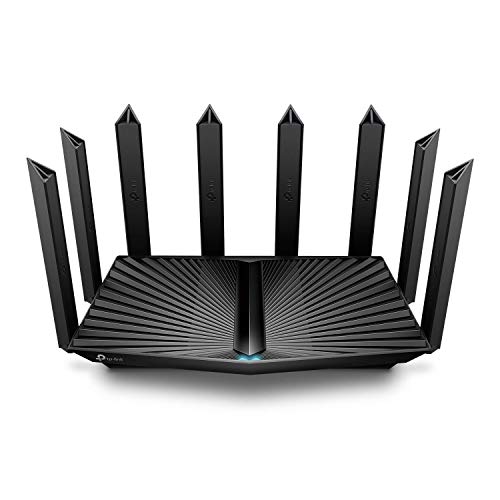
Who Should Buy Which Long Range Home Router?
Single Story and Open Two Story Wood/Drywall Homes (Up to 2,800 Sq Ft)
A single high power 4x4 standalone WiFi 6E or WiFi 7 router with external adjustable antennas is usually the most cost effective choice for a 1,500 to 2,800 square foot home framed with wood studs and drywall. This assumes your internet cable or fiber enters near the middle of the house.
Because every room is within two interior walls of the central router, high gain beamforming and dedicated Front End Modules (FEMs) can push a strong signal out to the garage and backyard without needing satellite pods.
Large Multi Story, L Shaped, and Split Level Homes (3,000 to 6,500+ Sq Ft)
Large and multi story homes generally need a two or three pack Tri Band WiFi 6E or WiFi 7 mesh system. When your fiber ONT or cable modem sits at one far end of an L shaped ranch, or in a basement utility room several floors below the master bedroom, no single standalone router can overcome the signal loss across dozens of feet of diagonal floors.
Placing a mesh node on each floor creates overlapping bubbles of 5GHz and 6GHz signal under one seamless home network name.
Older Homes With Plaster and Metal Lath, Brick, or Concrete Walls
Older homes with dense walls do best with a mesh system connected by wired Ethernet backhaul, or by MoCA 2.5 coaxial adapters that turn existing TV cable jacks into gigabit Ethernet ports. Wire mesh plaster lath, interior brick chimneys, radiant floor heating pipes, and concrete block partitions can absorb 5GHz and 6GHz radio waves almost completely within a single room.
Running the data over copper bypasses those walls entirely, and each node then broadcasts fresh WiFi inside its own room.
Key Engineering Factors That Control Home WiFi Range
How Different Home Building Materials Block WiFi Waves
Building materials decide how far a signal travels, and the loss is measured in decibels (dB), where every 3 dB of loss cuts signal strength roughly in half. These are typical ballpark figures:
- Standard Interior Drywall (Hollow Wood Studs): Loses only about 3 to 4 dB per wall. Both 2.4GHz and 5GHz pass through two drywall walls easily.
- Solid Wood Doors & Plywood Subfloors: Loses about 6 to 9 dB. Passing diagonally through a thick floor plus two walls drops 6GHz speeds sharply.
- Low E Double Pane Exterior Windows (Metallic UV Coating): Modern energy efficient windows often carry a thin metal oxide film that can block roughly 10 to 15 dB of WiFi signal, which can hurt patio and driveway camera signals more than a wood wall does.
- Brick, Stone, Plaster over Wire Lath, & Concrete: Loses 12 to 25+ dB per wall, virtually stopping 5GHz and 6GHz waves and requiring mesh nodes or wired access points.
Why Receive Sensitivity (LNA) Matters More Than Router Loudness
Receive sensitivity matters because WiFi is a two way street, and your phone is the weaker talker. In the United States, the FCC limits consumer routers to a maximum transmit power of about 1 Watt (30 dBm EIRP), so a pricier router cannot simply shout louder.
The router has a mains powered radio that can reach the fence line, but your smartphone or smart doorbell has a tiny battery powered antenna whispering back at a fraction of that power. Long range routers use 4x4 antenna arrays paired with Low Noise Amplifiers (LNAs) that pick up that faint return signal without dropping the connection. That is why a well built router at around $250 can hold a link at the back door where a budget unit at around $60 disconnects.
4x4 MU MIMO Beamforming vs Basic 2x2 Omni Broadcast
A 4x4 MU MIMO radio with beamforming focuses energy toward your devices, while a 2x2 budget radio spreads WiFi in all directions like a bare light bulb. Much of that spread energy ends up in empty walls.
With beamforming, spaced antennas adjust their radio wave timing so the waves reinforce each other where your laptop or TV is sitting. The result is a few extra dB of directional gain through walls, which is often the difference between a usable and an unusable connection.
Range Band Steering: 2.4GHz vs 5GHz vs WiFi 7 MLO
Band steering assigns each device to the best frequency for its distance, so the long wavelength 2.4GHz band serves far away gadgets and the faster bands serve nearby ones. Smart plugs, garage door openers, and outdoor floodlight cameras 80 feet away stay on 2.4GHz, which penetrates exterior walls best.
Laptops, TVs, and phones inside the house use the 5GHz and 6GHz bands for 500 to 2,000+ Mbps speeds. On newer WiFi 7 routers, Multi Link Operation (MLO) bonds bands together so a device keeps high speed data even as you walk toward the outer edges of your home.
Comparing Home Long Range Router Setups Side by Side
Matching the hardware setup to your home's square footage and layout prevents dead bedrooms and backyard dropouts.
| Home Router Setup | Ideal Home Size | Wall Penetration Strategy | Yard & Garage Reach | Typical Price Range |
|---|---|---|---|---|
| Standalone 4x4 High Gain Router | 1,500 to 2,800 sq ft | High power FEMs + 4x4 beamforming | Good (15 to 40 ft past wall) | About $130 to $320 |
| Expandable Router + 1 Pod | 2,500 to 4,000 sq ft | Main router + 1 targeted wing node | Very high (put pod near garage) | About $220 to $400 |
| 3 Pack Tri Band WiFi 6E/7 Mesh | 3,500 to 7,000+ sq ft | Dedicated 6GHz / wired backhaul | Blankets house, patio, & garage | About $280 to $650+ |
Price Tiers: What Your Budget Gets You
Entry Long Range 4x4 WiFi 6 & Dual Pack Mesh (Around $100 to $175)
Around $100 to $175 you can choose between a high gain 4x4 WiFi 6 or entry WiFi 7 standalone router, or a two pack dual band mesh system. The standalone route suits single story homes and apartments up to about 2,500 sq ft, with external beamforming antennas.
The mesh route suits multi story homes on internet plans under about 500 Mbps, where coverage matters more than top speed.
Core Whole Home Sweet Spot: Tri Band & Expandable WiFi 6E/7 (Around $180 to $360)
Spending around $180 to $360 gets you Tri Band WiFi 6E and WiFi 7 standalone routers with 2.5GbE ports and high power FEM amplifiers. It also covers two and three pack Tri Band mesh kits.
These kits use the 6GHz band as a dedicated wireless link between nodes, so distant bedrooms can still see several hundred Mbps.
Flagship 4x4 Quad Band & Multi Gig Estate Systems (Around $380 to $750+)
Between roughly $380 and $750 or more, flagship routers and three pack WiFi 7 mesh systems add eight internal or external high gain antennas per unit, 10GbE ports, Multi Link Operation, and dedicated IoT networks. They make sense for large homes with many connected devices and multi gig internet plans.
Common Home Placement Mistakes That Cut Your Range
Placement errors can cost you as much range as buying a weaker router. These are the five most common ones.
- Leaving the router on the basement floor or tucked behind a flat screen TV: Basements are surrounded by concrete foundation walls that swallow radio signals, and the metal backplate of a TV blocks much of the WiFi directly in front of it. Elevate your router 4 to 6 feet high on an open shelf on the main living floor.
- Parking your router right next to a microwave oven, cordless phone base, or baby monitor: Kitchen microwaves can leak 2.4GHz noise that disrupts WiFi whenever someone heats lunch. Keep routers at least 10 feet away from kitchen appliances such as the microwave and a large metal refrigerator.
- Placing a wireless mesh node in the dead zone room itself: If your upstairs bedroom has a very weak signal, putting a mesh satellite inside that bedroom only rebroadcasts a weak connection. Place the node halfway between the main router and the bedroom (such as the top of the stairs) where it still receives a strong 5GHz or 6GHz backhaul signal.
- Using 160MHz DFS channels near an airport or weather radar station: DFS channels (52 to 144) are uncongested, but routers drop power or switch channels if they detect radar. For long range stability on 5GHz, try non DFS channels 36 to 48 or 149 to 161.
- Putting smart home cameras and plugs on a mixed WPA3 only network: Many outdoor cameras and garage door openers have simple 2.4GHz chips that get confused by WPA3 or band steering. Enable your router's dedicated 2.4GHz IoT or guest network (set to WPA2) for smart home devices.
Antenna Aiming and Whole Home Range Optimization Tips
Adjustable dipole antennas should not point at the room you want to reach, because they radiate outward from the sides of the rod, like a donut around the stick, not from the tip. In a single story home, stand all antennas straight up so the horizontal signal plane spreads farthest across the floor. In a two or three story home, leave half the antennas vertical and angle the others 30 to 45 degrees so part of the signal projects through the ceiling and floor.
To push fast WiFi out to a detached garage, pool house, or backyard patio blocked by Low E window glass, place an expandable mesh node against an interior drywall wall facing the yard rather than directly behind a coated window pane.
Setup Steps After You Buy
A careful setup gets more range out of any router than random placement does. Start by placing the main unit as central as possible, off the floor, and away from large metal objects, mirrors, and aquariums.
Next, update the firmware before connecting your devices, since manufacturers often improve radio tuning and stability in later releases. Set your country region correctly, because a wrong region setting can limit available channels and transmit power.
If you add mesh nodes, plug them in one at a time and watch the app's backhaul indicator before moving on to the next. Where a wall has an Ethernet jack or a coax outlet, use it: a wired link to each node removes the biggest source of speed loss in large homes.
Finally, walk the house with a phone and a free speed test app, noting the weakest rooms. Move a node a few feet if a room is still weak, since small shifts can change results more than expected.
Frequently Asked Questions
What is the best router for getting WiFi through thick walls at home?
For two or three standard drywall or wood walls, a standalone router with 4x4 radios and high power Front End Modules delivers the strongest single unit signal. If your home has solid brick, concrete block, or metal lath plaster walls, radio waves cannot pass through efficiently. The better solution there is a mesh system connected by wired Ethernet or MoCA 2.5 coax adapters, so the data travels through a cable instead.
How far can a long range home router reach outside into the yard?
A high gain standalone router or mesh node near an exterior wall can often reach roughly 75 to 150 feet into an open backyard on 2.4GHz, and about 40 to 80 feet on 5GHz. Real results vary with windows, trees, and fences. That is usually enough for patio streaming, outdoor cameras, and smart plugs.
Are routers with external antennas longer range than internal antenna mesh pods?
Unit for unit, yes: a large standalone router with spaced external antennas has higher gain and better single unit range than a small mesh pod with internal antennas. However, two or three mesh pods spaced about 35 feet apart cover a much larger total area than any single router. Choose by home size rather than by antenna style alone.
Why does my phone show full WiFi bars in the bedroom but web pages will not load?
The bar icon only shows how well your phone hears the router, not how well the router hears your phone. At the far edge of range, your phone's weak transmitter cannot push data back through several walls. A router with 4x4 receive antennas and Low Noise Amplifiers, or a mesh node halfway along the hall, usually fixes it.
Should I separate my 2.4GHz and 5GHz WiFi names for better range?
Yes, but only for distant smart devices. On WiFi 6E and WiFi 7 routers, keep 5GHz and 6GHz combined under one name for laptops and phones. Create a separate 2.4GHz only network name for outdoor cameras, smart bulbs, and garage openers so they never try to hop onto a weak 5GHz signal.
Final Thoughts
Choosing the best long range routers for home coverage comes down to matching your transmitter count to your home's square footage and wall density. For single story and open two story homes up to 2,800 square feet, place a 4x4 Tri Band WiFi 6E or WiFi 7 standalone router centrally at shelf height. For homes over 3,000 square feet, L shaped layouts, or multi floor townhomes, invest in a two or three pack Tri Band mesh system using wired or 6GHz backhaul. The picks in the product table fall into these same three setups, so choose the one that matches your floor plan.


