

NETGEAR
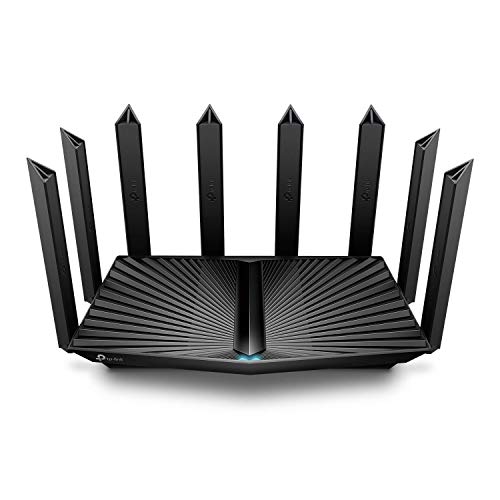
NETGEAR Nighthawk WiFi 7 Router, Up to 2,500 sq ft, 9.3 Gbps
Disclosure: We may earn a commission when you buy through links on this page, at no extra cost to you. As an Amazon Associate I earn from qualifying purchases. Learn more
Highlights
- FASTER, FARTHER, MORE RELIABLE WIFI: A dedicated tri-band WiFi 7 router with a third high-speed band for demanding devices, built to keep up as your connected home grows with streaming, video calls, gaming, and smart home devices.
- WORKS WITH YOUR EXISTING INTERNET SERVICE: Pairs with your existing modem or gateway via ethernet. Compatible with most cable, fiber, DSL, and satellite providers. Some gateways and modem router combos may require bridge mode. No coax needed.
- SET UP AND MANAGE YOUR NETWORK WITH THE NIGHTHAWK APP: Download the free Nighthawk app on iOS or Android for guided setup. Manage WiFi, run speed tests, pause devices, and set up guest networks from anywhere. Active internet required.
- WIFI 7 THAT KEEPS UP WITH A BUSY HOME: Up to 9.3 Gbps across 2.4 GHz, 5 GHz, and 6 GHz bands, 2.4x faster than WiFi 6. The added 6 GHz band gives your fastest devices their own lane so nothing slows down. Real-world speeds depend on your devices and plan.
- COVERAGE IN EVERY ROOM: Delivers up to 2,500 sq. ft. of coverage for up to 100 devices. Walls, floors, and interference can reduce range. Larger or multi-story homes may benefit from a NETGEAR Orbi mesh WiFi system.
- MULTI-GIG READY WIRED CONNECTIONS: Plug your modem or gateway into the 2.5 Gig WAN port to unlock multi-gig internet plans. Two 2.5 Gig LAN ports and two 1 Gig Ethernet LAN ports connect gaming rigs, NAS drives, and smart TVs.
- YOUR SECURITY AND PRIVACY ARE OUR TOP PRIORITY: NETGEAR routers give you more control over your home network with security features enabled out of the box, exclusive Advanced Router Protection, and automatic firmware updates to help protect your family.
- NETGEAR ARMOR SECURITY (30-DAY FREE TRIAL): NETGEAR Armor adds a layer of protection for every connected device, guarding against hackers, malware, and identity theft at home or on the go. A separate subscription is required to continue after the trial.
Why You'll Love It
- Delivers combined wireless speeds up to 9.3 Gbps across three separate frequency bands
- Provides a dedicated 6 GHz lane to keep high-bandwidth hardware running smoothly
- Covers living areas up to 2,500 square feet and handles up to 100 devices
- Features a 2.5 Gig WAN port paired with two 2.5 Gig LAN connections
- Guided smartphone installation makes running speed checks and managing guest networks straightforward
- Automatic security updates and out-of-the-box protection help safeguard your connected home
Pros
- +Tri-band WiFi 7 throughput
- +Multiple multi-gig wired ports
- +Handles up to 100 devices
- +No coaxial cable needed
Cons
- -Full security suite requires ongoing paid subscription
- -Interior walls and floors reduce rated coverage
- -May require modem bridge mode configuration
Detailed Review
Upgrading your household network with a dedicated tri-band WiFi 7 router solves the bottleneck of bandwidth-heavy streaming, video calls, and responsive online gaming. The NETGEAR Nighthawk WiFi 7 Router distributes up to 9.3 Gbps of total throughput across 2.4 GHz, 5 GHz, and 6 GHz bands. By introducing the 6 GHz frequency band as a clear channel for modern hardware, it prevents older smart home accessories from dragging down your most demanding electronics. Real-world wireless performance will naturally vary according to your internet service tier and client devices, but the platform offers 2.4 times faster theoretical throughput than standard WiFi 6 gear.
Physical connectivity is equally capable for power users who rely on stable, low-latency cables. The unit includes a 2.5 Gig WAN port designed to accept multi-gigabit feeds directly from your existing modem or gateway. For internal distribution, you get two matching 2.5 Gig LAN ports alongside two standard 1 Gig Ethernet ports. This layout lets you hardwire high-demand equipment, such as network-attached storage enclosures, desktop gaming rigs, or media streaming hardware, without dropping down to base gigabit limits on your fastest local links.
Day-to-day network management runs through the free Nighthawk mobile app on iOS or Android devices. The app walks you through initial hardware installation, enables guest network setup, and allows you to pause access for specific devices when needed. You can also run speed tests directly from your phone. Network protection begins right out of the box with exclusive Advanced Router Protection and automatic firmware updates designed to keep background software current without manual intervention.
There are practical operational trade-offs to keep in mind before choosing a standalone unit. Its rated reach extends up to 2,500 square feet and supports up to 100 devices, but physical obstacles like interior walls, multiple floors, and environmental interference will diminish coverage. Furthermore, while the router includes a 30-day trial of NETGEAR Armor software to guard against malware and identity theft, retaining that complete layer of protection across your mobile and home hardware requires an active paid subscription after the trial concludes.
Verdict: This tri-band router is an excellent choice for households with multi-gigabit service plans and modern devices that can take advantage of the 6 GHz spectrum. Buyers living in sprawling or multi-story layouts may want to look toward mesh hardware instead, while those with moderate speeds will find plenty of future-ready performance here.
Who Should Buy It
A great fit if you:
- Subscribe to a multi-gigabit internet tier and want 2.5 Gig wired connections for your modem, desktop PC, or storage drive.
- Own modern electronics capable of connecting to the clear 6 GHz band to avoid congestion from older smart home gear.
- Manage a busy household with dozens of active devices streaming video, running video conferences, and playing games simultaneously.
- Prefer managing your local network, testing connection speeds, and controlling guest access directly through a mobile phone application.
Consider something else if you:
- Live in a sprawling, multi-story property that would get more reliable whole-home coverage from a modular mesh system.
- Want all ongoing network security features permanently included without having to maintain an optional paid software subscription service.
Before You Buy
Confirm on the listing:
- Check whether your existing internet service provider gateway requires manual adjustment to bridge mode before pairing via Ethernet.
- Check the physical dimensions of the router chassis to ensure your shelf or entertainment center has adequate clearance.
- Verify which specific Ethernet patch cables, power adapters, or accessories come packaged inside the retail box.
- Confirm the operating system version requirements for the Nighthawk app on your current iOS or Android smartphone.
How to compare your options: When shopping for home networking equipment, focus on wireless generation standards, port throughput speeds, and rated square footage. This model provides WiFi 7 capabilities with multi-gigabit WAN and LAN hardware, which suits fast broadband tiers better than basic single-gigabit alternatives. Consider whether your floor plan matches its single-unit 2,500 square foot rating or if your layout demands multi-node hardware.
Getting the Most From It
Begin setup by connecting the router WAN port directly to your existing broadband modem using an Ethernet cable. If your internet service provider supplied a combined modem-router gateway, review its settings to enable bridge mode so the two devices communicate properly without creating conflicting networks.
Download the official Nighthawk app on your mobile device to complete guided setup, establish secure network names, and activate guest network access. Use the built-in speed test tool within the application to verify that your incoming service matches the speeds delivered by your internet provider.
Connect your highest-priority hardware, like gaming desktops or dedicated network drives, directly into the available 2.5 Gig Ethernet LAN ports. For wireless electronics that support the 6 GHz band, assign them to that frequency lane to keep them isolated from lower-speed smart home products on the 2.4 GHz and 5 GHz bands.
FAQ
Does this router require a coaxial cable connection?
No, it connects to your existing modem or gateway using an Ethernet cable and does not use a coaxial port.
Will it work with my current internet service provider?
Yes, it is compatible with most cable, fiber, DSL, and satellite providers. If you use an all-in-one modem-router combo, you may need to set that equipment to bridge mode.
How many wired ports are available on the unit?
The router includes one 2.5 Gig WAN port for your modem, two 2.5 Gig LAN ports, and two standard 1 Gig Ethernet LAN ports for hardwired devices.
Is the NETGEAR Armor security service free to use permanently?
No, the router includes a 30-day free trial of NETGEAR Armor, after which a separate paid subscription is required to keep that specific protection active.
What is the maximum square footage this unit can cover?
It provides up to 2,500 square feet of coverage for up to 100 devices, though walls, floors, and wireless interference can reduce that operational range.
Product Details
| Brand | NETGEAR |
| ASIN | B0DK7Q5SCN |
Similar Products

Featured In

Best Wireless Internet Routers: Everything to Know Before Your First Purchase
Oct 29, 2026

Best Long Range Routers for Home in 2026: Wall Penetration, Yard Reach, and Buyer Guide
Oct 30, 2026

The Best Wifi Routers for Long Range for 2026: Whole Home Signal Guide
Oct 30, 2026

The Best Extended Range Routers for 2026: Buying Guide for Large Homes
Oct 30, 2026