Xvive
Xvive U45 Wireless in-Ear Monitor System, 5.8 GHz True Diversity IEM
Disclosure: We may earn a commission when you buy through links on this page, at no extra cost to you. As an Amazon Associate I earn from qualifying purchases. Learn more
Highlights
- 5.8 GHz True Diversity Wireless: U45 combines 5.8 GHz wireless transmission with True Diversity reception and a dual-antenna receiver design to help maintain a stable RF connection on stage, giving you the freedom to move and stay focused on your performance
- High-Resolution Audio with Low Latency: U45 delivers 24-bit/48 kHz audio, a 20 Hz–20 kHz frequency response, 110 dB signal-to-noise ratio and less than 5 ms latency, so you can hear vocals and instruments clearly while keeping your performance feeling natural and responsive
- Smart Channel Scan: Hold the receiver’s channel button for three seconds to scan the local RF environment and find the optimal channel, then match the transmitter to the selected channel, helping you get your wireless monitor ready faster when moving between rehearsals, stages and venues
- Flexible Mixer Connectivity: Connect the U45 transmitter directly to a balanced XLR output or 1/4-inch TS aux or line output, with selectable Line +4 dBu and Aux -10 dBV modes for different audio sources, making it easier to integrate wireless monitoring into your existing setup
- Multi-System Setup: U45 offers up to six channels, allowing multiple wireless systems to operate on the 5.8 GHz band in the same area and multiple performers to use their own wireless systems on separate channels, giving your band greater flexibility when building or expanding its stage setup
Why You'll Love It
- Dual antenna True Diversity reception helps maintain a stable wireless monitor connection while you move on stage
- 24 bit audio at 48 kHz with less than 5 ms latency keeps monitoring responsive during live performance
- A 20 Hz to 20 kHz frequency response supports monitoring across the listed audio range
- Automatic RF scanning helps you find a suitable channel when changing rehearsal spaces or venues
- Balanced XLR and 1/4 inch TS inputs offer flexible connections to compatible mixer outputs
- Up to six channels let multiple performers build a wireless monitoring setup with separate channel assignments
Pros
- +5.8 GHz True Diversity wireless reception
- +Dual antenna receiver design
- +24 bit, 48 kHz audio
- +Smart channel scanning
- +Flexible mixer output connections
Cons
- -Requires matching transmitter and receiver channels
- -Multi performer setups require channel coordination
- -Source equipment must provide a compatible output
Detailed Review
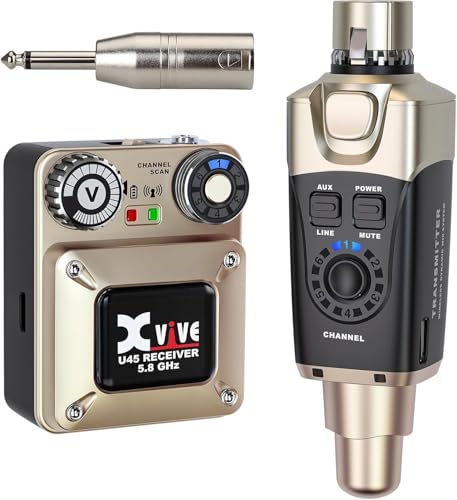
The Xvive U45 wireless in ear monitor system is designed for performers who want to hear their monitor audio without a wired connection between the transmitter and receiver. Its main appeal is the combination of 5.8 GHz wireless transmission, True Diversity reception, and a dual antenna receiver design. These features are intended to help maintain a stable RF connection while a musician moves on stage. For singers, instrumentalists, and bands building a wireless monitoring setup, the U45 offers a focused set of tools for managing audio and wireless channels.
Audio specifications are another important part of the package. The system supports 24 bit audio at 48 kHz, a frequency response of 20 Hz to 20 kHz, a signal to noise ratio of 110 dB, and latency of less than 5 ms. Together, these figures describe the system's audio format, stated frequency range, signal to noise performance, and transmission delay. The low stated latency is particularly relevant when you need your monitor signal to follow your performance closely. These specifications give shoppers concrete criteria for deciding whether the system suits their monitoring needs.
Channel management is designed to be straightforward. Holding the receiver's channel button for three seconds starts a scan of the local RF environment, helping identify an appropriate channel for the setup. You then match the transmitter to the selected channel. This process is useful when moving between rehearsal rooms, stages, and venues, where the surrounding wireless environment may differ. The system supports up to six channels, giving bands a way to assign separate channels to multiple wireless monitoring systems.
Connectivity is another practical consideration. The transmitter can connect directly to a balanced XLR output or a 1/4 inch TS auxiliary or line output. Selectable Line +4 dBu and Aux -10 dBV modes help accommodate different output types. This gives the U45 flexibility when integrating it with compatible mixer outputs, although buyers should check their own equipment connections and output levels before choosing a setup. The available connection options are useful only when they match the gear already in place.
The main trade off is that wireless monitoring still requires deliberate setup. The transmitter and receiver need matching channels, and multiple systems need appropriate channel assignments. You will also need to consider the output available from your mixer or other source equipment. Verdict: This wireless in ear monitor system is a strong candidate for performers and bands who want wireless stage monitoring, low stated latency, and flexible mixer connectivity. Consider another type of monitoring solution if your equipment cannot provide a compatible output or if you do not need a wireless system.
Specifications
- Wireless frequency band: 5.8 GHz
- Audio resolution: 24 bit at 48 kHz
- Frequency response: 20 Hz to 20 kHz
- Signal to noise ratio: 110 dB
- Latency: Less than 5 ms
- Wireless channels: Up to six
- Reception design: True Diversity with dual antennas
- Transmitter connections: Balanced XLR or 1/4 inch TS auxiliary or line output
- Selectable input modes: Line +4 dBu and Aux -10 dBV
Who Should Buy It
A great fit if you:
- You sing or play an instrument on stage and want monitor audio without a wired connection to the transmitter.
- Your mixer provides a balanced XLR output or a compatible 1/4 inch TS auxiliary or line output.
- You want low stated transmission latency so the sound in your monitors can follow your performance closely.
- Your band needs separate wireless monitoring channels for several performers using systems in the same area.
Consider something else if you:
- You prefer a wired monitoring arrangement and do not need wireless transmission between your audio source and monitoring receiver.
- Your existing equipment lacks a compatible output, making a different monitoring system with matching connections a better fit.
Before You Buy
Confirm on the listing:
- Check what is included in the package, including the supplied transmitter, receiver, and any other components needed for your intended setup.
- Verify that your mixer or audio source has a compatible balanced XLR or 1/4 inch TS auxiliary or line output.
- Check which input mode suits your source, since the system offers Line +4 dBu and Aux -10 dBV settings.
- Confirm how the included components are powered and whether the package meets your practical setup needs.
How to compare your options: Prioritize connection compatibility, wireless channel management, stated latency, and the audio specifications that matter to your performance. The U45 offers 24 bit audio at 48 kHz, less than 5 ms latency, and scanning to help select a channel. If several performers will use wireless systems in the same area, consider how the available six channels fit your planned arrangement. Compare each option against your actual mixer outputs and monitoring requirements rather than choosing by specifications alone.
Getting the Most From It
Start by checking the output on your mixer or audio source and choosing the matching transmitter connection. Select the appropriate Line or Aux mode for the source, using the stated output types as your guide. Confirm that the rest of your equipment fits the intended signal path before setting up for a performance.
When preparing for a new rehearsal room or venue, use the receiver's channel scan to assess the local RF environment. Hold the channel button for three seconds to initiate the scan, then set the transmitter to the selected channel. Making this part of your setup routine can help keep channel selection organized when your location changes.
If several performers are using separate wireless monitoring systems, plan channel assignments together before playing. The U45 supports up to six channels, so coordinate the available channels across your intended setup and make sure each transmitter matches its receiver.
Keep your setup organized by recording which output connection, input mode, and channel assignment work for each arrangement. If the product comes with operating or care instructions, follow them for routine handling and maintenance. Recheck your connections and channel match whenever you change the setup or move to a different venue.
FAQ
What is the Xvive U45 used for?
It is a wireless in ear monitor system for performers who want monitor audio without a wired connection between the transmitter and receiver. Its features focus on wireless reception, audio specifications, and channel management.
Does the U45 support multiple performers?
Yes, it offers up to six channels for multiple wireless systems in the same area. Each system needs an appropriate channel assignment, with the transmitter matched to its receiver.
Can I connect it to my mixer?
Yes, if your mixer provides a compatible balanced XLR output or 1/4 inch TS auxiliary or line output. Select the Line +4 dBu or Aux -10 dBV mode that fits your source.
How do I select a wireless channel?
Hold the receiver's channel button for three seconds to scan the local RF environment. Then match the transmitter to the channel selected by the receiver.
What comes in the box, and does it include earphones?
The listed features do not state the full package contents or confirm whether earphones are included. Check the current product listing for the supplied components before buying.
Product Details
| Brand | Xvive |
| ASIN | B0F1T6TSP6 |