ZOTAC
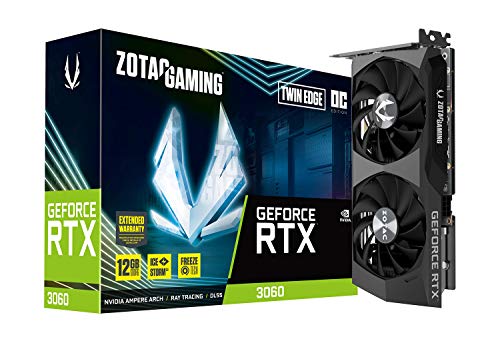
ZOTAC Gaming GeForce RTX 3060 Twin Edge OC 12GB GDDR6 192-bit 15 Gbps PCIE 4.0 Gaming Graphics Card, IceStorm 2.0 Cooling, Active Fan Control, Freeze Fan Stop ZT-A30600H-10M
Disclosure: We may earn a commission when you buy through links on this page, at no extra cost to you. As an Amazon Associate I earn from qualifying purchases. Learn more
Highlights
- NVIDIA Ampere architecture, 2nd Gen Ray Tracing Cores, 3rd Gen Tensor Cores
- 12GB 192-bit GDDR6, 15 Gbps, PCIE 4.0; Boost Clock 1807 MHz
- IceStorm 2.0 Cooling, Active Fan Control, Freeze Fan Stop, Metal Backplate
- 8K Ready, 4 Display Ready, HDCP 2.3, VR Ready.Avoid using unofficial software
- 3 x DisplayPort 1.4a, 1 x HDMI 2.1, DirectX 12 Ultimate, Vulkan RT API, OpenGL 4.6
Why You'll Love It
- 12GB of GDDR6 memory provides dedicated graphics memory for gaming and graphics workloads
- Ampere architecture combines second-generation ray tracing and third-generation Tensor cores
- 1807 MHz boost clock provides a clearly defined operating specification for graphics workloads
- IceStorm 2.0 cooling works alongside active fan control and Freeze Fan Stop
- Three DisplayPort 1.4a connections and one HDMI 2.1 output support multiple display configurations
- Metal backplate adds a structural finishing element to the card's design
Pros
- +12GB GDDR6 graphics memory
- +Second-generation ray tracing cores
- +Active fan control
- +Freeze Fan Stop
- +Four display outputs
Cons
- -PCIe 4.0 compatibility needs checking
Detailed Review
The ZOTAC RTX 3060 12GB graphics card is aimed at PC owners who want dedicated graphics hardware with a generous memory specification and support for modern graphics technologies. Its combination of NVIDIA Ampere architecture, 12GB of GDDR6 memory and a 1807 MHz boost clock gives shoppers several concrete specifications to consider when choosing a card for a gaming-focused computer. It is particularly worth considering if you want ray tracing capabilities, multiple display connections and a cooling system with automatic fan control.
Memory is one of the main attractions here. The card uses 12GB of 192-bit GDDR6 memory running at 15 Gbps, giving buyers a detailed specification to compare against their intended games and graphics applications. The NVIDIA Ampere architecture also includes second-generation ray tracing cores and third-generation Tensor cores. These technologies are relevant to shoppers interested in graphics features that extend beyond basic display output. DirectX 12 Ultimate, Vulkan RT API and OpenGL 4.6 support provide additional information when checking whether the card matches the software and graphics environment they intend to use.
The cooling arrangement is another important part of the design. ZOTAC includes IceStorm 2.0 cooling, Active Fan Control and Freeze Fan Stop. Together, these features give the card a cooling system with adjustable fan operation and a fan-stop function. That distinction may appeal to buyers who want fan behavior to be part of their graphics card selection rather than focusing exclusively on memory and clock specifications. A metal backplate completes the physical design, while the overall feature set gives shoppers several different aspects to weigh when comparing graphics cards.
Connectivity is particularly useful to consider before making a decision. The card has three DisplayPort 1.4a outputs and one HDMI 2.1 output, with support for four displays and HDCP 2.3. It is also identified as 8K Ready and VR Ready. These are useful specifications for shoppers planning a display arrangement or looking for particular graphics capabilities, although the actual setup should still match the requirements of their other equipment. Its PCIe 4.0 interface is another compatibility detail worth checking.
Verdict: This graphics card deserves consideration from PC owners who want 12GB of GDDR6 memory, ray tracing hardware, multiple display outputs and dedicated cooling features in one product. It is a more suitable shortlist candidate for shoppers whose existing computer and display setup match its connection requirements than for anyone choosing a card without checking compatibility first.
Who Should Buy It
A great fit if you:
- You want a gaming graphics card with 12GB of GDDR6 memory and a clearly stated 192-bit memory interface.
- You are interested in ray tracing features and want second-generation ray tracing cores included in your graphics hardware.
- Your computer setup can accommodate a PCIe 4.0 graphics card and you have checked the relevant connection requirements.
- You want several display connections, including DisplayPort 1.4a and HDMI 2.1, for your preferred monitor arrangement.
Consider something else if you:
- You need a graphics card designed for a different connection standard, so a model matching your computer's actual interface would be a better choice.
- You need a different graphics memory capacity or display connection arrangement, making a card with specifications tailored to those requirements more appropriate.
Before You Buy
Confirm on the listing:
- Check that your computer supports the PCIe 4.0 interface and that the graphics card is compatible with your existing hardware.
- Confirm the card's physical dimensions against the available space in your computer before placing an order.
- Check whether the included package contains any accessories or connection items you expect to need for your intended setup.
- Verify that your displays use compatible connections, particularly if you plan to use the three DisplayPort 1.4a outputs or HDMI 2.1.
How to compare your options: Start with graphics memory, memory interface, memory speed and boost clock, because these are clearly stated specifications that help distinguish the hardware configurations you are considering. Next, compare graphics technologies, cooling features and available display connections. This model brings together 12GB GDDR6 memory, a 1807 MHz boost clock, IceStorm 2.0 cooling and four display outputs. Finally, consider the software standards you need, including DirectX 12 Ultimate, Vulkan RT API and OpenGL 4.6. Matching these details to your actual computer and intended use is more useful than choosing on a single specification alone.
Getting the Most From It
Begin by checking the compatibility of your computer and intended display arrangement. The PCIe 4.0 interface is an important starting point, and the available outputs should be matched to the connections on your displays. Planning this before installation helps you make a more informed decision about how the card will fit into your existing setup.
Once installed, consider the graphics technologies supported by the card when configuring your games and applications. Its second-generation ray tracing cores, third-generation Tensor cores and support for DirectX 12 Ultimate, Vulkan RT API and OpenGL 4.6 give you several relevant specifications to keep in mind. Check the requirements of the particular software you intend to run rather than assuming every application uses the same features.
Pay attention to the cooling features as part of everyday operation. IceStorm 2.0, Active Fan Control and Freeze Fan Stop are included in the design, so familiarize yourself with their available behavior and settings. If accompanying instructions provide guidance for these features, follow that information rather than changing settings without understanding their purpose.
Keep your setup organized around the connections you actually use. The three DisplayPort outputs and one HDMI output provide several connection choices, while the metal backplate is part of the card's physical design. For ongoing care, follow the manufacturer's cleaning and maintenance instructions, and review the compatibility requirements again if you change your computer or display arrangement.
FAQ
How much graphics memory does the ZOTAC RTX 3060 have?
It has 12GB of GDDR6 memory with a 192-bit interface and a memory speed of 15 Gbps. These specifications are useful starting points when comparing graphics card configurations.
Does this graphics card support ray tracing?
Yes, it includes second-generation ray tracing cores based on NVIDIA Ampere architecture. It also has third-generation Tensor cores and supports DirectX 12 Ultimate.
How many monitors can it support?
It is listed as supporting four displays. Its connections consist of three DisplayPort 1.4a outputs and one HDMI 2.1 output, so check your monitors' connections before purchasing.
Does the card have a dedicated cooling system?
Yes, it features IceStorm 2.0 cooling, Active Fan Control and Freeze Fan Stop. These are the listed cooling and fan-management features.
Is this graphics card VR Ready and 8K Ready?
Yes, both VR Ready and 8K Ready are included in its listed capabilities. Check the requirements of your intended displays and applications to confirm that the complete setup is suitable.
Specifications
- Brand: ZOTAC
- Model: ZT-A30600H-10M
- GPU Architecture: NVIDIA Ampere
- Graphics Memory: 12GB GDDR6
- Memory Interface: 192-bit
- Memory Speed: 15 Gbps
- Interface: PCIe 4.0
- Boost Clock: 1807 MHz
- Cooling: IceStorm 2.0
- Fan Features: Active Fan Control, Freeze Fan Stop
- Backplate: Metal
- Display Outputs: 3 x DisplayPort 1.4a, 1 x HDMI 2.1
- Display Support: 4 displays
- HDCP: 2.3
- Graphics Technologies: Second-generation Ray Tracing Cores, third-generation Tensor Cores
- Graphics APIs: DirectX 12 Ultimate, Vulkan RT API, OpenGL 4.6
- Additional Capabilities: 8K Ready, VR Ready
Product Details
| Brand | ZOTAC |
| ASIN | B08W8DGK3X |