
3 Pin vs 5 Pin Keyboard Switches: Which Is Better in 2026?
Disclosure: We may earn a commission when you buy through links on this page, at no extra cost to you. As an Amazon Associate I earn from qualifying purchases. Learn more

3 pin vs 5 pin switches for mechanical keyboards: how pin count affects fit and wobble, and which hot-swap sockets take which.
The difference between 3 pin vs 5 pin mechanical keyboard switches is a few small pieces of plastic, yet it decides whether a switch drops into your board cleanly or fights you. A 3-pin switch has a center post and two metal contact pins, while a 5-pin switch adds two plastic alignment pins on either side of the post. The product table right after this introduction lists switch sets of both types.
This guide explains what the extra pins do, which keyboards accept each type, and what to check before you buy a pack for a swap or a custom build.


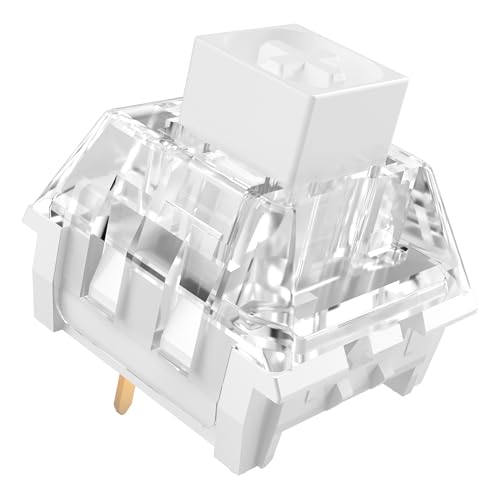

What the Pins Actually Are
Every mechanical switch needs two metal pins to complete the circuit with the keyboard's circuit board. Both types have them. The center post, a larger plastic peg, locates the switch in the middle of the socket on both types.
The extra two pins on a 5-pin switch are plastic and carry no electricity. They sit on the left and right of the center post and fit into small holes in the circuit board. Their only job is to hold the switch steady and stop it from rotating, which keeps the metal pins aligned and the top of the switch level.
- 3-pin: center post plus two metal contacts, also called plate-mount.
- 5-pin: center post, two metal contacts and two plastic alignment pins, also called PCB-mount.
Stability and Feel
A 5-pin switch sits more securely on the board, with less side to side wobble. In a keyboard with a metal or stiff plate, the switch clips into the plate and the difference is small. In a board without a plate, or with a flexible one, the extra pins make a noticeable difference, because nothing else holds the switch square.
A switch that wobbles can feel mushy and may even misalign its pins, causing a key that does not register. That is the practical reason enthusiasts prefer 5-pin switches for custom builds: they are simply easier to install straight and keep that way.
Which Boards Accept Each Type
Hot-swap keyboards have sockets that grip the metal pins without soldering. Most hot-swap boards have holes for the extra plastic pins, so they accept both types, but check the product page. If the board lacks those holes, a 5-pin switch will not sit flat unless you trim the plastic pins.
Soldered boards depend on the design. Boards that use a plate to hold switches can take 3-pin switches easily, and many accept 5-pin too if the PCB has the holes. Boards without a plate need 5-pin switches, since the pins are the only support.
A simple rule
A 3-pin switch fits any socket that accepts 5-pin switches, since the missing pins just mean fewer points of support. A 5-pin switch fits a 3-pin-only board only if you clip off the two plastic pins with flush cutters. Many people do this routinely, and it does not harm the switch's function.
Clipping Pins Safely
If you own 5-pin switches and a board that needs 3-pin ones, trim the two outer pins carefully. Use a small flush cutter, cut close to the base of the switch and be careful not to bend the metal contacts. Try one switch in the socket before you do a full set, and keep the clipped pieces away from your keyboard.
Clipping is irreversible, so only do it if you are sure of the fit. A board with plenty of room for the pins is worth keeping as it is.
What Else Matters More
Pin count is one detail among many. The feel of a switch comes from its type (linear, tactile or clicky), spring weight, stem material and lubrication. A good 3-pin switch beats a poor 5-pin one, and lubed switches often feel smoother straight from the pack. For deeper advice on feel, see our guide to the best keyboard switches.
Check the stem too. Most switches use an MX-style cross stem, which fits the majority of keycaps. Packs usually list a count and sometimes a tray, and a switch opener is sold separately if you want to lube them yourself.
Why Pin Count Matters for Hot-Swap Sockets
Hot-swap sockets are small metal clips soldered to the board. They grip the two contact pins of a switch and can wear if you insert and remove switches many times. A 5-pin switch pressing into the extra holes puts less sideways strain on those clips, which helps them last longer when you swap often.
If you plan to try many switch types, choose a board with sturdy sockets and buy switches with clean, straight pins. Always pull straight up, never rock a switch side to side, and check the pins before every insertion.
Common Mistakes to Avoid
The most common error is forcing a switch into a socket when the pins are bent. The second is buying a pack without checking whether the pin type suits the board. A third is mixing switches with very different heights in the same board, which makes typing feel uneven.
Keep the packaging tray, which holds the pins safe, and check the product page for compatibility notes such as supported layouts and plate types before you click buy.
3 pin vs 5 pin: Which Should You Choose?
Choose 3-pin if you
- Own a plate-mounted board that only has a center hole and two contact holes.
- Want the simplest replacement for older keyboards.
- Are replacing a few switches on a budget board.
Choose 5-pin if you
- Build a custom keyboard or own a hot-swap board with full holes.
- Want the most stable fit and straighter keys.
- Plan to buy a larger set and mix them with other makers' switches.
Buying and Installing Tips
Buy a few spare switches along with the pack, since a bent pin can ruin one. Look at the pack size too: 35, 45 or 90 switches are common. Count the switches your board needs, including the larger keys, and add spares.
When installing in a hot-swap board, line up the pins, press straight down and avoid forcing it. A bent metal pin should be straightened with tweezers before you try again. Pull switches out with a puller, not with your fingers, to avoid damage.
Read the reviews and our write-ups on popular switches, such as the Gateron Oil King review and the Gateron Milky Yellow Pro review, to see how common models feel.
FAQ
Can I use 5-pin switches in a 3-pin board?
Yes, after clipping off the two plastic pins, if the board has no holes for them.
Can I use 3-pin switches in a 5-pin board?
Yes. They fit, though they have less support from the missing pins.
Are 5-pin switches better?
They sit more securely, which suits custom builds, but feel depends on other factors.
Do the plastic pins carry signals?
No. They only guide and hold the switch in place.
To sum up 3 pin vs 5 pin: 5-pin switches are the sturdier standard for hot-swap and custom boards, while 3-pin switches work in plate-mounted boards and are easy to swap.


