
Best Affordable Gaming Keyboards: Our Checklist and Top 3 Picks
Disclosure: We may earn a commission when you buy through links on this page, at no extra cost to you. As an Amazon Associate I earn from qualifying purchases. Learn more

How we judge budget gaming keyboards on switches, build, layout, software and connectivity, with three picks under about $80.
A good gaming keyboard makes every keypress feel precise, survives years of heavy use and fits neatly on your desk, and you no longer need to spend $150 to get one. Budget mechanical keyboards now offer hot swappable switches, gasket mounts and wireless modes that used to be premium features. The challenge is separating solid value from cheap boards with wobbly keys and unreliable connections. This guide to the best affordable gaming keyboards explains the checklist we use, then shows three picks that pass.
The short answer: most gamers should choose a mechanical keyboard with linear or tactile switches, a compact tenkeyless or 75 percent layout, a sturdy plate, per key RGB and software or onboard memory for macros, which costs around $35 to $80; choose a wired board for the lowest price and a tri mode wireless board with 2.4GHz for the best balance of freedom and speed.


How We Evaluate Gaming Keyboards
We score affordable gaming keyboards on six criteria. Each comes with thresholds for good and poor performance.
What You Can Realistically Get on a Budget
Around $30 to $45 buys a wired mechanical keyboard with clone switches, RGB lighting and a compact layout, or a membrane gaming keyboard with media keys and spill resistance. Around $50 to $80 adds hot swappable sockets, gasket mounted designs, sound dampening foam, PBT keycaps, volume knobs and wireless modes. You give up premium aluminum cases, high end switches and advanced software. Do not compromise on key stability and build quality, since wobbly stabilizers and flexing cases ruin the typing feel. Good: solid case, consistent keys, clear specs. Poor: rattling space bars and missing switch information.
Wired vs Wireless (2.4GHz, Bluetooth)
Wired keyboards are the cheapest and never need charging, with consistent low latency. Wireless keyboards using a 2.4GHz dongle now deliver response times close to wired, while Bluetooth adds latency and suits typing more than competitive gaming. Tri mode keyboards combine wired, 2.4GHz and Bluetooth for flexibility across PC, laptop and tablet. Good: wired or 2.4GHz for gaming, Bluetooth as a bonus. Poor: Bluetooth only keyboards marketed for esports.
Customization and Software
Software lets you remap keys, record macros and control lighting. Onboard memory saves profiles so they work on any computer. Enthusiast friendly boards support QMK or VIA for deep remapping without proprietary apps. Good: easy remapping, macro support and onboard profiles. Poor: buggy software or no remapping at all.
Battery Life and Charging
Wireless keyboards vary widely in battery life depending on lighting. With RGB on, expect around one to three weeks; with lighting off, many last a month or more. USB C charging is standard and lets you play while charging. Good: 4,000 mAh or larger batteries and USB C. Poor: tiny batteries that die in days with lighting enabled.
Durability and Warranty
Mechanical switches are typically rated for tens of millions of keystrokes, far longer than membrane keys. PBT keycaps resist shine better than ABS. Hot swappable sockets let you replace a faulty switch in seconds. Spill resistance helps membrane keyboards survive accidents. Good: durable switches, PBT or double shot keycaps and a one to two year warranty. Poor: no warranty and keycap legends that wear quickly.
Switch Type and Performance
Switch type defines how the keyboard feels. Linear switches are smooth and quiet, favored for fast games. Tactile switches have a bump that confirms each press, great for mixed gaming and typing. Clicky switches add an audible click but can annoy roommates. Membrane and mecha membrane keyboards are quieter and cheaper but feel softer. Anti ghosting and N key rollover ensure every press registers during intense moments. Good: consistent mechanical switches with full anti ghosting. Poor: mushy keys that miss inputs.
3 Picks That Pass Our Checklist
These three keyboards come from the product table above and meet every criterion on our checklist.


Best Overall
The HyperX Alloy Origins Core, around $80, is our pick for gamers who want a durable, compact mechanical keyboard from an established brand. Its first strength is build quality: a solid aluminum body and HyperX mechanical switches deliver a stable, consistent feel that holds up to heavy gaming. Its second strength is a tenkeyless layout that frees space for wide mouse movements, plus software controlled lighting and macro customization with onboard memory for profiles.
The limitation is that it is wired only, so players who want a cable free setup should look at wireless options.
Best Value
The Redragon K552, around $37, is the classic entry point for new PC gamers and students. Its first strength is a full mechanical experience at a very low price, with red linear switches that feel smooth and fast in games. Its second strength is a compact 87 key tenkeyless layout with a sturdy metal top plate and anti ghosting keys, making it a durable everyday board that thousands of buyers rely on.
The limitation is basic single color or simple lighting on some versions and no dedicated software for deep customization.
Best Premium Pick
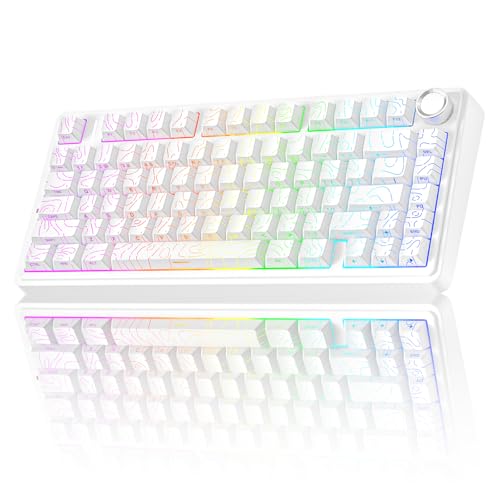
The AULA F75 Pro, around $70, is for gamers who want enthusiast features without enthusiast prices. Its first strength is a gasket mounted 75 percent layout with hot swappable switches, which gives a soft, refined typing feel and lets you change switches without soldering. Its second strength is wireless flexibility, combining 2.4GHz, Bluetooth and wired modes with a volume knob and RGB backlighting.
The limitation is software that is less polished than major gaming brands, though most users only need it for lighting and remapping.
Quick Buyer Checklist
- Do you prefer linear, tactile or clicky switches?
- Does the layout fit your desk and mouse space?
- Do you need wireless, and does it offer a 2.4GHz dongle?
- Does it support full anti ghosting or N key rollover?
- Are the keycaps durable, ideally PBT or double shot?
- Can you remap keys and save profiles?
- Is it hot swappable if you want to experiment with switches?
- Is there a warranty and accessible support?
Red Flags to Watch For
- Vague switch details. Listings that do not name switch types or actuation often hide inconsistent switches.
- Mechanical claims on membrane boards. Some keyboards use mechanical feel marketing on membrane designs.
- Suspicious reviews. Many short, similar five star reviews posted together suggest manipulation.
- No warranty. Reputable brands clearly state coverage and support options.
- Unclear wireless specs. Missing battery capacity or latency details signal weak wireless performance.
Choosing the Right Keyboard Layout
Keyboard layout affects desk space, ergonomics and convenience. Full size keyboards include a number pad and suit players who also work with spreadsheets. Tenkeyless layouts remove the number pad, giving more room for mouse movement and keeping your shoulders in a natural position. Seventy five percent layouts pack arrow keys and function keys into a tighter footprint, a popular sweet spot for gaming.
Sixty and sixty five percent keyboards are the most compact, ideal for small desks and low sensitivity players who need lots of mouse space, but they rely on function layers for arrows and function keys. If you are unsure, a tenkeyless or 75 percent keyboard is a safe choice for most gamers.
Mechanical vs Membrane Gaming Keyboards
Mechanical keyboards use individual switches under each key, delivering consistent feel, precise actuation and long lifespans. They are louder and can cost more, but budget models now start under $40. Membrane keyboards use rubber domes under a single sheet, making them quieter, cheaper and often spill resistant, though they feel softer and wear faster.
Mecha membrane keyboards like the Logitech G213 combine membrane quietness with a slightly crisper feel. Choose mechanical for the best gaming feel and durability, and membrane for quiet shared spaces or tight budgets.
Tips to Get the Most From Your Gaming Keyboard
Clean switches and keycaps regularly with compressed air and a keycap puller to remove dust and crumbs. Update firmware through the companion app for better wireless stability and new features. Use a large desk mat to keep the keyboard stable and give your mouse room. Lower RGB brightness on wireless boards to extend battery life, and use the included cable for tournaments or low battery situations.
Setting Up a New Gaming Keyboard
Out of the box, most budget gaming keyboards work as plug and play devices, but a few minutes of setup make them better. Plug wired boards directly into a USB port on your computer rather than a hub, and for wireless models, insert the 2.4GHz dongle into a front port or use the included extension adapter so it sits close to the keyboard. Charge wireless keyboards fully before first use.
Install the companion software or open the web configurator to update firmware, which often improves wireless stability and fixes bugs. Set up a gaming profile with macros or remapped keys, and save it to onboard memory if supported. Adjust lighting brightness and effects to taste, and consider turning off distracting animations during competitive play. Finally, flip out the keyboard feet if you prefer a steeper typing angle, or add a wrist rest for long sessions.
Upgrading an Affordable Keyboard Later
One advantage of modern budget keyboards is upgradability. Hot swappable boards let you try different switches, such as quieter linear switches for night gaming or tactile switches for typing. Replacing stock keycaps with thicker PBT sets improves sound and durability and changes the look of your setup.
Adding tape or foam mods, lubing stabilizers and using a desk mat can make a $70 keyboard sound and feel closer to a premium board. These small upgrades cost little and help you personalize your setup over time.
How Much to Spend on Affordable Gaming Keyboards
Under about $40, the best affordable gaming keyboards offer wired mechanical switches, compact layouts and basic RGB, perfect for first time buyers. Between $50 and $80, you get hot swappable switches, gasket mounts, sound dampening foam, PBT keycaps and tri mode wireless. Above $100, premium keyboards add aluminum cases, analog switches, rapid trigger features and polished software.
For most gamers, $50 to $80 is the sweet spot, delivering enthusiast level feel and features without premium pricing.
Gaming Keyboards: Your Questions Answered
Are mechanical keyboards worth it for gaming?
Yes, mechanical keyboards are worth it for most gamers. They offer consistent actuation, tactile or smooth feedback and longer lifespans than membrane keyboards. Affordable mechanical boards now cost under $40, making the upgrade accessible. Membrane keyboards remain good for quiet environments.
Wired or wireless: which is better for gaming?
Wired is cheapest and most consistent, while 2.4GHz wireless now matches it for most players. Choose a keyboard with a dedicated dongle rather than Bluetooth for gaming. Wired keyboards never need charging and suit tournaments.
Does a gaming keyboard work with Mac and console?
Most USB gaming keyboards work with Macs, PS5 and Xbox in supported games. Some keys may need remapping on Mac, and customization software may be Windows only. Consoles support keyboards in games that enable keyboard and mouse controls.
What switch type is best for gaming?
Linear switches are popular for fast paced games, while tactile switches suit mixed gaming and typing. Linear switches feel smooth and quick, helping with rapid presses. Tactile switches provide feedback that reduces typos. Clicky switches are fun but loud.
What is a hot swappable keyboard?
A hot swappable keyboard lets you pull out and replace switches without soldering. This makes it easy to experiment with different switch feels or replace a faulty switch. Many affordable keyboards now include hot swap sockets.
The Bottom Line
A great gaming keyboard does not have to be expensive. Focus on reliable switches, solid build quality and a layout that fits your setup, then choose wired or 2.4GHz wireless based on your preferences. Budget buyers can start with a sturdy wired mechanical board under $40, most gamers will love a gasket mounted hot swappable keyboard around $70 and those who want brand reliability can choose a proven model around $80.
Compare the best affordable gaming keyboards in the product table above to find the right feel, layout and price.


