EPOMAKER
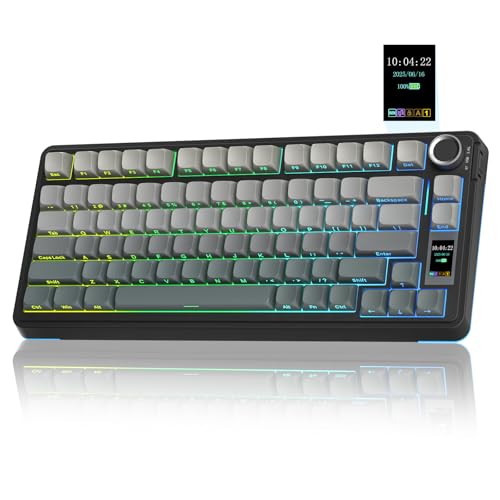
EPOMAKER X Aula F75 MAX Wireless Mechanical Keyboard with TFT Screen and Knob, Gasket Gaming Keyboard in 75% Layout, Hot Swappable, RGB Backlight, for PC/Mac/Linux (Black Gradient)
Disclosure: We may earn a commission when you buy through links on this page, at no extra cost to you. As an Amazon Associate I earn from qualifying purchases. Learn more
Highlights
- Compact Size, Function Core: With 80 programmable keys and a customizable screen, the F75 Max upgrades from its successful predecessor EPOMAKER X Aula F75 with equal reliability and incredible new functions. Revel in the convenience the volume knob offers and enjoy the Gif-showing screen that makes Backlight customization fun and easy. With connectivity, battery monitor and indicator lights combined in one, the F75 Max keyboard with TFT smart display will be your inseparable helper and productivity booster in gaming and life
- Stylish and Ergonomic: Say goodbye to wrist strain and finger fatigue, as this Cherry-profile keyboard becomes your ergonomic assistant in browsing the digital world. With the 2cm-low front height and a 2-stage adjustable kickstand, typing angle can be as high or low as your comfort calls for. The Gasket-Mount structure separates F75 Max’s PCB from its shell to rid the harsh bottom-out, while the flex-cut PC plate gives it extra flexibility for soft and soothing typing
- Satisfying Creamy Sound: Indulge in the creamy smooth melody of F75 MAX, composed by the rhythmic thud of every keystroke. Factory-lubed and tuned, the stabilizers and linear switches sound as incredible as they feel, with the right amount of creamy and thocky combined. Full of foams and silicone sandwiched between plate, PCB and bottom case, noise caused by echo within the keyboard is eliminated, while the IXPE switch pad and PET pad highlight the mellow switch sound that’s rich and pleasant
- Versatile Gaming Keyboard: Game in style with this anti-ghosting keyboard that performs stably without double chattering or mistype in BT, 2.4Ghz wireless and cable mode, with 1000hz polling rate in USB and 2.4G modes. Its support of NKRO allows gamers to input multiple keys simultaneously, handy in FPS and Rhythm Games, while its compatibility with Android, Windows, Mac and Linux is valuable for programmers and clerks in the office
- Custom Keyboard with Compatibility: As personalization being our core branding, our F75 Max isn’t shy in the realm of customization. With south-facing per-key LEDs and light diffusers on the Reaper switches, the RGB Backlight shines brightly with pre-set dynamic effect, adjustable in color and style via software, screen and shortcut. The hot-swappable F75 MAX comes with plate-mount stabilizers but is compatible with 3/5-pin mechanical switches and screw-in stabilizers for experimenting typing feel and sound, while the software offers key remapping and macro editing for efficiency and accessibility
Why You'll Love It
- Switch between Bluetooth, 2.4 GHz wireless, and wired connections to suit your setup
- Use the TFT screen and volume knob to access keyboard information and adjust everyday settings
- Enjoy a cushioned typing design with a gasket mount, flexible plate, and layered sound dampening
- Customize RGB lighting, remap keys, and create macros through supported software and keyboard controls
- Swap compatible 3-pin or 5-pin mechanical switches to explore different typing feels and sounds
- Use the compact 75% layout with Windows, Mac, Linux, or Android devices
Pros
- +Three connection options
- +Customizable TFT display and volume knob
- +Hot-swappable mechanical switches
- +Gasket-mounted typing structure
- +Per-key RGB lighting and macro support
Cons
- -Compact layout requires adapting to its key arrangement
- -Personalization features may take time to configure
- -Linear switches may not suit every typing preference
Detailed Review
The EPOMAKER F75 MAX is a 75% wireless mechanical keyboard for shoppers who want a compact desktop setup with room for personalization. Its combination of a TFT screen, volume knob, RGB lighting, and three connection modes makes it suitable for gaming, programming, and everyday computer work. Rather than focusing only on typing, it gives users several ways to adjust the keyboard's appearance and behavior. The 80 programmable keys keep the layout compact, while the screen adds a dedicated place for keyboard information and GIF displays.
Connectivity is one of its practical strengths. Bluetooth, 2.4 GHz wireless, and wired operation give you options for different setups, and compatibility includes Windows, Mac, Linux, and Android. For gaming, the keyboard supports anti-ghosting, N-key rollover, and a 1000 Hz polling rate in USB and 2.4 GHz modes. Those features are relevant if you regularly press several keys together, particularly in first-person shooters or rhythm games. The volume knob also provides a physical control for convenient adjustments, while the screen brings connectivity information, battery monitoring, and indicator lights into view.
The typing design combines a gasket-mounted structure with a flexible PC plate and layers of foam and silicone between internal components. The switches and stabilizers are factory-lubed, and additional IXPE and PET pads are intended to shape the sound. Together, these design choices target a cushioned typing experience with a rounded, muted character rather than a harsh bottom-out. The Cherry-profile design, low front height, and two-stage adjustable kickstand offer further ways to position the keyboard. However, comfort remains personal, so the layout and typing angle should suit your own habits.
Customization extends beyond lighting effects. South-facing per-key LEDs and light diffusers on the Reaper switches support RGB illumination, with adjustments available through software, the screen, and shortcuts. Hot-swappable sockets accept compatible 3-pin and 5-pin mechanical switches, creating room to change the typing feel without committing to the original switches indefinitely. The software also supports key remapping and macro editing. The trade-off is that a compact layout has a different key arrangement from a full-size keyboard, and making use of its screen, lighting, and programmable functions can involve additional setup. Linear switches also have a particular feel that may not match every preference.
Verdict: Choose this wireless mechanical keyboard if you want a compact gaming and productivity setup with a display, a volume knob, flexible connectivity, and substantial customization options. If you prefer a full-size layout, want a simpler keyboard without configuration features, or specifically prefer a different switch feel, a more suitable layout or switch configuration may be worth considering.
Specifications
- Layout: 75%
- Programmable keys: 80
- Connection options: Bluetooth, 2.4 GHz wireless, and wired
- Polling rate: 1000 Hz in USB and 2.4 GHz modes
- Switch type: Linear Reaper switches
- Switch compatibility: 3-pin and 5-pin mechanical switches
- Mounting structure: Gasket mount
- Plate: Flex-cut PC plate
- Lighting: South-facing per-key RGB LEDs
- Display: Customizable TFT screen with GIF display capability
- Controls: Volume knob
- Adjustable angle: Two-stage kickstand
- Compatible operating systems: Windows, Mac, Linux, and Android
- Additional features: Anti-ghosting, N-key rollover, key remapping, and macro editing
Who Should Buy It
A great fit if you:
- You want a compact keyboard for gaming and everyday work without giving up a customizable display and physical volume control.
- You switch between compatible devices and value the choice of Bluetooth, 2.4 GHz wireless, or wired connectivity.
- You enjoy personalizing your setup with per-key RGB effects, programmable keys, and custom macros.
- You want the option to change mechanical switches later instead of being permanently committed to the original configuration.
- You care about the sound and feel of typing and appreciate a gasket mount, flexible plate, and layered internal padding.
Consider something else if you:
- You rely on a full-size key arrangement, in which case a full-size keyboard would better match your established workflow.
- You prefer a different switch feel or want fewer customization features, making a keyboard with your preferred switches and simpler controls a better fit.
Before You Buy
Confirm on the listing:
- Check the keyboard's exact dimensions and compare them with your available desk space, especially if you need room for other equipment.
- Confirm which switches and other accessories are included in the box, and whether the supplied configuration matches your preferences.
- Check compatibility with your specific device and operating system, particularly if you intend to use keyboard software, remapping, or macros.
- Review the available instructions for charging, battery management, software setup, and care before deciding how it will fit into your routine.
How to compare your options: Start with layout, connection methods, and switch feel, since these directly affect how the keyboard fits your setup and typing habits. Then compare customization options, including display controls, RGB lighting, hot-swappable switches, and macro support. The F75 MAX brings all of these functions together, so it makes the most sense when you expect to use several of them rather than choosing solely for its compact layout. If you already have preferred switches, verify their compatibility before planning a change.
Getting the Most From It
Begin by choosing the connection mode that suits your device and setup. Use Bluetooth, 2.4 GHz wireless, or a wired connection as appropriate, and review the keyboard's instructions for selecting and managing the connection. Check the screen's connectivity and battery indicators so you can make use of the information it provides.
Adjust the two-stage kickstand to find a typing angle that feels comfortable for your working position. The low front height and Cherry-profile design are part of the keyboard's overall ergonomics, but your preferred angle will depend on your own habits. If you switch between gaming and office work, consider whether your chosen position works well for both.
Personalize the RGB lighting through the available software, screen, or shortcuts. Start with an effect you find easy to use, then explore color adjustments and other available styles. If you want shortcuts for repeated tasks, review the key-remapping and macro-editing options and configure only the functions that are useful to you.
If you plan to change switches, confirm compatibility with the supported 3-pin or 5-pin types before making a selection. Follow the manufacturer's instructions for switch changes and routine care. Keeping your preferred lighting, key mappings, and connection settings organized can also make the keyboard easier to use consistently.
FAQ
Can I use the F75 MAX wirelessly?
Yes, it supports Bluetooth and 2.4 GHz wireless connections, as well as wired operation. Its 1000 Hz polling rate applies to USB and 2.4 GHz modes.
Is this keyboard compatible with Mac and Linux?
Yes, the listed compatibility includes Mac, Linux, Windows, and Android. Check the available software instructions if you need remapping or macro features on a particular system.
Can I change the mechanical switches?
Yes, the keyboard is hot-swappable and supports compatible 3-pin and 5-pin mechanical switches. Confirm compatibility before choosing replacement switches, since the typing feel and sound can vary with your selection.
What comes with the keyboard?
The keyboard's listed features include a TFT screen, volume knob, RGB lighting, and linear Reaper switches. The listing details provided here do not establish the complete box contents, so check the current package description for included cables or other accessories.
Can I customize the display and RGB lighting?
Yes, the TFT screen supports GIF display capability, and the per-key RGB lighting can be adjusted through software, the screen, and shortcuts. Software also provides key remapping and macro editing.
Product Details
| Brand | EPOMAKER |
| ASIN | B0DPWX3WTL |