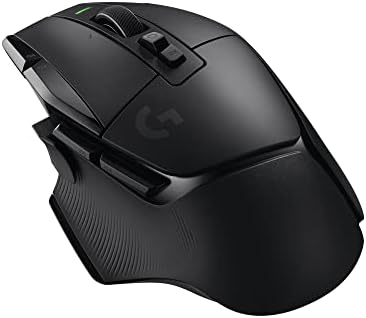
The Best Wireless Gaming Mouse for 2026
Disclosure: We may earn a commission when you buy through links on this page, at no extra cost to you. As an Amazon Associate I earn from qualifying purchases. Learn more

What determines a great wireless gaming mouse, from sensor performance and connection latency to battery life and grip fit.
Wireless gaming mice used to come with a real performance penalty, forcing players to choose between the freedom of a cable-free desk and the responsiveness a competitive match demands. That tradeoff has largely disappeared. The best wireless gaming mouse today matches wired performance almost exactly, which means the decision now comes down to sensor quality, connection type, battery life, and how the mouse actually feels in your hand over a long session.
Here's what to actually check when shopping for a wireless gaming mouse, beyond the marketing claims printed on the box.









Sensor Performance and DPI Explained
DPI, or dots per inch, measures how far the cursor moves on screen relative to how far you physically move the mouse. A higher number sounds better, but past a certain point it stops mattering for actual gameplay, since most competitive players use settings well below the maximum DPI a modern sensor supports. What matters more is sensor accuracy and consistency, meaning the mouse tracks your movement exactly without unexpected jumps, skips, or acceleration you didn't intend.
Look for a mouse with an adjustable DPI range roughly between 400 and 16,000, along with onboard DPI switching so you can adjust sensitivity on the fly between different games or tasks. A dedicated gaming sensor from a reputable component maker is generally a stronger signal of quality than a headline DPI number alone. Polling rate, which measures how often the mouse reports its position to your PC each second, also affects perceived smoothness, and a rate of 1000Hz remains a solid standard for most players even as some newer mice push beyond it.
Wireless Connection Types and Latency
Most gaming-focused wireless mice use a dedicated 2.4GHz USB receiver rather than Bluetooth, and for good reason. A 2.4GHz connection delivers consistently lower latency and a more stable signal, which matters in fast-paced or competitive games where even small delays are noticeable. Bluetooth is convenient for general use and saves a USB port, but it typically introduces slightly more latency and can be less consistent, especially in rooms with a lot of wireless interference.
Many higher-end mice now offer both options, letting you pick 2.4GHz for gaming and Bluetooth for everyday productivity on a laptop. If competitive performance is your priority, treat 2.4GHz support as a requirement rather than a nice-to-have feature.
Battery Life and Charging Considerations
Battery life varies enormously between models, from as little as 20 hours to well over 100 hours on a single charge, largely depending on the sensor's power draw and whether the mouse includes RGB lighting, which drains the battery noticeably faster when active. If you game daily for long stretches, look for a mouse rated for at least 50 to 70 hours to avoid frequent charging interruptions.
Charging method matters too. A mouse that supports fast charging, where a short 10 to 15 minute charge provides several hours of use, is far more forgiving if you forget to charge it overnight. Some mice also support passthrough charging via a cable, letting you keep playing wired while the battery tops up, which removes the anxiety of a mid-session low battery warning entirely. A companion app that clearly displays remaining battery percentage, rather than a vague blinking light, also makes it much easier to plan a quick top-up before a long session instead of getting caught off guard.
Shape, Weight and Grip Style
The best sensor and connection type in the world won't help if the mouse doesn't fit your hand or grip style comfortably. Palm grip users, who rest their whole hand on the mouse, generally do better with a larger, more contoured shape, while claw and fingertip grip users tend to prefer smaller, lighter mice that allow quicker, more precise movements.
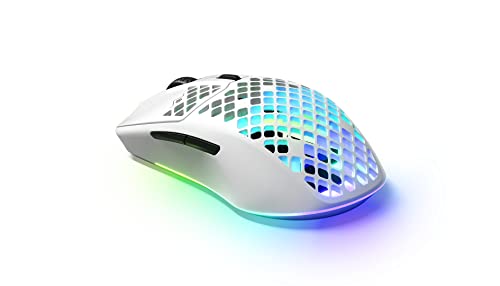
Weight has become a major differentiator in recent years, with many wireless gaming mice now weighing under 70 grams thanks to lighter internal components and honeycomb or perforated shells. A lighter mouse reduces fatigue during long sessions and allows faster flick movements, though some players still prefer the stability of a slightly heavier mouse for precision aiming.
Frequently Asked Questions
Is a wireless gaming mouse as responsive as a wired one?
For any mouse using a modern 2.4GHz connection and a quality sensor, yes. The latency difference compared to a wired mouse is now negligible for the vast majority of players, including competitive gamers.
How much DPI do I actually need for gaming?
Most competitive players use settings between 400 and 1,600 DPI, adjusted alongside in-game sensitivity. A mouse supporting up to 16,000 DPI gives you flexibility, but you're unlikely to ever use the top end of that range during actual gameplay.
Should I choose 2.4GHz or Bluetooth for gaming?
2.4GHz is the better choice for gaming due to its lower and more consistent latency. Bluetooth is fine for general productivity use, especially on a laptop where saving a USB port matters more than shaving off a few milliseconds.
How long should a wireless gaming mouse battery last?
Look for at least 50 to 70 hours of battery life if you game regularly, and note that RGB lighting can significantly reduce that number if left on. Mice with fast charging make shorter battery life much less of an issue day to day.
What mouse weight is best for competitive gaming?
There's no single correct weight, but many competitive players favor mice under 70 grams for quicker, less fatiguing movements. Casual players or those who prefer more stability during precision aiming sometimes favor a bit more weight instead.
Does grip style really affect which mouse I should buy?
Yes, significantly. Palm grip users generally want a larger, more filled-out shape, claw grip users benefit from a slight hump and defined front, and fingertip grip users usually prefer smaller, lighter mice. Trying a mouse in person, when possible, is the most reliable way to confirm fit.
Wrapping Up: Picking a Wireless Mouse That Feels Right
The best wireless gaming mouse for you balances sensor quality, a reliable low-latency connection, battery life that matches how often you play, and a shape that fits your grip comfortably. Prioritize those fundamentals over headline specs like maximum DPI, and you'll end up with a mouse that performs consistently well long after the initial excitement of a new purchase wears off.
Related reading: best ai laptop for business and best laptop for ai engineer.