Amazon
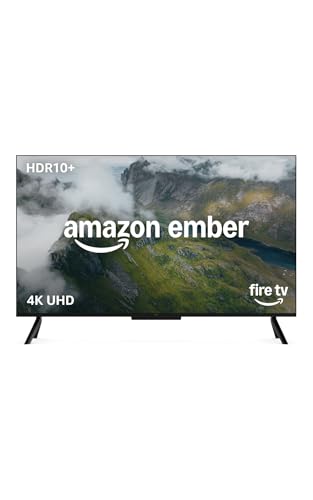
Amazon Ember 43" 4-Series with Fire TV (newest model), 4K Ultra HD smart TV with Alexa Remote, HDR10+, fast processor, Dolby Audio, Ambient Experience, free and live TV, find shows faster with Alexa+
Disclosure: We may earn a commission when you buy through links on this page, at no extra cost to you. As an Amazon Associate I earn from qualifying purchases. Learn more
Highlights
- Get more from your TV – With 4K Ultra HD, enhanced brightness, and clear audio, the Amazon Ember 4-Series upgrades your entertainment.
- Vivid views – 4K Ultra HD and HDR10+ deliver bright, crisp visuals with improved contrast, so details look beautiful even in dark scenes.
- Speed, redefined – Jump right into what you love with Wi-Fi 6 support and a new quad-core processor. Apps open and load fast and the picture stays smooth.
- The newest Fire TV experience (2026) – Our biggest update to Fire TV has a new, modern design that gets you to your entertainment fast. Browse dedicated content categories, pin more of your favorite apps, and get personalized recommendations from Alexa+. Spend less time scrolling, and more time watching.
- Smarter picks with Alexa+ – Getting to what you love has never been easier. Press the voice remote button and talk naturally to find what to watch across your apps, manage your smart home, or dive into virtually any topic.
- Instantly On - Introducing our custom Omnisense technology. Built-in sensors wake the display when you enter to show your favorite artwork or let you start watching in a snap.
- Find it fast. Watch it now. – Easily find what to watch from hundreds of thousands of movies and TV episodes (subscription fees may apply), including free, ad-supported content.
- Play instantly with Amazon Luna and Xbox Game Pass - no console needed. Stream premium games, enjoy family-friendly titles, and host party games using your phones as controllers, all on your Amazon Ember 4-Series.
- Alexa Voice Remote Enhanced – Get to your favorite apps fast with preset buttons, and control your entertainment with one remote.
- Quick connections – Connect your soundbar, gaming consoles, and more with four HDMI inputs. Use AirPlay to share content from compatible devices to your TV.
Why You'll Love It
- Watch crisp 4K Ultra HD video with HDR10+ contrast support and enhanced brightness
- Stream and navigate quickly with an updated quad-core processor and Wi-Fi 6 compatibility
- Find shows and control smart devices by speaking naturally with Alexa+ voice tools
- Wake the screen automatically to display artwork whenever you walk into the room
- Play titles through Amazon Luna and Xbox Game Pass without buying a dedicated console
- Plug in your soundbar and accessories easily using four built-in HDMI inputs
Pros
- +Detailed 4K picture with HDR10+ support
- +Built-in Wi-Fi 6 and quad-core processor
- +Four HDMI ports for external gear
- +Console-free cloud gaming access
- +Omnisense motion sensors wake the display
- +Includes Alexa Voice Remote Enhanced
Cons
- -Screen size is fixed at 43 inches
- -Cloud gaming and some apps require paid subscriptions
Detailed Review
A 4K Ultra HD smart TV delivers an accessible way to combine all your favorite streaming platforms, broadcast feeds, and gaming services into a single central screen. The Amazon Ember 4-Series focuses on responsive day-to-day streaming by pairing a 43-inch display with an updated quad-core processor and Wi-Fi 6 connectivity. This combination ensures menus remain snappy, apps launch without long delays, and picture playback stays steady across your everyday viewing sessions.
Visual quality centers on 4K Ultra HD resolution supported by HDR10+ processing and enhanced brightness levels. In practice, this gives movies and series improved contrast so shadows stay legible rather than turning into muddy blocks of gray. Audio is powered by Dolby Audio, which works alongside the display to provide clear dialogue and balanced sound directly out of the box, while four HDMI inputs let you connect an external soundbar or dedicated speaker system whenever you want expanded sound.
The built-in software uses the newest Fire TV interface with Alexa+, which helps you organize your entertainment quickly. You can pin frequently used apps, browse structured content categories, and use the included Alexa Voice Remote Enhanced to request titles across apps using natural speech. Beyond passive viewing, the platform includes built-in sensors dubbed Omnisense technology, which detect when you walk into the room to automatically wake the panel. This lets the display show artwork or jump directly into live and free content without waiting for a manual power button press.
Cloud gaming support adds extra versatility through Amazon Luna and Xbox Game Pass without requiring a physical console under your screen. You can jump directly into casual family games, use your phone as a controller for party titles, or stream full games over your network connection. In addition, Apple AirPlay support allows straightforward streaming from compatible phones or tablets directly to the television screen.
Because the panel measures 43 inches, it represents a compact format that might feel undersized for expansive living spaces with distant seating arrangements. Additionally, while the system offers thousands of free, ad-supported movies and series, access to premium catalogs on Luna, Xbox Game Pass, and top video platforms will require ongoing third-party subscriptions.
Verdict: The Amazon Ember 4-Series 43-inch 4K Ultra HD smart TV is a versatile pick for bedrooms, offices, and mid-sized dens where responsive navigation and built-in cloud gaming matter. Shoppers seeking a massive home theater centerpiece or who want zero reliance on subscription streaming services should consider a larger or more basic display instead.
Who Should Buy It
A great fit if you:
- Want a responsive compact 4K screen with modern Wi-Fi 6 wireless networking for everyday streaming.
- Prefer speaking naturally to find entertainment across apps and manage connected smart devices using Alexa+.
- Enjoy playing video games through cloud platforms without buying and setting up an external gaming console.
- Appreciate convenient features like motion-activated screen waking and direct AirPlay casting from compatible personal devices.
Consider something else if you:
- Need an extra-large television designed specifically to anchor wide living rooms or dedicated theater spaces.
- Prefer an offline monitor setup that does not rely on connected streaming software or cloud-based gaming services.
Before You Buy
Confirm on the listing:
- Check the exterior dimensions, stand footprint, and weight to ensure it fits your current TV stand or media furniture.
- Check whether your preferred soundbar or peripheral accessories use standard HDMI connections, as this model includes four HDMI ports.
- Measure your viewing distance to make sure a 43-inch panel provides the visual scale you want for your room.
- Check the subscription terms and controller requirements if you plan to use Xbox Game Pass or Amazon Luna services.
How to compare your options: Consider display resolution, processing performance, and connectivity when shopping for a smart television. Models with modern wireless standards like Wi-Fi 6 and fast quad-core processors navigate menus more smoothly than basic units. If you plan to attach external audio, multiple consoles, or player boxes, counting the available HDMI ports helps ensure you will not need an external switcher.
Getting the Most From It
Place the television on a level, stable surface or mount it following the hardware guidelines included with your mounting equipment. Leave sufficient ventilation around the frame and verify that the Omnisense sensors on the front have an unobstructed view into the room so they can reliably detect your entrance.
During initial configuration, connect the television to a Wi-Fi 6 router if your home network supports it to achieve the most stable streaming speeds. Pin your most-watched channels and streaming platforms to the main menu bar to minimize time spent browsing, and use the preset shortcut buttons on the Alexa Voice Remote Enhanced for quick app launching.
If you plan to use cloud gaming, link your accounts and connect compatible phone controllers or gamepads before starting a gaming session. For maintenance, keep the screen clean by wiping it gently with a dry, lint-free cloth, avoiding harsh liquid cleaners or abrasive rags that could scratch the panel surface.
FAQ
Does this TV require a console to play video games?
No, it streams games directly through Amazon Luna and Xbox Game Pass without requiring a separate physical game console. You can play selected titles using your smartphone as a controller.
Can I stream video from my phone or tablet?
Yes, it supports AirPlay, allowing you to share videos, photos, and other content directly from compatible devices to the display.
How many external devices can I connect via HDMI?
The television includes four HDMI inputs, which provide ample room to hook up soundbars, disc players, or other media hardware simultaneously.
What kind of audio technology is included?
It features built-in Dolby Audio processing designed to deliver clear dialogue and balanced sound for movies and television shows.
What does the Omnisense technology do?
Omnisense uses built-in sensors that detect movement when you walk into the room, automatically waking the screen to show artwork or allow instant viewing.
Product Details
| Brand | Amazon |
| ASIN | B0DFNPK1D3 |