
Best Smart TVs: What Actually Matters Before You Buy
Disclosure: We may earn a commission when you buy through links on this page, at no extra cost to you. As an Amazon Associate I earn from qualifying purchases. Learn more

A checklist for choosing a smart TV, with three picks that pass it.
Almost every TV sold today is a smart TV, so the label alone tells you little. What separates a great one from a frustrating one is the picture hardware, the speed and design of the smart platform, gaming support and the ports on the back. To find the best smart tvs, we use a checklist covering panel type, HDR brightness, platform and sound, resolution and size, gaming features, mounting and connectivity.
Below, each criterion includes what good and poor look like, followed by three picks that pass the checklist, a quick buyer checklist, red flags and answers to common questions.



How We Evaluate Smart TVs
We judge smart TVs on seven criteria, weighted toward picture quality and the everyday smart experience. Our scoring uses manufacturer specifications, listing details, platform features and buyer feedback in aggregate.
Panel Technology (IPS, VA, OLED, Mini LED)
Good: OLED for perfect blacks and wide viewing angles, or Mini LED with full array local dimming for high brightness and strong contrast. Acceptable: standard VA LED panels with decent contrast. Poor: edge lit IPS panels at large sizes, which show gray blacks in dark rooms. OLED carries a small burn in risk with static images, while Mini LED can show blooming around bright objects on dark backgrounds.
HDR and Brightness
Good: support for Dolby Vision or HDR10+ plus HDR10 and HLG, with enough brightness to make HDR highlights pop; Mini LED sets often reach well over 1,000 nits. Poor: TVs that accept HDR signals but lack the brightness or dimming to display them, which can look dim or flat. Note that Samsung uses HDR10+ but not Dolby Vision, while TCL, Hisense, Sony and LG generally support Dolby Vision.
Smart Platform and Sound
Good: a fast, regularly updated platform such as Google TV, Roku, Fire TV, webOS or Tizen, with all major apps, voice search and casting (Chromecast or AirPlay). Poor: slow menus, missing apps or heavy ads. Built in sound is weak on most thin TVs; good models offer Dolby Atmos processing and HDMI eARC for a soundbar. Plan on a soundbar for larger rooms.
Resolution and Screen Size
Good: 4K resolution for any screen 43 inches and larger, sized to your seating distance. A common guideline is to sit about 1 to 1.5 times the diagonal away for 4K, so a 65 inch TV suits roughly 5.5 to 8 feet. Poor: 1080p at 50 inches and above, which looks soft up close. Compact 32 inch sets in 720p or 1080p remain fine for kitchens and small bedrooms.
Adaptive Sync and Gaming Features
Good for gamers: a native 120Hz or faster panel, HDMI 2.1 for 4K at 120Hz, variable refresh rate (HDMI VRR, FreeSync and sometimes G-Sync compatibility) and auto low latency mode. Acceptable for casual gaming: a 60Hz panel with ALLM and low input lag, like many budget sets. Poor: no game mode or input lag that makes controls feel sluggish.
Stand, Mounting, and Ergonomics
Good: a VESA mounting pattern, a stand that fits standard furniture and center or adjustable feet that work on narrow consoles. Poor: wide set feet that need a stand as wide as the TV, or unusual mounting patterns. Check the TV's weight and VESA size before buying a wall mount, and confirm the screen height suits your seating.
Connectivity and Ports
Good: at least three or four HDMI ports with one supporting eARC, two or more HDMI 2.1 ports on gaming oriented models, USB ports, Ethernet, Wi-Fi 5 or newer and an optical audio output. Poor: only two HDMI ports, which fill fast with a streaming box, console and soundbar. TVs generally do not include DisplayPort or USB-C video, so PC users connect over HDMI.
3 Picks That Pass Our Checklist
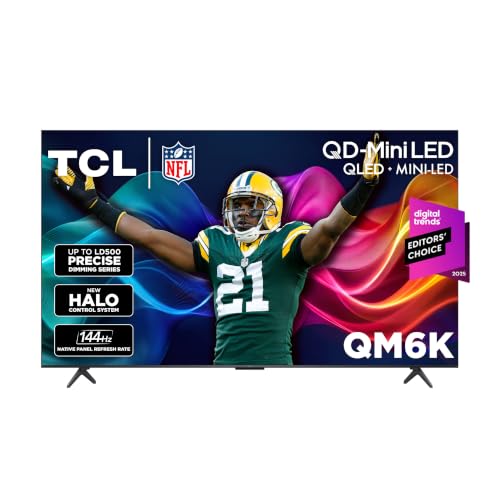
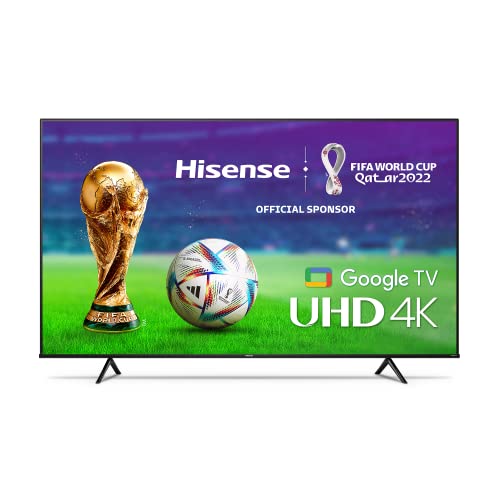
The TCL 65 Inch QM6K is our best overall smart TV, the Hisense 65 Inch A6 is the best value and the Roku 43 Inch Select Series is the best compact pick.
Best Overall: TCL 65 Inch QM6K Mini LED QLED
The TCL QM6K suits households that want premium picture features without premium pricing. At around $648 for the 65 inch size, it combines Mini LED backlighting with quantum dot color, a native 144Hz refresh rate and support for Dolby Vision, HDR10+, HDR10 and HLG, according to TCL.
Its two standout strengths are bright, high contrast HDR from local dimming that TCL calls its Halo Control System, and gaming smoothness from the 144Hz panel. It runs Google TV and includes Dolby Atmos with Onkyo tuned audio. The limitation is that, as with most Mini LED sets, slight blooming can appear around bright objects in very dark scenes.

Best Value: Hisense 65 Inch A6 Series 4K Google TV
The Hisense A6 suits budget buyers who want a big screen for streaming and sports. At around $510 for 65 inches, it offers 4K resolution with AI upscaling, Dolby Vision and HDR10, Google TV with Chromecast built in and DTS Virtual X sound.
Its strengths are the low price for its size and a Game Mode Plus feature set that includes variable refresh rate and auto low latency mode. Sports Mode presets adjust motion and color for games. The limitation is the 60Hz panel and modest brightness, so it suits casual viewing more than dedicated gaming or bright rooms.

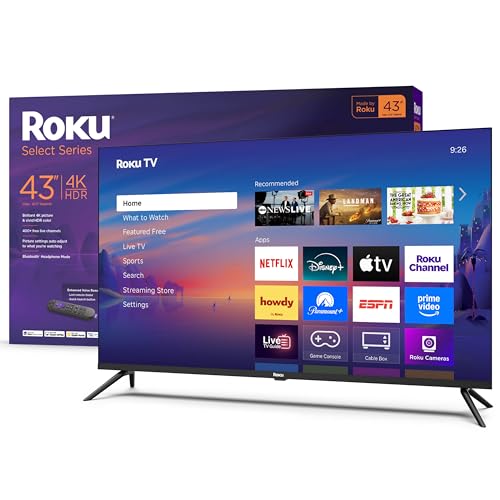
Best Compact Pick: Roku 43 Inch Select Series 4K HDR TV
The Roku Select Series suits bedrooms, dorms, kitchens and small apartments. At around $248, the 43 inch model offers 4K resolution with HDR10 and the Roku TV platform with an enhanced voice remote and lost remote finder.
Its strengths are the simple, fast Roku interface with automatic updates and broad smart home support, including Roku Voice, Siri, Alexa, Google Assistant and Apple AirPlay. Roku says the platform includes 500+ free TV channels. The limitation is basic HDR and audio, so it is best for casual viewing rather than movie nights.
Smart TV Platforms Compared
The best smart tvs pair good hardware with a platform you enjoy using every day, since you will navigate it every time you turn the TV on. Here is how the major platforms compare.
| Platform | Found On | Strengths | Watch Outs |
|---|---|---|---|
| Google TV | Sony, TCL, Hisense | Content recommendations across apps, Chromecast built in, Google Assistant | Home screen promotes content heavily |
| Roku TV | Roku, TCL, Hisense, Westinghouse | Simple grid layout, free channels, AirPlay support | Fewer picture tuning options on budget sets |
| Fire TV | Amazon, Hisense, Insignia | Alexa voice control, deep Prime Video integration | Ads and Amazon content take prominent space |
| webOS | LG | Quick menus, Magic Remote pointer, good gaming hub | Some ad tiles on the home screen |
| Tizen | Samsung | Samsung TV Plus free channels, SmartThings smart home hub | No Dolby Vision on Samsung TVs |
If you dislike your TV's platform, a $30 to $50 streaming stick can replace it while keeping the TV's picture hardware.
Privacy and Ads on Smart TVs
Most smart TVs collect viewing data through automatic content recognition (ACR) to target ads and recommendations, and many show sponsored tiles on the home screen. You can usually turn off ACR and personalized ads in the privacy or terms settings during setup or later. If privacy matters to you, review those settings on day one, skip optional voice data storage and consider using the TV offline with a separate streaming device you trust.
Quick Buyer Checklist
Run through these yes or no questions before you buy.
- Does the screen size suit your seating distance and wall or stand width?
- Is it 4K if the screen is 43 inches or larger?
- Does it support Dolby Vision or HDR10+ plus HDR10?
- Do you like the smart platform, and does it carry all your apps?
- If you game, does it have a native 120Hz panel and HDMI 2.1?
- Does it have enough HDMI ports, including one with eARC for a soundbar?
- Does the stand fit your furniture, or is it VESA mountable?
- Does the warranty and return policy cover at least one year?
Red Flags to Watch For
Be wary of TVs that show these warning signs.
- Inflated motion numbers: terms like "Motion Rate 240" often mean a 60Hz panel with processing.
- HDR claims without brightness: "HDR compatible" on a dim, edge lit TV rarely looks like true HDR.
- Unknown brands with no update history: smart platforms without updates lose apps and security fixes.
- Only two HDMI ports: they fill fast with common devices.
- Short or unclear warranties: look for at least one year from the manufacturer.
Setup and Care Tips
- Calibrate picture settings: turn off vivid mode and start with Filmmaker, Movie or Calibrated presets.
- On OLEDs, allow pixel refresh cycles to run in standby and vary content to limit burn in risk.
- Clean screens with a dry microfiber cloth only, never with sprays or paper towels.
- Install software updates for new features, app support and security fixes.
- Review privacy settings and turn off viewing data collection (often called ACR) if you prefer.
Smart TVs: Your Questions Answered
IPS vs OLED: which is better?
OLED is better for contrast and dark room movies, while IPS LCDs are better for bright rooms and wide seating. OLED pixels light themselves, delivering perfect blacks. IPS panels hold color well from the side but show grayer blacks. Most mainstream TVs actually use VA panels, often with Mini LED backlights, which offer deep contrast and high brightness at a lower price than OLED.
How long do they last?
Most smart TVs last about 7 to 10 years. The panel and backlight usually outlast the smart software, which may stop receiving updates after several years. If apps slow down or disappear, add a streaming stick or box to keep the TV useful. A surge protector and good ventilation help protect the hardware.
Does refresh rate matter for non gamers?
Refresh rate matters for sports and fast action, even for non gamers. A native 120Hz panel shows smoother motion in live sports and makes menus feel snappier. For movies and dramas, 60Hz is fine. If you watch a lot of sports, choose 120Hz or higher; otherwise, spend on contrast and brightness first.
Can I use a smart TV without internet?
Yes, a smart TV works without internet for antenna, cable box, console and Blu-ray inputs. You lose streaming apps, voice search and software updates. Some brands ask you to accept terms during setup, but most allow skipping network setup and using the TV as a regular display connected to HDMI devices or an antenna.
Is 4K worth it?
Yes, 4K is worth it on any TV 43 inches or larger. It is standard at most sizes and streaming services offer plenty of 4K content. Good upscaling also makes HD content look sharper on 4K screens. At 32 inches and smaller, 1080p is usually sharp enough from normal distances.
What size should I get for my room or desk?
Choose about 43 to 50 inches for bedrooms, 55 to 65 inches for most living rooms and 75 inches or more for large rooms. Measure your seating distance: sitting about 1 to 1.5 times the diagonal away works well for 4K. For desks, a TV under 43 inches or a monitor is more comfortable at close range.
Do I need a streaming stick with a smart TV?
No, a smart TV streams on its own, but a stick can still help. A streaming stick or box is useful if your TV's platform becomes slow, loses app support after years of use or lacks an app you want. It also lets you switch platforms without replacing the TV.
Wrapping Up
Focus on panel type and HDR brightness first, then pick a smart platform you enjoy and make sure the ports and gaming features match your devices. The TCL QM6K suits most living rooms, the Hisense A6 suits tight budgets and the Roku Select Series suits small rooms. Keep that checklist in mind and choosing among the best smart tvs gets much easier. Compare current models in the product table above, and see our guide to the best TVs for video games if gaming comes first.


