BenQ
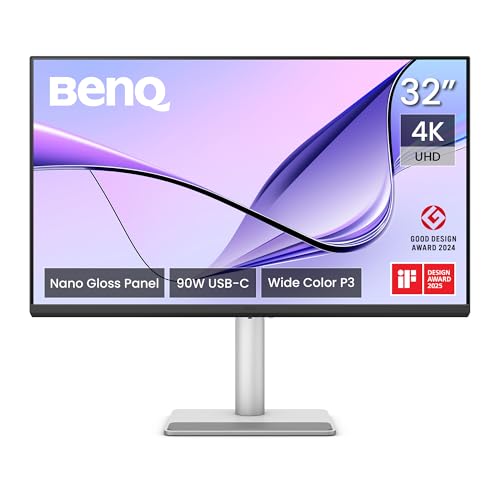
BenQ MA320UP 32” 4K 3840x2160 Monitor for MacBook® Pro/Air, Dual USB-C, 90W Power Delivery, Mac Color Match, USB Hub, Brightness & Volume Control on Mac, Height & Tilt Adjustable Stand, P3 Color Gamut
Disclosure: We may earn a commission when you buy through links on this page, at no extra cost to you. As an Amazon Associate I earn from qualifying purchases. Learn more
Highlights
- [Show Mac Colors] Calibrated for MacBook with BenQ’s exclusive color tuning, offering a vibrant P3 wide color gamut for MacBook Pro and MacBook Air.
- [Expand MacBook with USB-C] Connect and expand your MacBook display with a single USB-C cable.
- [Integrated MacBook Controls] Adjust brightness and volume directly from your MacBook keyboard.
- [Versatile Connectivity] 2 HDMI and 2 USB-C ports—The dual USB-C ports deliver 90W for your MacBook, and 15W to charge your iPad or iPhone.
- [Adjustable Stand] Adjust height, tilt, swivel, and pivot for maximum comfort.
Why You'll Love It
- MacBook focused color tuning and P3 wide color gamut support a consistent color focused workspace
- A single USB C connection expands your MacBook display while helping keep desk connections simple
- Adjust brightness and volume from your MacBook keyboard instead of reaching for separate monitor controls
- Dual USB C ports provide 90W for a MacBook and 15W for charging an iPad or iPhone
- Height, tilt, swivel, and pivot adjustments let you position the screen around your working preferences
- Two HDMI ports and two USB C ports give you several ways to connect compatible devices
Pros
- +MacBook focused color tuning
- +4K resolution on a 32 inch screen
- +90W USB C power delivery
- +Keyboard based brightness and volume control
- +Four stand adjustment options
Cons
- -Mac focused features may be less useful to non Mac users
- -The 32 inch screen needs adequate desk space
Detailed Review
The BenQ MA320UP 4K monitor is designed for MacBook owners who want a larger display, Mac focused color tuning, and convenient connections in one desktop setup. Its 32 inch screen has a resolution of 3840x2160, giving you a substantial viewing area for work that benefits from keeping content visible together. Rather than treating a MacBook as a device that must do everything on its own screen, this monitor gives you the option to expand your workspace while retaining features intended for Apple's laptops.
Color is a central part of its appeal. BenQ lists color tuning calibrated for MacBook and a P3 wide color gamut, with MacBook Pro and MacBook Air named as the intended computers. Those features make the MA320UP worth considering if you want a display built around a Mac oriented color experience. They may be particularly relevant when your work involves viewing or arranging visual content, although the listed specifications alone do not establish how every individual image or application will appear.
Connectivity is another important part of the design. The monitor has two HDMI ports and two USB C ports, with the dual USB C connections delivering 90W for a MacBook and 15W for charging an iPad or iPhone. BenQ also describes single cable USB C connectivity for expanding a MacBook display. This combination gives buyers several connection options while making USB C a practical part of the intended setup. Integrated controls add another convenience: you can adjust brightness and volume directly from your MacBook keyboard.
The stand is adjustable in four ways: height, tilt, swivel, and pivot. That flexibility lets you change the screen's position to suit your desk arrangement and preferred viewing orientation. It is a useful complement to the large display because choosing a screen size is only part of creating a comfortable working arrangement. You can adjust the monitor itself rather than relying on one fixed position.
The main trade off is that this is a sizable, Mac focused monitor, so its advantages depend on your workspace and devices. A 32 inch screen needs room, and color tuning plus keyboard controls aimed at MacBook users may matter less if your setup centers on another computer. Verdict: This 4K monitor is a strong candidate for MacBook Pro and MacBook Air owners who want a large display, Mac oriented color tuning, USB C connectivity, and an adjustable stand. If you do not use a MacBook or cannot comfortably accommodate a 32 inch screen, compare options better matched to your devices and available desk space.
Who Should Buy It
A great fit if you:
- You use a MacBook Pro or MacBook Air and want a larger display for your regular desktop work.
- You care about Mac focused color tuning and want a monitor with a P3 wide color gamut.
- You prefer connecting your MacBook through USB C rather than treating the monitor as a display alone.
- You want brightness and volume adjustments available directly from your MacBook keyboard.
- Your desk can accommodate a 32 inch screen, and you value being able to adjust its position.
Consider something else if you:
- You have limited desk space and would be better served by a smaller monitor that fits your working area.
- You mainly use a non Mac computer and would prefer a general purpose monitor whose features better match that setup.
Before You Buy
Confirm on the listing:
- Measure your available desk space and check whether a 32 inch screen will fit your intended arrangement.
- Confirm that your computer is compatible with the connection you plan to use, especially if you want single cable USB C connectivity.
- Check whether the included cables and other box contents meet your setup needs before purchasing any additional accessories.
- Review the complete connection and charging details for the devices you intend to attach, including your MacBook, iPad, or iPhone.
How to compare your options: Start with screen size and resolution, then consider whether Mac focused color tuning and P3 wide color gamut support match your work. Next, compare connection choices, charging needs, and whether you want brightness and volume control from your MacBook keyboard. Finally, consider stand flexibility and available desk space. The MA320UP combines a 32 inch 4K display, two HDMI ports, two USB C ports, and four stand adjustments, making those practical criteria central to your decision.
Getting the Most From It
Begin by choosing a suitable place for the monitor. Consider the full 32 inch screen in relation to your desk and the other devices you want to keep nearby. Use the stand's height, tilt, swivel, and pivot adjustments to find a position that works for your workspace, then reassess the arrangement whenever your setup changes.
For a MacBook connection, consider the single cable USB C approach described by BenQ. Check that your computer and chosen connection support the intended setup, and use the monitor's available ports according to the devices you want to connect. Its HDMI and USB C connections provide options for organizing your display connections around your needs.
Make use of the MacBook keyboard controls for brightness and volume if those adjustments are part of your normal routine. If you use an iPad or iPhone with the monitor, review the USB C charging arrangement and the stated 15W charging provision when planning your connections.
If you work with color focused content, keep the Mac oriented color tuning and P3 wide color gamut in mind when choosing how to use the display. Follow the manufacturer's instructions for setup, adjustment, and care, and check the relevant guidance before changing connections or moving the stand.
FAQ
Is the BenQ MA320UP compatible with MacBook Pro and MacBook Air?
Yes, it is designed with MacBook Pro and MacBook Air in mind. BenQ highlights Mac focused color tuning, USB C connectivity, and keyboard based brightness and volume control.
What resolution does this monitor have?
It has a 4K resolution of 3840x2160 on a 32 inch screen. This combination is a key consideration if you want a larger desktop display.
Can it charge a MacBook and an iPhone or iPad?
Yes, the listed dual USB C ports provide 90W for a MacBook and 15W for charging an iPad or iPhone. Confirm that your intended devices and connection arrangement are suitable for your setup.
Can I adjust brightness and volume from my MacBook?
Yes, the monitor supports brightness and volume adjustments directly from the MacBook keyboard. This feature is intended to make routine display and audio adjustments more convenient.
What comes in the box, and how do I connect it?
The listing describes two HDMI ports and two USB C ports, along with an adjustable stand. It does not state the complete box contents, so check the listing for included cables and setup instructions before buying.
Product Details
| Brand | BenQ |
| ASIN | B0FNNFNCXW |