BenQ
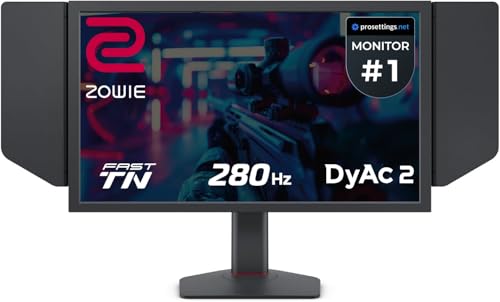
BenQ Zowie XL2546X+ 24.1 DyAc 2 280Hz Fast TN Gaming Monitor for Esports | 280Hz, Fast TN Panel, DyAc 2 Technology, XL Setting to Share, Black eQualizer, Color Vibrance, S Switch, Shielding Hood
Disclosure: We may earn a commission when you buy through links on this page, at no extra cost to you. As an Amazon Associate I earn from qualifying purchases. Learn more
Highlights
- PROVIDE THE BEST MOTION CLARITY IN THE INDUSTRY — Compared to any other panel types, a Fast TN panel with DyAc technology provide clearer and sharper images.
- SHARPER AND CLEARER than IPS — a Fast TN panel provides clearer and sharper outlines of overall moving images, helping you focus and have less distractions from the unwanted afterimage of the motions in-game.
- OVERSHOOT REDUCED WITH NEWLY DEVELOPED FAST TN PANEL — The latest panel design improves electrical conductivity, enhancing liquid crystal responsiveness and effectively reducing overshoot.
- BETTER COLOR PERFORMANCE — The XL2546X+ has been meticulously redesigned to enhance color performance, offering more vibrant hues and greater clarity in identifying enemies.
- LATEST DYNAMIC ACCURACY TECHNOLOGY (DYAC 2) — With its dual backlight technology, DyAc 2 enhances performance in blur reduction while it offers a soft light output, facilitating eye adaptation.
Why You'll Love It
- 280Hz refresh rate and DyAc 2 technology focus on clearer motion during fast paced esports gameplay
- Fast TN panel design emphasizes sharp moving outlines and helps reduce distracting motion afterimages
- Updated panel design improves responsiveness while reducing overshoot for clearer transitions during gameplay
- Enhanced color performance helps make visual details and opponents easier to distinguish
- Black eQualizer, Color Vibrance and XL Setting to Share provide additional ways to tailor the viewing experience
- S Switch and shielding hood add dedicated controls and a more focused gaming setup
Pros
- +280Hz refresh rate
- +DyAc 2 motion clarity technology
- +Reduced overshoot from updated panel design
- +Multiple picture adjustment features
- +S Switch and shielding hood
Cons
- -Fast TN panel is a specific panel preference
- -Esports focused feature set may exceed general gaming needs
- -Picture settings may require individual adjustment
Detailed Review
The BenQ XL2546X+ 280Hz gaming monitor is designed for esports players who want to keep fast moving action visually clear. Its combination of a Fast TN panel, a 280Hz refresh rate and DyAc 2 motion clarity technology puts movement at the center of its design. Rather than presenting itself as a general purpose display with gaming features added on, this model emphasizes seeing moving outlines clearly and limiting distracting afterimages. That makes it particularly relevant to players who value visual tracking and quick recognition of activity during competitive matches.
The Fast TN panel is a central part of that approach. BenQ describes the panel as providing sharper moving outlines, while its updated design improves electrical conductivity to help liquid crystals respond more quickly. The redesign also aims to reduce overshoot, an unwanted effect that can accompany rapid visual transitions. For shoppers comparing gaming monitors, these details explain the intended benefit more clearly than a refresh rate figure alone: the emphasis is on how clearly motion appears, not simply how frequently the screen refreshes.
DyAc 2 adds a separate motion clarity feature through dual backlight technology. According to the product description, it improves blur reduction while providing a softer light output intended to facilitate eye adaptation. The monitor also receives a color redesign intended to produce more vibrant hues and make enemies easier to identify. These features serve related but distinct purposes. Motion clarity addresses the appearance of movement, while color performance and the available picture adjustments help users tailor how game details appear on screen.
Beyond the panel itself, the XL2546X+ includes XL Setting to Share, Black eQualizer, Color Vibrance, an S Switch and a shielding hood. Together, these give the monitor a more specialized configuration than a display centered on a single picture mode. Buyers interested in adjusting their viewing experience have several named features to explore, and the S Switch provides a dedicated control accessory. The shielding hood also contributes to the product's focused gaming setup, although shoppers should confirm its exact included components and configuration before ordering.
The main trade-off is the deliberate emphasis on competitive motion clarity and a Fast TN panel. That focus will make the most sense to someone who prioritizes fast gameplay, whereas a shopper choosing primarily for broad everyday use may not need the specialized features. The number of picture adjustment options also makes personal preferences important, since a feature rich monitor is not automatically configured exactly as every player wants. Verdict: This 280Hz gaming monitor is a strong candidate for esports focused buyers who want motion clarity technology, responsive panel design and dedicated picture controls. If your priority is general purpose viewing rather than competitive gameplay, consider whether those specialized features justify choosing a monitor built around this particular use case.
Who Should Buy It
A great fit if you:
- You play competitive games where following fast moving characters and objects clearly is a major part of your priorities.
- You want a 280Hz gaming monitor and specifically value a Fast TN panel with DyAc 2 motion clarity technology.
- You prefer having several ways to adjust how game visuals appear, including Black eQualizer, Color Vibrance and XL Setting to Share.
- You appreciate a gaming focused setup that includes an S Switch and a shielding hood.
Consider something else if you:
- You mainly need a general purpose display and would prefer a simpler monitor without a specialized esports feature set.
- You specifically prefer a different panel type and would rather compare monitors built around that panel preference.
Before You Buy
Confirm on the listing:
- Measure your intended display space and check the monitor's full dimensions, including the space needed for its shielding hood and any other included components.
- Check compatibility with your existing computer and gaming setup, including the connections and operating requirements needed for your intended use.
- Review the package contents to confirm whether the S Switch, shielding hood and any other accessories are included in the configuration you plan to purchase.
- Check the available setup instructions and adjustment guidance so you know how to access the monitor's picture features and configure them for your preferences.
How to compare your options: Start with the combination of refresh rate, panel type and motion clarity features, rather than treating one specification as the whole decision. This model pairs a 280Hz refresh rate with a Fast TN panel and DyAc 2, then adds overshoot reduction and color adjustments. Compare those priorities with your own gaming needs, the space available for the display and the picture controls you expect to use. If your priorities center on a different panel preference or broader everyday use, compare alternatives according to those needs before deciding.
Getting the Most From It
Begin by reviewing the monitor's setup instructions, if provided, and arranging it in a position that suits your gaming space. Account for the shielding hood when deciding where the display should sit, and make sure the included components are arranged according to the manufacturer's guidance.
Explore DyAc 2 as part of your motion clarity preferences. Its dual backlight technology is designed to improve blur reduction, so consider how this feature fits your priorities when following fast moving action. Avoid assuming that one configuration will suit every game or player.
Spend time understanding the available picture adjustments. Black eQualizer and Color Vibrance offer named options to explore, while XL Setting to Share is another feature to investigate when organizing your preferred settings. Make adjustments deliberately so you can identify which choices best match your own visual preferences.
Use the S Switch and shielding hood as intended according to the supplied instructions. If care guidance is available, follow it when cleaning or maintaining the monitor and its accessories. Keeping track of your preferred settings can also make it easier to return to a familiar viewing configuration after experimenting with the available controls.
FAQ
What is the BenQ XL2546X+ designed for?
It is a gaming monitor focused on esports and motion clarity. Its 280Hz refresh rate, Fast TN panel and DyAc 2 technology are central to that purpose.
Does this monitor include motion blur reduction technology?
Yes, it features DyAc 2 with dual backlight technology. The stated purpose is to improve blur reduction while providing softer light output.
What comes with the monitor?
The product name identifies an S Switch and shielding hood as included features. Check the specific package details to confirm the accessories supplied with your chosen configuration.
Can I adjust the picture for gaming?
Yes, the monitor includes Black eQualizer, Color Vibrance and XL Setting to Share. These features provide additional ways to tailor the viewing experience.
Will it work with my existing computer?
Compatibility depends on your existing setup. The listing does not establish compatibility with a particular computer, so confirm the required connections and operating requirements before buying.
Product Details
| Brand | BenQ |
| ASIN | B0DKZPJ1X6 |