msi
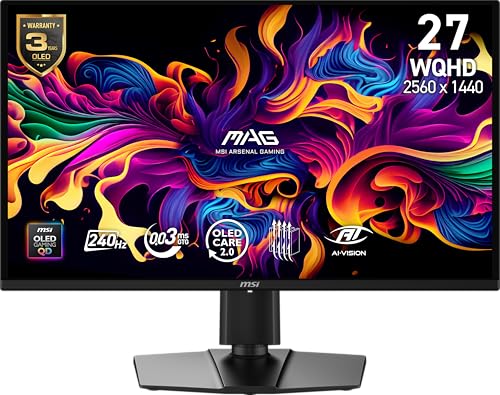
msi MAG 274QP QD-OLED X24 27-Inch WQHD Gaming Monitor, 2560 x 1440 Quantum Dot OLED Panel, 240Hz, 0.03ms, Adaptive-Sync, HDMI2.1, DP 1.4a, Tilt/Height Adjustable, Black
Disclosure: We may earn a commission when you buy through links on this page, at no extra cost to you. As an Amazon Associate I earn from qualifying purchases. Learn more
Highlights
- QUANTUM DOT OLED - The MSI MAG 274QP QD-OLED X24 gaming monitor combines 10-bit Quantum Dot color conversion with OLED self-emitting pixels for unrivalled dark levels & an elite response time; An enhanced sub-pixel arrangement improves image sharpness
- 26.5" WQHD, 10-BIT COLOR - A Quantum Dot OLED panel displays 1.07 billion colors (10-bit, 99% DCI-P3) with extreme Delta E ≤2 color accuracy; (1500000:1 native contrast ratio) & up to 400 nits peak brightness
- 240 HZ REFRESH RATE, 0.03MS RESPONSE TIME - A high 240 Hz refresh rate is complemented by an incredibly low 0.03ms (GtG) response time for an amazing VESA ClearMR 13000 rating; An elite graphene heatsink (fanless) enhances panel durability
- GAMING INTELLIGENCE - MSI GI software features OLED Care 2.0 to help prevent burn-in, AI supported software (AI Crosshair), Console modes & Game Assistance; Features a 4-way adjustable stand (VESA 100mm)
- CUTTING-EDGE CONNECTIVITY - PC, Mac, console & laptop interface options (all WQHD/240Hz) include DisplayPort 1.4a, HDMI 2.1 CEC ports
Why You'll Love It
- QD OLED technology combines self illuminating pixels with Quantum Dot color conversion for deep blacks and vivid color
- A 240Hz refresh rate and 0.03ms response time support fast paced gaming with responsive on screen motion
- WQHD resolution and 10 bit color deliver detailed images across 1.07 billion colors
- 99% DCI P3 coverage and Delta E of 2 or less support color conscious gaming and creative work
- HDMI 2.1 and DisplayPort 1.4a provide connection options for PCs, consoles, Macs and laptops
- Height and tilt adjustments, OLED Care 2.0 and a fanless graphene heatsink add flexibility and panel care features
Pros
- +240Hz refresh rate
- +QD OLED contrast and color
- +WQHD resolution with 10 bit color
- +Height and tilt adjustable stand
- +OLED Care 2.0 support
Cons
- -Single 27 inch class screen size
- -Peak brightness listed at 400 nits
- -OLED care requires attention to panel upkeep
Detailed Review
The MSI MAG 274QP QD OLED is a 27 inch class gaming monitor built for players who prioritize fast refresh rates, detailed visuals and rich contrast. Its combination of WQHD resolution, Quantum Dot OLED technology and a 240Hz refresh rate makes it particularly appealing for PC gaming and compatible console setups. Rather than focusing on speed alone, it pairs responsive image updates with 10 bit color and a stated 99% DCI P3 color gamut, giving shoppers a display designed to balance motion and image quality.
The panel is the main attraction. Quantum Dot color conversion works alongside self emitting OLED pixels, while the listed native contrast ratio is 1,500,000:1. For a buyer who values dark scenes, color separation and visually detailed game environments, those specifications make this monitor worth considering. The enhanced subpixel arrangement is also intended to improve image sharpness. WQHD resolution provides a 2560 x 1440 image, and 10 bit color supports the display of approximately 1.07 billion colors. The stated Delta E of 2 or less adds a specific color accuracy claim for shoppers who also care about consistent color presentation.
Speed is another central reason to consider this model. Its 240Hz refresh rate is paired with a 0.03ms gray to gray response time and a VESA ClearMR 13000 rating. Together, these specifications target players who want frequent screen updates and quick pixel transitions. Adaptive Sync is included, adding a synchronization feature for supported gaming setups. The listed peak brightness reaches 400 nits, so shoppers should consider how that figure suits their intended room and viewing preferences rather than judging the screen by contrast or refresh rate alone.
Connectivity and adjustment options give the display more flexibility. HDMI 2.1 CEC and DisplayPort 1.4a support connection choices across PCs, Macs, consoles and laptops, with the seller listing WQHD at 240Hz for the available interfaces. The stand offers height and tilt adjustment, while a four way adjustable design and VESA 100mm support provide additional positioning options. MSI Gaming Intelligence software includes OLED Care 2.0, AI Crosshair, console modes and Game Assistance. A fanless graphene heatsink is also listed as part of the panel design.
Verdict: Choose this gaming monitor if you want a fast QD OLED screen with WQHD detail, broad color coverage and flexible positioning. It is a strong match for shoppers who value refresh rate and contrast together, but buyers who need a different screen size or whose priorities center on brightness should compare alternatives carefully before committing.
Who Should Buy It
A great fit if you:
- You play fast paced games and want a 240Hz refresh rate paired with a very low stated pixel response time.
- You care about deep blacks, strong contrast and a broad color gamut when exploring visually detailed game worlds.
- You want a WQHD display that can connect with a compatible PC, Mac, laptop or gaming console.
- You prefer adjusting your screen position instead of relying on a fixed height and tilt arrangement.
Consider something else if you:
- You need a larger viewing area, in which case a larger screen model may fit your setup better.
- You prioritize a different brightness profile over OLED contrast and high refresh rate, so compare monitors with brightness specifications suited to your room.
This model is best approached as a gaming focused display with color capabilities that may also appeal to creative users. Its value depends on whether those particular strengths match your daily work and entertainment needs.
Before You Buy
Confirm on the listing:
- Measure your available desk space and check the monitor's physical dimensions, including how the adjustable stand will fit your arrangement.
- Check your computer or console's available video output and confirm that it supports the resolution and refresh rate you want to use.
- Review the current package contents if you need specific cables, mounting hardware or other accessories for your setup.
- Read the current OLED care guidance and confirm that the recommended panel maintenance suits your usage habits.
How to compare your options: Start with resolution and refresh rate, then consider panel technology, contrast, color coverage and response time. The MSI combines WQHD resolution, 240Hz, QD OLED technology and 99% DCI P3 coverage, so compare those specifications together rather than choosing on refresh rate alone. Check connection types and stand adjustments against your existing equipment and preferred screen position. If brightness is a deciding factor, compare the stated 400 nit peak brightness with the figures provided for the alternatives you are considering. Finally, review care features as part of the ownership decision, not just the initial display specifications.
Getting the Most From It
Start by choosing a screen position that suits your desk and viewing habits. Use the stand's height and tilt adjustments to find a comfortable arrangement, or review VESA 100mm mounting compatibility if you prefer another supported positioning option. Make sure the placement leaves room for your intended connections.
Next, check your source device's display settings. The monitor lists WQHD resolution and a 240Hz refresh rate, so confirm that your connected device and chosen connection are configured for the display mode you want. Adaptive Sync and the available console modes are worth reviewing when they match your gaming setup.
Explore Gaming Intelligence software for the features relevant to your routine. OLED Care 2.0 is intended to help prevent burn in, while AI Crosshair and Game Assistance provide additional gaming tools. Review the available settings and enable the functions that suit your preferences rather than assuming every feature needs to be active.
Make panel care part of your regular routine. Follow MSI's applicable OLED care instructions, and review any guidance supplied with the monitor before changing maintenance settings. The fanless graphene heatsink is part of the listed design, but it does not replace the need to understand the manufacturer's recommended care practices.
FAQ
Is the MSI MAG 274QP QD OLED suitable for gaming?
Yes, gaming is its primary focus. It combines a 240Hz refresh rate, a stated 0.03ms gray to gray response time, Adaptive Sync and WQHD resolution.
What resolution and color capabilities does it offer?
It offers 2560 x 1440 WQHD resolution with 10 bit color and a stated 99% DCI P3 gamut. The panel can display approximately 1.07 billion colors.
Can I connect a console or laptop?
Yes, the listed connection options include HDMI 2.1 CEC and DisplayPort 1.4a, with PCs, Macs, consoles and laptops identified as compatible device types. Check your device's output and supported display modes before buying.
Does the monitor help with OLED burn in prevention?
Yes, MSI Gaming Intelligence includes OLED Care 2.0, which is described as helping prevent burn in. Review the manufacturer's care instructions to understand the available features and recommended habits.
What comes in the box, and how do I mount it?
The listing identifies a height and tilt adjustable stand and VESA 100mm support. It does not state the complete package contents, so confirm included cables, mounting hardware and other accessories on the current product listing before ordering.
Product Details
| Brand | msi |
| ASIN | B0G4P697M8 |