Brother
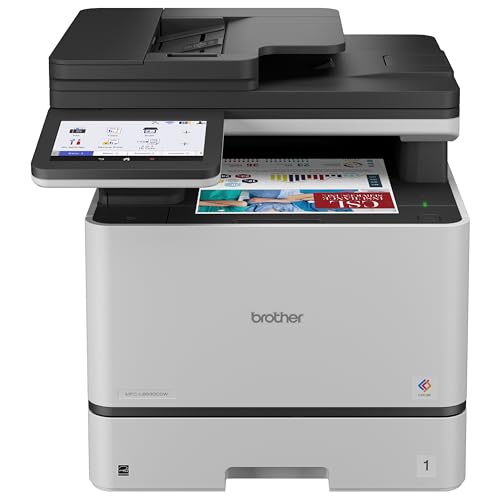
Brother MFC-L8930CDW Business Color Laser All-in-One Printer with Duplex Print, Scan, Copy, Low-Cost Printing, and Advanced Security Features
Disclosure: We may earn a commission when you buy through links on this page, at no extra cost to you. As an Amazon Associate I earn from qualifying purchases. Learn more
Highlights
- Updated design, professional results. High-quality output with sharp color and black printing. Fast print and copy speeds up to 33ppm(1) help boost productivity. Reliable performance and durable, compact design, 25% smaller than the previous model. Multipurpose tray for custom printing.
- Maximize printing budgets. Offers built-in value with included Brother Genuine 3,000-page black and 1,800-page color standard yield toner cartridges. Help lower printing costs by using the TN635XXL super high yield replacement toner cartridges for 7,500-page black and 6,500-page color(2).
- Advanced scanning. High-speed, two-sided scanning up to 104ipm(3) with 80-page auto document feeder(4) and legal-size glass. Scan to cloud, email, SharePoint, and more from the touchscreen(5). Supports the added benefit of creating searchable and editable Microsoft Office documents(6).
- Productivity-enhancing features. Flexible connectivity, including built-in dual-band (2.4GHz / 5GHz) wireless networking and Gigabit Ethernet networking. 7” color touchscreen for easy menu navigation, scan preview, and up to 64 customized shortcuts for frequently used tasks.
- Triple Layer Security. Advanced security features to help keep devices secure, protect documents in transit to and from print devices, and safeguard networks. Includes an integrated NFC card reader for easy badge authentication.
- Sustainability features: EPEAT Gold rated, ENERGY STAR certified, EPS-free (expanded polystyrene) packaging, 11% Post Consumer Recycled (PCR) material.
Why You'll Love It
- Print and copy at speeds up to 33 pages per minute for busy office workflows
- Reduce replacement toner costs with optional high yield cartridges rated for thousands of pages
- Scan both sides of documents at up to 104 images per minute using the automatic document feeder
- Connect through dual band Wi-Fi or Gigabit Ethernet to suit your office network
- Customize the seven inch touchscreen with shortcuts for frequently repeated printing and scanning tasks
- Protect office workflows with layered security features and integrated badge authentication
Pros
- +Print and copy speeds up to 33ppm
- +Two sided scanning up to 104ipm
- +80 page automatic document feeder
- +Dual band wireless and Gigabit Ethernet
- +High yield toner replacement options
Cons
- -Requires ongoing toner replacement
- -High volume scanning features may exceed basic home needs
- -Advanced security features may be unnecessary for simple personal printing
Detailed Review
The Brother MFC-L8930CDW color laser all in one printer is designed for offices that need printing, copying, and document scanning in one machine. Its combination of color and black printing, two sided scanning, and network connectivity makes it particularly relevant for teams handling reports, correspondence, and paperwork throughout the workday. Print and copy speeds reach up to 33 pages per minute, giving busy users a clear performance specification to consider when choosing equipment for recurring office tasks.
Printing costs deserve attention alongside speed. The machine includes Brother Genuine toner cartridges rated for 3,000 black pages and 1,800 color pages. For businesses that print regularly, optional TN635XXL super high yield replacement cartridges are rated for 7,500 black pages and 6,500 color pages. These larger stated yields provide a way to evaluate replacement toner options around expected workloads. The multipurpose tray also accommodates custom printing, which is useful when everyday documents are not the only items moving through the office.
Scanning is a major part of the appeal. The 80 page automatic document feeder supports high speed, two sided scanning at up to 104 images per minute, while the legal size glass provides another way to scan documents. From the touchscreen, users can send scans to cloud destinations, email, SharePoint, and other supported destinations. The additional ability to create searchable and editable Microsoft Office documents may be especially useful for offices that need to work with scanned information rather than simply retain an image of a page.
The seven inch color touchscreen is designed to simplify navigation, show scan previews, and store up to 64 customized shortcuts. Connectivity includes dual band wireless networking at 2.4GHz and 5GHz, along with Gigabit Ethernet. Triple Layer Security features address device security, document protection during transmission, and network protection, while an integrated NFC card reader supports badge authentication. The updated design is described as 25% smaller than the previous model, and the machine also carries EPEAT Gold and ENERGY STAR certifications.
The trade off is that this is a feature rich office machine whose scanning, networking, and security capabilities may be more than a household or occasional printer user needs. Toner remains an ongoing purchasing consideration, even with higher yield replacement options. Verdict: Choose this color laser all in one printer if your office regularly prints, copies, and scans substantial document batches and values network connectivity and security features. If you mainly print occasional personal documents and rarely scan multiple pages, a simpler printer may better match your everyday needs.
Who Should Buy It
A great fit if you:
- Manage a busy office where employees regularly need color printing, black printing, copying, and scanning from one device.
- Process batches of paperwork and want an automatic document feeder that scans both sides without requiring each page to be handled individually.
- Prefer to evaluate printing expenses through toner yields and want the option of higher yield replacement cartridges.
- Need wireless or wired network connectivity and want frequently used tasks available as touchscreen shortcuts.
- Handle office documents that benefit from searchable and editable Microsoft Office output and scanning to cloud services or SharePoint.
Consider something else if you:
- Print only occasional personal pages and would benefit more from a simpler printer with fewer office focused functions.
- Rarely scan paperwork and would prefer a basic printing device without an integrated copying and advanced scanning workflow.
Before You Buy
Confirm on the listing:
- Measure the intended placement area and check the printer's full dimensions, including the room needed to access its trays and scanner.
- Check whether the included toner cartridges and their stated yields suit your expected mix of black and color printing.
- Confirm that your preferred computers, devices, network environment, cloud destinations, and document workflows are supported for the tasks you intend to perform.
- Review what is included in the box and any setup instructions relevant to your intended wired or wireless connection.
How to compare your options: Start with your monthly document workload, then consider print and copy speed, toner yield, and the amount of scanning you perform. This model specifies speeds up to 33 pages per minute for printing and copying, plus two sided scanning up to 104 images per minute. Also weigh the value of its 80 page feeder, touchscreen shortcuts, network choices, and security features against the functions you will actually use. If you need searchable documents, verify that the supported scanning workflow fits your software requirements before deciding.
Getting the Most From It
Choose your connection deliberately during setup. If your office uses wireless networking, consider whether the 2.4GHz or 5GHz network is the appropriate option. If a wired network better matches your workplace arrangement, the Gigabit Ethernet connection provides an alternative. Follow the supplied instructions for configuring the connection and the functions your office intends to use.
Make the touchscreen work around your routine. Set up the available customized shortcuts for frequently repeated tasks, such as common scanning destinations or recurring document workflows. Scan previews can help you review documents as part of the process before sending them to a destination.
For multipage paperwork, organize documents before using the automatic document feeder and select the appropriate scanning workflow for the job. Use the legal size glass when its format better suits the document. If you need editable or searchable output, choose the supported Microsoft Office document creation workflow rather than assuming every scan will automatically have those properties.
Keep toner planning tied to actual printing needs. Review the stated yields of the included cartridges and compare them with the available TN635XXL high yield options when replacement becomes relevant. Follow Brother's supplied care and maintenance instructions, and use the printer's security features in line with your organization's document handling and network practices.
FAQ
What toner comes with the Brother MFC-L8930CDW?
It includes Brother Genuine standard yield toner cartridges rated for 3,000 black pages and 1,800 color pages. TN635XXL super high yield replacements are also offered, with stated yields of 7,500 black pages and 6,500 color pages.
Can this printer scan both sides of a document?
Yes, it supports high speed two sided scanning at up to 104 images per minute. Its automatic document feeder holds up to 80 pages, and a legal size glass is also available for scanning.
Does it support wireless and wired connections?
Yes, it includes dual band wireless networking at 2.4GHz and 5GHz, plus Gigabit Ethernet. Check your office network and intended devices before choosing a connection method.
Can it create searchable documents from scans?
Yes, the listed features include the ability to create searchable and editable Microsoft Office documents. Confirm that the available workflow suits the document formats and software you need.
What should I confirm before ordering?
Check the printer's dimensions, box contents, setup instructions, and compatibility with your intended devices and network. These checks help establish whether it fits your workspace and planned workflow.
Product Details
| Brand | Brother |
| ASIN | B0FR8Y4VDW |