Canon
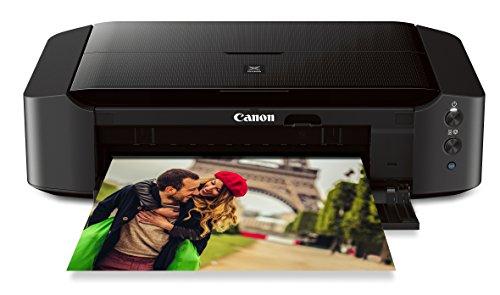
Canon IP8720 Wireless Printer, AirPrint and Cloud Compatible, Black
Disclosure: We may earn a commission when you buy through links on this page, at no extra cost to you. As an Amazon Associate I earn from qualifying purchases. Learn more
Highlights
- Don't get stuck in an 8 inches x 10 inches world; Print your favorite photos up to 13 inches x 19 inches
- With a 6 color ink system including gray ink and 9600 x 2400 maximum color dots per inch, the results are incredible quality and amazing detail in your black & white and color photos. Noise level: Approx. 43.5 dB(A)
- Print wireless from any Wi-Fi enabled computer around the house; Ink droplet size: 1, 2 and 5
- Note: Kindly refer to the user manual provided as a PDF manual in the product description section
- Ink compatibility : PGI 250 Pigment Black XL, CLI 251 Cyan XL, CLI 251 Magenta XL, CLI 251 Yellow XL, CLI 251 Gray XL, CLI 251 Black XL , PGI 250 Pigment Black, CLI 251 Cyan, CLI 251 Magenta, CLI 251 Yellow, CLI 251 Gray, CLI 251 Black
Why You'll Love It
- Produce large format photo prints measuring up to 13 inches by 19 inches
- Dedicated gray ink tank delivers subtle shading in black and white pictures
- Detailed prints with a maximum resolution of 9600 x 2400 color dots per inch
- Three precise ink droplet sizes down to 1 picoliter capture fine image details
- Print cable-free across your home network from Wi-Fi enabled computers
- Compatible with both standard and XL capacity individual replacement ink tanks
Pros
- +Prints up to 13 by 19 inches
- +Six individual color ink system including gray
- +High 9600 by 2400 dpi resolution
- +Quiet operation at roughly 43.5 decibels
- +Wireless printing from Wi-Fi enabled computers
Cons
- -Requires managing six separate ink cartridges
- -Large format footprint takes up significant desk space
Detailed Review
Large-format imaging at home becomes practical with this wireless printer, designed for photographers and creatives who want gallery-sized prints without outsourcing to a print lab. The Canon IP8720 steps beyond standard letter-sized output by supporting media up to 13 inches by 19 inches. This capability allows you to showcase portraits, art reproductions, and landscapes at frame-ready dimensions right from your home office.
Print fidelity relies on a 6-color ink system featuring a dedicated gray ink tank alongside standard pigment black and dye colors. The addition of gray provides balanced monochrome reproduction and subtle gradations in shadow areas, eliminating color casting in black-and-white photos. With a top color resolution of 9600 x 2400 dots per inch and microscopic droplet sizes of 1, 2, and 5 picoliters, fine photographic nuances remain sharp and smooth across large surfaces.
Operating within shared workspaces is manageable thanks to an acoustic output rated at approximately 43.5 dB(A). The machine supports wireless connections, allowing any Wi-Fi enabled computer on your local home network to send jobs without tethered USB connections. It also includes compatibility for mobile workflow features like AirPrint and cloud printing options as highlighted by the manufacturer.
Because the unit uses six independent ink tanks, upkeep involves keeping track of multiple cartridges across both standard and XL capacities (PGI 250 and CLI 251 series). The physical footprint needed to feed and receive 13x19-inch sheets also requires dedicated desk space compared to standard compact document printers.
Verdict: The Canon IP8720 is an excellent choice for photo enthusiasts and home artists who demand wide-format 13x19 output and fine monochrome tonality. Those who only need to print standard letters or quick everyday documents may prefer a simpler four-ink office machine.
Specifications
- Maximum Print Size: Up to 13 inches x 19 inches
- Print Resolution: Up to 9600 x 2400 maximum color dots per inch
- Ink Droplet Sizes: 1, 2, and 5 picoliters
- Ink System: 6-color system including gray ink
- Operational Noise Level: Approximately 43.5 dB(A)
- Compatible Cartridges: PGI-250 / CLI-251 series (standard and XL)
- Connectivity: Wi-Fi, AirPrint, Cloud Compatible
Who Should Buy It
A great fit if you:
- Want to produce wide-format photographic prints up to 13x19 inches right at your personal desk.
- Value detailed monochrome photography and need a dedicated gray ink tank for smoother tonal transitions.
- Prefer printing cable-free over your home Wi-Fi network from laptops and computers in other rooms.
- Want the flexibility to swap high-yield XL ink tanks individually as colors run out.
Consider something else if you:
- Need an all-in-one device for scanning and copying, which requires a multifunction office printer instead.
- Work in very cramped quarters with zero room for deep, wide rear paper feeding and wide catch trays.
- Print mostly text documents and would be better served by a basic monochrome or standard four-color inkjet model.
Before You Buy
Confirm on the listing:
- Check whether starter ink tanks or connection cables are bundled inside the box or sold separately.
- Measure your available table depth and clearance to ensure a printer capable of 13x19 sheets will physically fit.
- Check whether your specific computer operating system version supports the downloadable drivers from the manufacturer PDF guide.
How to compare your options: When shopping for a dedicated photo printer, evaluate the maximum paper size, the number of distinct color tanks, and wireless connectivity. A six-tank setup with gray ink produces superior photographic shading compared to standard cyan, magenta, yellow, and black models. Consider whether your printing volume justifies maintaining individual XL replacement tanks for distinct color channels.
Getting the Most From It
Refer to the downloadable PDF user manual provided by the manufacturer before unboxing and setting up your hardware. The guide details initial printhead alignment and proper cartridge seating, which are critical for achieving the rated 9600 x 2400 dpi detail.
Position the unit on a flat, sturdy surface with ample space around the front and rear so that larger 13x19-inch sheets can pass through without bending or hitting walls.
Keep individual replacement cartridges on hand, particularly CLI 251 XL tanks for your most frequently used shades, so you can replace single colors as they deplete without interrupting print jobs.
FAQ
What is the largest paper size this printer handles?
It can print images and documents up to 13 inches by 19 inches.
Which replacement ink cartridges work with this model?
It uses Canon PGI-250 Pigment Black and CLI-251 Cyan, Magenta, Yellow, Gray, and Black tanks, available in both standard and XL sizes.
How loud is this unit when printing?
The noise level is rated at approximately 43.5 dB(A), keeping operation reasonably quiet during output.
Can I print without connecting a physical cable?
Yes, the printer connects wirelessly over Wi-Fi and supports AirPrint as well as cloud printing features.
Where can I find setup instructions and operational guides?
The manufacturer provides a user manual as a downloadable PDF in the product description area.
Product Details
| Brand | Canon |
| ASIN | B00HM0IV52 |