Canon
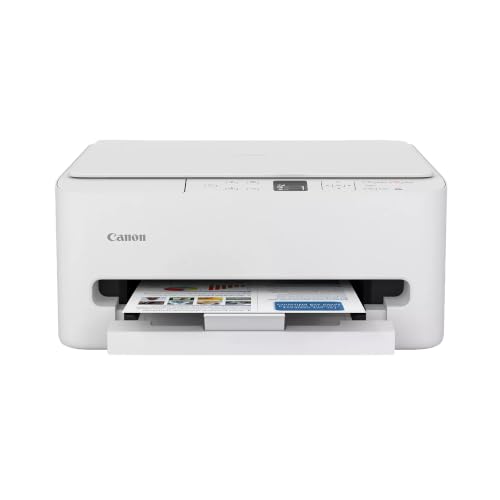
Canon PIXMA TS9521Ca – Wireless Home All-in-One Inkjet Printer
Disclosure: We may earn a commission when you buy through links on this page, at no extra cost to you. As an Amazon Associate I earn from qualifying purchases. Learn more
Highlights
- ALL-IN-ONE: Print, Copy, Scan features for full control at your fingertips. Comes with a 1 year limited warranty.
- FAST PRINT SPEEDS: Print approximately 15 (black) / 10 (color) images per minute.
- EASY SETUP and INSTALL: Get running in just a few minutes thanks to a streamlined and easy setup process out of the box. The five individual ink system makes it easy to only replace the ink that runs out.
- USER-FRIENDLY TOUCHSCREEN: Get the job done with an intuitive and easy to use 4.3” touch LCD screen.
- AUTO 2-SIDED PRINTING: Built in auto duplex printing for convenience & paper savings.
- PAPER CAPACITY: Load up to 200-Sheets of plain paper: 100-sheets in the bottom cassette and 100-sheets in rear tray.
- AUTO DOCUMENT FEEDER: Copy multi-page documents with ease with the 20-sheet auto document feeder.
- WiFi CERTIFIED: Easily print from any room in the house with Wi-Fi.
- MOBILE DEVICE PRINTING: Print from your compatible mobile devices using the free Canon PRINT app and more.
- VERSATILE MEDIA SUPPORT: Print envelopes, photos, business cards, high resolution paper, banners. You can also print large documents including 12" x 12" up to 11” x 17” such as calendars, schedules, posters, scrapbooking and more!
Why You'll Love It
- Produce oversized prints from 12x12 up to 11x17 for crafts, posters, and scrapbooking
- Replace only the color that empties thanks to a five individual ink tank system
- Cut paper use in half automatically with built in duplex two sided printing
- Feed multi page copies without manual intervention using the 20 sheet auto feeder
- Manage daily printing, scanning, and copying through a clear 4.3 inch touchscreen
- Send print jobs from anywhere in your home using certified Wi-Fi connectivity
Pros
- +Prints large formats up to 11x17 inches
- +Five individual ink cartridge system
- +Generous 200 sheet dual tray capacity
- +Built in automatic two sided printing
- +Integrated 20 sheet auto document feeder
Cons
- -Modest auto document feeder capacity
- -Standard color print speed of 10 ipm
Detailed Review
Crafting enthusiasts, small home offices, and busy households often need a versatile all-in-one inkjet printer that handles standard paperwork alongside creative media. The Canon PIXMA TS9521Ca fulfills both roles by combining printing, copying, and scanning in a single unit designed for streamlined setup out of the box. Its wide media capability lets you output documents from standard envelopes and business cards up to oversized 12-inch by 12-inch craft pages and 11-inch by 17-inch posters, calendars, and schedules.
Paper management is divided between a 100-sheet front cassette and a 100-sheet rear tray, giving you a combined plain paper capacity of 200 sheets. This dual-path design lets you keep everyday paper ready while feeding specialized media like photo paper, high-resolution sheets, or banners through the rear feed. For multi-page scanning and copying, a 20-sheet automatic document feeder handles stacks without manual placement, while built-in auto duplex printing automatically handles two-sided outputs to reduce paper consumption.
Day-to-day operation centers on a large 4.3-inch color LCD touchscreen that simplifies navigating menus and choosing print options. Connectivity is straightforward with built-in certified Wi-Fi, allowing you to trigger jobs from computers or mobile devices across your home network. Mobile printing is supported via the free Canon PRINT app along with compatible mobile options, keeping direct access within reach for phones and tablets.
Output speeds run at approximately 15 images per minute for monochrome jobs and 10 images per minute for color. The five individual ink system ensures you only swap out the specific cartridge that runs dry, avoiding the waste typical of combined tricolor tanks. However, heavy document environments might find the 20-sheet capacity on the auto document feeder somewhat modest for large stack jobs, and production speeds are geared toward steady personal workflows rather than high-volume commercial runs.
Verdict: The Canon PIXMA TS9521Ca is an exceptional pick for home creators, scrapbookers, and remote workers who need large-format paper support up to 11x17 alongside full scanning and copying tools. If your primary need is ultra-fast monochrome bulk printing with massive feeder trays, a dedicated high-capacity office machine will serve you better.
Specifications
- Print Speed: Approximately 15 ipm black / 10 ipm color
- Display: 4.3-inch LCD touchscreen
- Paper Capacity: 200 sheets total (100-sheet cassette, 100-sheet rear tray)
- Document Feeder: 20-sheet auto document feeder (ADF)
- Duplex Printing: Built-in automatic 2-sided printing
- Ink System: 5 individual ink cartridges
- Max Document Size: 12x12 inches up to 11x17 inches
- Warranty: 1-year limited warranty
Who Should Buy It
A great fit if you:
- Create scrapbook pages, banners, or visual displays that require wide-format printing up to 11x17 or 12x12 inches.
- Want to save on supply costs over time by replacing only the specific color cartridge that runs empty.
- Need an all-in-one unit that automates two-sided document printing to reduce everyday paper consumption.
- Prefer managing copy, scan, and print tasks directly from an integrated 4.3-inch color touchscreen interface.
- Routinely print projects directly from smartphones or tablets using home Wi-Fi and mobile printing applications.
Consider something else if you:
- Require an oversized automatic document feeder to process paper stacks significantly larger than 20 sheets at once.
- Need high-volume commercial print speeds well beyond 15 black and 10 color images per minute.
Before You Buy
Confirm on the listing:
- Check whether a full set of initial ink cartridges is bundled in the box or if you need to purchase spares right away.
- Measure your available shelf or desk area to ensure your space accommodates the unit when feeding larger 11x17 sheets.
- Check the exact operating system versions supported by the Canon PRINT app and printer drivers for your computers and phones.
- Confirm whether standard connection cables are included if you plan to connect directly in addition to Wi-Fi.
How to compare your options: Consider whether your typical projects require specialized media support like 12x12 or 11x17 sheets, as standard desktop all-in-ones often top out at letter size. Look closely at ink management, since a five individual tank layout provides separate replacements unlike combined color blocks. Finally, weigh feeder capacity and duplex capability to ensure the automated handling meets your weekly copying and printing volume.
Getting the Most From It
Load your standard copy paper into the bottom 100-sheet cassette for daily jobs, reserving the 100-sheet rear tray for specialized media such as photo sheets, envelopes, business cards, or 12x12 craft papers. Keeping the two paths separated reduces frequent paper switching.
Take advantage of the built-in automatic duplex setting for general multi-page reports to cut your paper consumption in half without having to manually flip and refeed sheets.
When using the automatic document feeder for multi-page scanning or copying, keep stacks to 20 sheets or fewer to ensure smooth document intake and avoid feed interruptions.
Install the free Canon PRINT app on compatible mobile devices and link the printer to your home Wi-Fi network during initial setup to enable wireless printing from any room.
FAQ
What is the maximum paper size this printer supports?
It supports large document printing from 12-inch by 12-inch sizes up to 11-inch by 17-inch sheets, alongside smaller formats like business cards and envelopes.
Does this printer support automatic two-sided printing?
Yes, it features built-in auto duplex printing, which automatically prints on both sides of the sheet to save paper.
How many ink cartridges does this unit use?
It uses a five individual ink system, meaning you only need to swap out the specific individual color that runs out.
Can I scan and copy multi-page documents automatically?
Yes, it includes a 20-sheet auto document feeder to copy and process multi-page documents without feeding each page manually.
What is the total paper capacity?
It holds up to 200 sheets of plain paper in total, split evenly between a 100-sheet bottom cassette and a 100-sheet rear tray.
Product Details
| Brand | Canon |
| ASIN | B0CX69SZMB |