Corsair
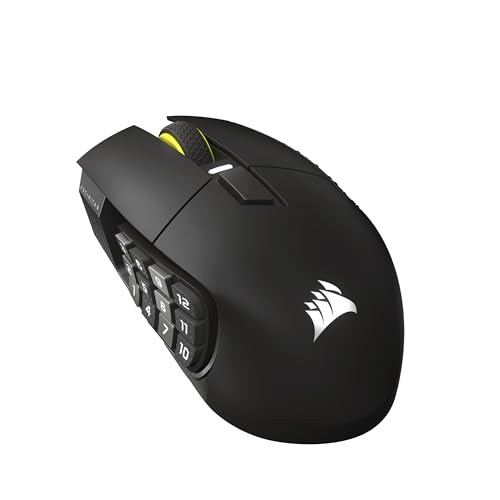
Corsair Scimitar Elite Wireless SE MMO MOBA PC Gaming Mouse – Black
Disclosure: We may earn a commission when you buy through links on this page, at no extra cost to you. As an Amazon Associate I earn from qualifying purchases. Learn more
Highlights
- Phenomenally Precise 33k DPI MARKSMAN S: Hit headshots, scan the entire map, ping teammates all with amazing accuracy thanks to the MARKSMAN S 33k DPI optical sensor. With improved DPI detection, IPS tracking, and lower power consumption over the previous version, it’s definitely a worthy upgrade
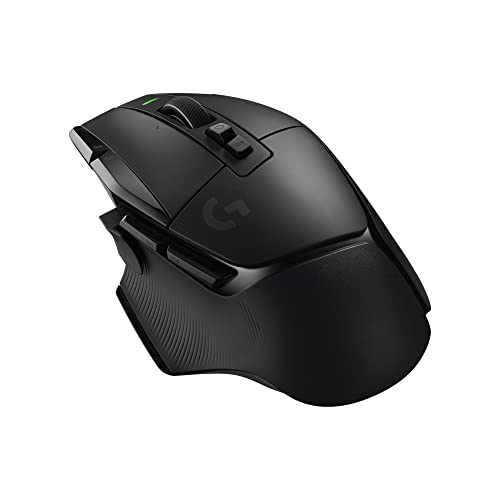
- 16 Programmable Buttons: All the powers in the world, right at your fingertips. Have a button ready for every power, consumable, action, and attack with 16 programmable buttons
- Elgato Stream Deck Integration: Native Elgato Stream Deck integration allows you to directly map Stream Deck functions to the SCIMITAR ELITE WIRELESS SE from the Stream Deck App, so your most important functions are just a button away
- Elgato Virtual Stream Deck Integration: This mouse can also utilize Elgato’s Virtual Stream Deck integration to give your 16 buttons more functionality than ever. Map buttons to their own Virtual Stream Deck to build out profiles for productivity, gaming, streaming, and more
- Fast, Low-Latency Wireless Freedom: Ditch the cords and the lag. SLIPSTREAM WIRELESS offers a low-latency connection on PC or Mac with 1,000Hz polling. Alternatively connect via Bluetooth or USB to charge while you play
Why You'll Love It
- Navigate complex titles easily with 16 programmable inputs mapped to powers and shortcuts
- Track targets reliably using an optical sensor capable of up to 33,000 DPI
- Streamers can trigger broadcast actions directly through integrated Elgato Stream Deck software
- Build custom task profiles across multiple activities with Virtual Stream Deck integration
- Connect through low-latency wireless, Bluetooth, or wired USB while charging during play
Pros
- +Versatile 16 programmable inputs
- +Accurate 33,000 DPI optical sensor
- +Native Elgato Stream Deck support
- +Three separate connection choices
- +Low-latency 1,000Hz polling rate
- +Recharges during active USB play
Cons
- -Complex layout takes time to configure
- -Heavier input density than standard pointers
Detailed Review
Complex hotkey management becomes significantly simpler with the Corsair Scimitar Elite Wireless SE, an MMO MOBA PC gaming mouse designed specifically for heavy ability users and content creators. If your favorite genres require juggling dozens of abilities, inventory consumables, and team pings, having a full cluster of direct inputs on your pointing device cuts down on left-hand keyboard clutter. The design focuses squarely on players who want total control mapped directly to their dominant hand without sacrificing desk mobility.
Core accuracy comes from the MARKSMAN S optical sensor, which reaches up to 33,000 DPI with improved tracking speed and lower power consumption compared to the previous model. High-resolution optical tracking ensures smooth sweeping motion across wide displays, letting you scan full game maps or adjust crosshairs with exact response. You also get a total of 16 programmable buttons, giving you sufficient assignable slots to bind an entire hotbar of powers, items, and team communication shortcuts directly to the device.
Where this peripheral sets itself apart is software synergy, featuring direct integration with Elgato Stream Deck and Elgato Virtual Stream Deck. Through the Stream Deck application, you can assign streaming commands, audio adjustments, and custom profile actions directly to the physical buttons on the device. This turns the hardware into a multi-use command pad that handles complex gaming keybinds during matches and productivity or broadcast functions during daily desktop sessions.
Connectivity covers three distinct methods: SLIPSTREAM wireless with a 1,000Hz polling rate for low-latency responsiveness, Bluetooth for versatile pairings, and a standard USB cable connection. Choosing USB allows you to charge the internal battery while continuing your match, eliminating downtime. The primary trade-off is the sheer complexity of managing 16 inputs: setting up multiple software profiles and remembering which action is mapped to each thumb position requires dedicated practice before it feels natural.
Verdict: For competitive players and active streamers who need an MMO MOBA PC gaming mouse loaded with macros and direct broadcast controls, the Corsair Scimitar Elite Wireless SE is an easy recommendation. Gamers who only play casual titles and prefer simple, two-button layouts should look at more basic options instead.
Who Should Buy It
A great fit if you:
- Play MMO or MOBA titles that require managing extensive action bars, attack combinations, and consumable inventories.
- Stream your gameplay online and want direct Elgato Stream Deck control right on your primary pointing hand.
- Prefer low-latency wireless play on PC or Mac with a fast 1,000Hz polling connection.
- Need the versatility of Bluetooth paired alongside a standard wired mode for recharging during long sessions.
Consider something else if you:
- Prefer an ultra-minimal setup and only require standard left and right clicks for light browsing.
- Want a barebones pointer that requires no software configuration or button mapping routines.
Before You Buy
Confirm on the listing:
- Check whether the physical dimensions and weight suit your hand size and preferred grip style.
- Check the included package contents to confirm which charging cords or wireless adapters are provided in the box.
- Verify that your computer operating system supports the companion software needed for custom button configurations and macro creation.
- Review the total battery life estimates for each wireless connection mode if you intend to travel without charging cords.
How to compare your options: Focus on input count, tracking precision, and connectivity types when evaluating gaming peripherals. The Corsair Scimitar Elite Wireless SE stands out with 16 programmable buttons, native Elgato software integration, and a 33,000 DPI sensor, making it more feature-dense than standard dual-button models. Balance your need for complex button mapping against whether you want a simpler layout on your desk.
Getting the Most From It
Begin your setup by installing the Stream Deck application if you plan to use broadcasting shortcuts or productivity hotkeys. Map your most frequently used inputs, such as health potions, tactical pings, or microphone mutes, to the easiest thumb positions first so muscle memory develops naturally.
Use the low-latency wireless mode for fast-paced competitive matches on PC or Mac to take full advantage of the 1,000Hz polling rate. Switch over to Bluetooth when you need a simple connection to secondary machines without moving your setup around.
When battery levels run low during a gaming session, plug in the USB cable to continue playing while recharging simultaneously. Keep the sensor area free of dust by wiping it periodically according to the manufacturer instructions included with the mouse.
FAQ
How many buttons can be programmed on this mouse?
The mouse features 16 fully programmable buttons that can be assigned to in-game actions, macros, or stream commands.
Does it work on Mac computers as well as PCs?
Yes, the low-latency wireless connection supports both PC and Mac operating systems.
What is the maximum sensitivity of the sensor?
The MARKSMAN S optical sensor provides adjustable sensitivity up to 33,000 DPI.
Can I charge the mouse while using it?
Yes, you can plug the mouse in via USB to recharge the battery while you continue playing.
How does the Elgato integration work?
Native Elgato Stream Deck and Virtual Stream Deck integration allows you to directly bind broadcast actions, streaming tools, and application shortcuts to the mouse buttons through the Stream Deck app.
Product Details
| Brand | Corsair |
| ASIN | B0F6NGCDFN |