Dell
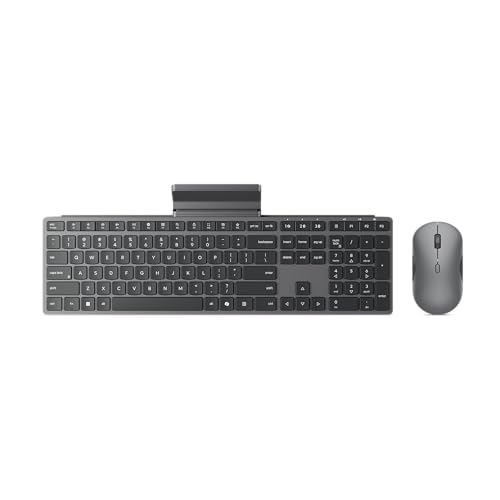
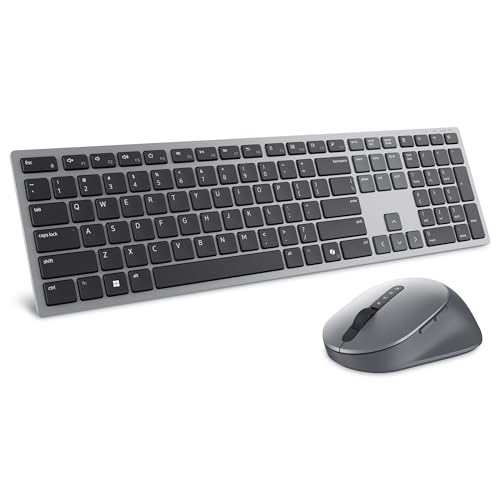
Dell Premium Wireless Keyboard and Mouse - KM720 - USB wireless receiver, 12 programmable keys of F1-F12, Mouse Buttons Qty 7, DPI. 1000, 1600 (default), 2400, 4000, Advanced Exchange Service - 1 year
Disclosure: We may earn a commission when you buy through links on this page, at no extra cost to you. As an Amazon Associate I earn from qualifying purchases. Learn more
Highlights
- Flexible multi-tasking: The dual mode RF 2.4 GHz and Bluetooth 5.0 connectivity lets you effortlessly switch across devices with the connection-mode key or button on your keyboard and mouse.
- Navigate with precision: Dell Peripheral Manager (DPM) software enables you to manage your input devices and adjust to your preferred preset DPIs at 1000, 1600, 2400 or 4000. Supported on Windows OS only.
- Well-crafted design: The thoughtfully designed quiet keyboard is slim and stylish with a premium feel and titan gray finish.
- Durable and secure: Powered by one of the industry’s leading battery lives at up to 36 months*, this keyboard and mouse combo has been rigorously tested to work seamlessly with your Dell system. *Based on Dell analysis of battery life usage model calculations, Nov. 2020. Results vary depending on use, operating conditions and other factors.
Why You'll Love It
- Switch between RF wireless and Bluetooth connections to accommodate different devices and working setups
- Choose from four preset mouse sensitivity levels through Dell Peripheral Manager on Windows
- Use 12 programmable function keys to tailor keyboard shortcuts to your preferred tasks
- Enjoy a slim, quiet keyboard with a titan gray finish for a streamlined workspace
- Benefit from a manufacturer estimated battery life of up to 36 months, depending on usage and conditions
- Move between connected devices using the connection controls on the keyboard and mouse
Pros
- +Dual RF and Bluetooth connectivity
- +12 programmable function keys
- +Four selectable mouse DPI settings
- +Slim keyboard with quiet operation
- +Long stated battery life
Cons
- -Peripheral Manager supports Windows only
- -Mouse sensitivity choices are limited to four presets
Detailed Review
The Dell KM720 wireless keyboard and mouse combo is aimed at people who want flexible device connections and customizable controls in one coordinated set. Its dual connectivity options let you switch between RF wireless at 2.4 GHz and Bluetooth 5.0, while programmable keyboard keys and adjustable mouse sensitivity offer ways to tailor everyday input. That combination makes it worth considering for a workspace where convenience, straightforward navigation, and personalized shortcuts matter.
Connectivity is a central part of the design. Both the keyboard and mouse support RF wireless and Bluetooth connections, with a connection mode key or button available for switching between devices. This flexibility may suit someone who works across multiple compatible devices and wants to change their input setup without treating the keyboard and mouse as separate purchases. The product name also identifies a USB wireless receiver, providing an RF connection option alongside Bluetooth. Before choosing it, consider which connection method fits the devices you intend to use and how often you expect to switch between them.
Customization is another reason to consider this set. The keyboard provides 12 programmable keys covering F1 through F12, allowing you to adapt those controls to your preferred tasks. On the mouse, the selectable DPI presets are 1000, 1600, 2400, and 4000, with 1600 as the default. Dell Peripheral Manager provides the software controls for managing the peripherals and adjusting these settings. The software is supported on Windows only, so the customization experience is particularly relevant to Windows users who want more control over their input devices.
The physical design emphasizes a slim profile, a titan gray finish, and quiet keyboard operation. Those characteristics make the set a reasonable option for someone who prefers a restrained appearance and wants keyboard operation that is described as quiet. Dell also states a battery life of up to 36 months, based on its battery life usage model calculations from November 2020. Actual results vary with use, operating conditions, and other factors, so that figure is best understood as an estimate rather than a guarantee.
Verdict: The Dell KM720 wireless keyboard and mouse combo is a sensible choice for Windows users who value dual connectivity, programmable function keys, and adjustable mouse sensitivity in a coordinated set. Consider another wireless keyboard and mouse set if you need peripheral management software on a non-Windows operating system or prefer a different set of customization options.
Specifications
- Brand: Dell
- Product type: Wireless keyboard and mouse combo
- Model: KM720
- Wireless connectivity: RF 2.4 GHz and Bluetooth 5.0
- Receiver: USB wireless receiver
- Programmable keyboard keys: 12, covering F1 through F12
- Mouse buttons: 7
- Mouse DPI presets: 1000, 1600, 2400, and 4000
- Default mouse DPI: 1600
- Configuration software: Dell Peripheral Manager, supported on Windows OS only
- Keyboard design: Slim, quiet, titan gray finish
- Stated battery life: Up to 36 months, depending on usage and operating conditions
Who Should Buy It
A great fit if you:
- You regularly move between compatible devices and want RF wireless and Bluetooth options in the same keyboard and mouse set.
- You use recurring keyboard shortcuts and would appreciate the ability to program the F1 through F12 keys around your preferred tasks.
- You prefer adjusting mouse sensitivity between defined presets rather than sticking with a single default setting.
- You want a coordinated input set with a slim keyboard, quiet operation, and a subdued titan gray finish.
- You value a long stated battery life estimate and are comfortable with results varying according to your usage.
Consider something else if you:
- You rely on peripheral configuration software outside Windows, in which case a keyboard and mouse with software support for your operating system would suit you better.
- You need a different set of keyboard or mouse controls, so an alternative input set with controls tailored to those needs would be a better fit.
Before You Buy
Confirm on the listing:
- Check that your intended devices support at least one of the listed connection methods, RF wireless at 2.4 GHz or Bluetooth 5.0.
- Confirm the included items in the package, particularly the USB wireless receiver, and check whether anything else you need is included.
- Verify that Windows is available on the computer where you plan to use Dell Peripheral Manager and customize the keyboard or mouse.
- Consider the keyboard's slim design and the space available on your desk, and check the full listing for dimensions if physical fit matters.
How to compare your options: Start with connectivity, because the ability to switch between RF wireless and Bluetooth is one of this set's main distinguishing features. Next, consider whether 12 programmable function keys and four mouse DPI presets match the way you work. If software customization is important, make operating system support a deciding factor. Finally, weigh the quiet keyboard design and stated battery life estimate against your priorities, remembering that actual battery results depend on usage and operating conditions.
Getting the Most From It
Begin by deciding which connection method you want to use with each intended device. The set supports RF wireless through a USB receiver and Bluetooth 5.0, and its connection controls let you switch between devices. If you plan to use more than one device, choose a setup that makes those transitions straightforward for your regular routine.
If you use Windows, explore Dell Peripheral Manager to manage the peripherals and select the mouse sensitivity that feels appropriate for your work. The available presets are 1000, 1600, 2400, and 4000 DPI, with 1600 as the default. Start with the default and change it when a different preset better suits your preferred pointer movement.
Think about which recurring tasks could benefit from programmable keyboard keys. The F1 through F12 keys provide 12 programmable controls, so choose assignments that fit your workflow and are easy for you to remember. Revisit those assignments if your daily tasks change, rather than programming shortcuts simply because the option is available.
For ongoing care, follow any supplied product instructions for cleaning and maintenance, and review the battery guidance provided with the set. Treat the stated battery life as an estimate, since Dell notes that usage and operating conditions affect results. Keep your connection preferences and custom settings aligned with how you actually use the peripherals.
FAQ
What comes with the Dell KM720?
It is a wireless keyboard and mouse combo identified with a USB wireless receiver. Check the package details on the listing to confirm the complete contents before ordering.
Can I connect it through Bluetooth?
Yes, the set supports Bluetooth 5.0 as well as RF wireless at 2.4 GHz. Its connection controls allow switching between devices, giving you two listed connection options.
Can I customize the keyboard and mouse?
Yes, the keyboard has 12 programmable keys covering F1 through F12, and the mouse offers four DPI presets. Dell Peripheral Manager supports peripheral management and mouse sensitivity adjustments on Windows only.
Will it work with my operating system?
The customization software is supported on Windows OS only. Check the listing and your device's connection capabilities if you intend to use the set with another operating system.
How long does the battery last?
Dell states up to 36 months based on its battery life usage model calculations. Actual results vary with use, operating conditions, and other factors, so your experience may differ from that estimate.
Product Details
| Brand | Dell |
| ASIN | B0GVP4J6XG |