Lenovo
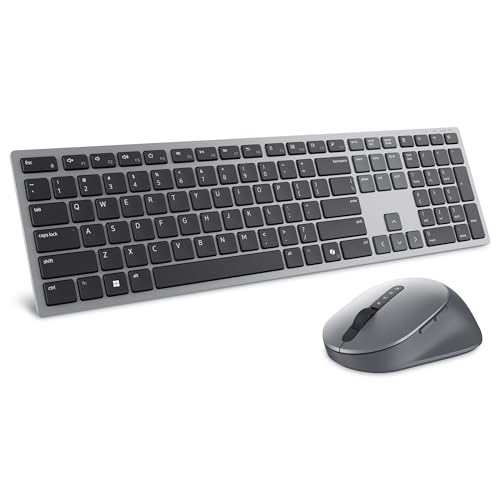
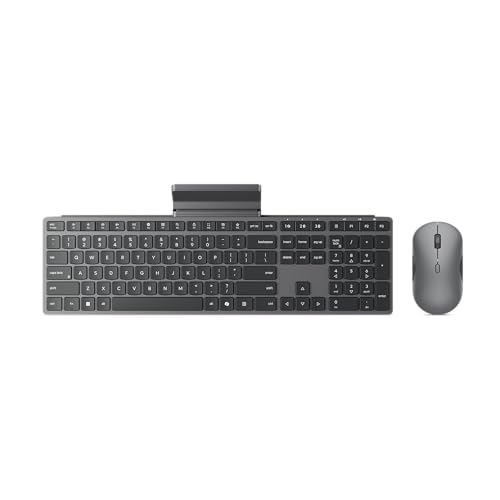
Lenovo 700 Modern Wireless Keyboard & Mouse Combo, 2.4 GHz Dongle & Dual Bluetooth Connection, AES-128 Encryption, 36 Month Battery Life, Quiet Mouse, Luna Grey
Disclosure: We may earn a commission when you buy through links on this page, at no extra cost to you. As an Amazon Associate I earn from qualifying purchases. Learn more
Highlights
- Get more done: The Lenovo 700 Modern Multi-Device Wireless Combo allows uninterrupted focus with silent, responsive keys and clicks. Its ergonomic design supports intense work sessions, while customizable buttons and keys boost productivity
- Connect with ease: This combo offers quick switching between 3 devices via Bluetooth or Unified Pairing Receiver. With advanced 128-bit AES encryption and universal OS compatibility, it delivers secure, flexible connectivity, elevating your workflow and peace of mind.
- Quality. Guaranteed: With an impressive 36-month battery life, rigorous quality testing, and a 1-year warranty, this combo is made for hassle-free, lasting performance so you can focus on what matters most.
- Connectivity:2.4 GHz Lenovo Pro Unified Pairing Receiver,Dual Bluetooth Hardware Requirements: Supported PC with USB-A Port, Blutooth Connection Battery: Type : 2 x AAA Batteries (Keyboard) 1x AA (Mouse) Battery Life : 36 Months (Keyboard & Mouse)
Why You'll Love It
- Switch among three devices using Bluetooth or the included type of connection supported by the Unified Pairing Receiver
- Choose between dual Bluetooth connectivity and a 2.4 GHz receiver to suit your device setup
- Quiet keys and mouse clicks help keep everyday computer work less distracting
- AES 128 encryption adds a layer of protection to wireless connections
- A stated 36 month battery life reduces how often you need to plan for battery replacement
- Customizable keys and buttons let you tailor selected controls to your working habits
Pros
- +Connects with up to three devices
- +Bluetooth and 2.4 GHz receiver connectivity
- +Quiet keyboard keys and mouse clicks
- +Customizable keys and buttons
- +Stated 36 month battery life
Cons
- -Requires separate AAA and AA batteries
- -Receiver connection requires a USB A port
Detailed Review
The Lenovo 700 wireless keyboard and mouse combo suits people who want a coordinated input setup for everyday computer work, especially when switching between several devices is part of their routine. Its main appeal is flexibility: it combines Bluetooth with a 2.4 GHz Lenovo Pro Unified Pairing Receiver and supports switching among three devices. Rather than managing a keyboard and mouse as unrelated purchases, you get a matching pair designed around the same multi-device workflow.
Connection options are an important part of the package. The combo supports dual Bluetooth connectivity as well as the receiver connection, giving you more than one way to pair it with a compatible computer or other supported device. The seller also identifies universal operating system compatibility, although your own setup still needs to meet the relevant connection requirements. AES 128 encryption is another stated feature, which may matter to buyers who want an additional layer of protection for wireless input. Before choosing a connection method, consider which devices you plan to use and whether they have the necessary Bluetooth capability or USB A port.
Day to day, quiet keys and mouse clicks are intended to keep the sound of routine computer work less distracting. That makes the combo worth considering for shared work areas or anyone who prefers quieter input. The ergonomic design is presented as support for intensive work sessions, while customizable keys and buttons provide an opportunity to adapt selected controls to individual working habits. These features make the set relevant to people who spend substantial time moving between documents, applications, and other computer tasks, though the actual value of customization depends on how you prefer to work.
Power is supplied by replaceable batteries: two AAA batteries for the keyboard and one AA battery for the mouse. Lenovo states a 36 month battery life for the keyboard and mouse, an appealing figure for shoppers who would rather not make frequent battery changes. That figure should be treated as the stated battery life rather than a guarantee that every person's setup will achieve identical results. The package also comes with a stated one year warranty. Buyers should still consider the practical trade-offs: this is a battery-powered wireless set, and using its receiver connection requires a compatible USB A port.
Verdict: Choose this wireless keyboard and mouse combo if you value switching among three devices, quiet input, customizable controls, and the choice of Bluetooth or receiver connectivity. If your setup needs a different connection method, or you would rather avoid replaceable batteries, a keyboard and mouse set built around those specific preferences may suit you better.
Who Should Buy It
A great fit if you:
- Work across several computers or supported devices and want to switch between them without maintaining a separate keyboard and mouse for each.
- Prefer quiet keys and mouse clicks because you share a workspace or want less distracting input while concentrating on tasks.
- Want to personalize selected keyboard keys and mouse buttons to better match the controls you use in your regular workflow.
- Prefer having Bluetooth and a wireless receiver available so you can choose a connection method based on your compatible device.
Consider something else if you:
- Want to avoid replacing batteries, in which case a rechargeable or wired keyboard and mouse set may better match your preference.
- Need a particular connection or specialized input layout, in which case a set designed specifically around that requirement may be a better fit.
Before You Buy
Confirm on the listing:
- Check whether each intended device supports Bluetooth or has a USB A port for the Lenovo Pro Unified Pairing Receiver, depending on your preferred connection method.
- Confirm that the operating system and device combination you plan to use is supported, especially if you intend to switch between different types of devices.
- Check the package contents and whether the required two AAA batteries for the keyboard and one AA battery for the mouse are included.
- Review the customization options and warranty terms to confirm they match your intended use and expectations.
How to compare your options: Start with connection flexibility, the number of devices you need to use, and whether you prefer Bluetooth or a receiver. Then consider keyboard and mouse noise, customization, battery arrangements, and the stated battery life. This set combines three-device switching with quiet input and two connection approaches, so those features are most useful when they align with your actual workspace. Prioritize the features you will use regularly rather than paying attention to a long list of capabilities that may not affect your routine.
Getting the Most From It
Begin by identifying the devices you want to connect and choosing the connection method that suits each one. Use Bluetooth where supported, or check that the device has a USB A port if you intend to use the Lenovo Pro Unified Pairing Receiver. Following the available pairing instructions for your device can help you establish the intended setup before relying on it for daily work.
Plan your three-device arrangement around your normal workflow. Decide which devices you want available and make a habit of selecting the intended connection when moving between them. A consistent routine can make the switching feature more useful than treating each change as a separate setup task.
Explore the customizable keys and buttons with your regular tasks in mind. Choose controls that support actions you perform often, where the available customization options allow it, rather than changing everything at once. This makes it easier to build a configuration that suits your habits.
Keep track of the keyboard's AAA batteries and the mouse's AA battery, and consult the product instructions for battery replacement and care. The stated 36 month battery life offers a planning reference, but actual results can vary with use. Follow the manufacturer's care guidance to maintain the set appropriately.
FAQ
What comes with the Lenovo 700 combo?
The product is a wireless keyboard and mouse combo. The stated power requirements are two AAA batteries for the keyboard and one AA battery for the mouse; check the listing to confirm which items are included in the box.
Can I connect it to more than one device?
Yes, the combo supports switching among three devices. It offers Bluetooth connectivity and a 2.4 GHz Lenovo Pro Unified Pairing Receiver, with the appropriate connection depending on your device.
Will it work with my computer?
It supports Bluetooth and a USB A receiver connection, with universal operating system compatibility stated by the seller. Confirm that your specific device supports the connection method you plan to use before buying.
How long do the batteries last?
Lenovo states a 36 month battery life for the keyboard and mouse. The keyboard uses two AAA batteries, while the mouse uses one AA battery; actual battery life may vary with usage.
Is this combo suitable for quiet workspaces?
It is designed with quiet keyboard keys and mouse clicks. It also includes customizable keys and buttons, making it worth considering if quieter input and adaptable controls matter in your daily work.
Specifications
- Brand: Lenovo
- Model: 700 Modern Wireless Keyboard and Mouse Combo
- Color: Luna Grey
- Connectivity: 2.4 GHz Lenovo Pro Unified Pairing Receiver and dual Bluetooth
- Device switching: Up to three devices
- Encryption: AES 128
- Battery life: 36 months for keyboard and mouse, as stated
- Keyboard batteries: Two AAA batteries
- Mouse battery: One AA battery
- Receiver requirement: USB A port
- Other features: Quiet keys and clicks, ergonomic design, customizable keys and buttons
- Warranty: One year, as stated by the seller
Product Details
| Brand | Lenovo |
| ASIN | B0FR7MYWS5 |