GIGABYTE
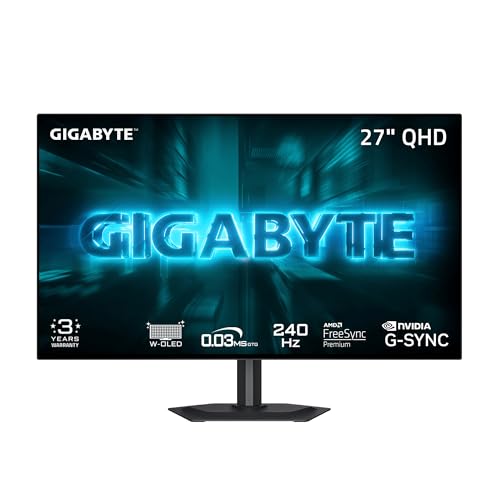
GIGABYTE GO27Q24G 27" W-OLED 240Hz QHD Gaming Monitor | Black, QHD 2560x1440, 0.03ms GTG, AMD FreeSync Premium, G-SYNC Compatible, HDMI, DP, Type-C, Height and Tilt Adjustable
Disclosure: We may earn a commission when you buy through links on this page, at no extra cost to you. As an Amazon Associate I earn from qualifying purchases. Learn more
Highlights
- MICRO LENS ARRAY+ (MLA+) WOLED PANEL – The GO27Q24G features a 27-inch WOLED panel with MLA+ Technology, delivering 275 nits of typical brightness and up to 1300 nits peak brightness for brighter, more vivid visuals.
- 4-SIDED BORDERLESS DISPLAY – Zero-bezel design on all four edges maximizes screen real estate, creating a seamless, distraction-free viewing experience that's perfect for multi-monitor setups
- REALBLACK GLOSSY - RealBlack Glossy WOLED features an advanced anti-reflective coating and zero-haze optical layer, reducing light diffusion to maintain rich dark details even in bright settings.
- EXCLUSIVE AI-BASED PROTECTION WITH GIGABYTE OLED CARE – GIGABYTE uses an AI-based algorithm to minimize the risks of burn-in issues and deploys it across a suite of OLED protecting technologies in the GO27Q24G’s background with minimal interference. OLED Care includes different settings that can be adjusted as you wish, and it efficiently minimizes the risks of burn-in issues.
- COMPETITIVE EDGE WITH 240HZ REFRESH RATE AND 0.03MS RESPONSE TIME – Achieve lightning-fast responsiveness and ultra-smooth motion clarity with an ultra-high 240Hz refresh rate and 0.03ms GtG response time. Whether you’re in high speed FPS battles or intense esports competitions, the GO27Q24G ensures every frame is delivered with precision, giving you the edge when milliseconds matter.
Why You'll Love It
- The 240Hz refresh rate and 0.03ms response time target fast, clear motion for competitive gaming
- MLA+ WOLED technology combines vivid visuals with a stated peak brightness of 1300 nits
- The glossy optical layer is designed to preserve rich dark details while reducing reflected light diffusion
- Four borderless edges create a more continuous display layout for shoppers planning a multi-monitor setup
- Built-in OLED Care uses an AI-based algorithm to help reduce the risk of burn-in
- Height and tilt adjustments let you tailor the screen position to your viewing preferences
Pros
- +Fast 240Hz refresh rate
- +0.03ms GtG response time
- +MLA+ WOLED display technology
- +Glossy finish designed for rich dark details
- +Adjustable height and tilt
Cons
- -OLED burn-in risk still requires consideration
- -Typical brightness is 275 nits
- -Glossy viewing surface may not suit every room
Detailed Review
The GIGABYTE GO27Q24G is a 27-inch OLED gaming monitor aimed at players who prioritize fast motion, responsive gameplay, and detailed dark scenes. Its 240Hz refresh rate and stated 0.03ms gray-to-gray response time are the central reasons to consider it, particularly if you spend your gaming time in fast-paced first-person shooters or competitive matches. The appeal here is a combination of a high refresh rate, OLED display technology, and features intended to preserve the panel over time. Buyers who primarily want a screen for competitive gaming will find the clearest reason to consider this model in those specifications.
The MLA+ WOLED panel is designed to deliver vivid visuals, with a stated typical brightness of 275 nits and peak brightness of up to 1300 nits. Those figures describe different brightness measures, so they should not be treated as interchangeable. The RealBlack Glossy finish adds another part of the picture: its anti-reflective coating and zero-haze optical layer are intended to reduce light diffusion and retain rich dark details. That combination may appeal to players who value contrast-rich imagery and clearly defined dark areas. Room lighting and the position of light sources are still worth considering when deciding whether a glossy screen suits your setup.
The exterior design focuses on keeping attention on the display. A four-sided borderless layout reduces the visible framing around the screen, which may be especially appealing if you intend to place multiple monitors side by side. Height and tilt adjustments provide options for changing the screen's position to better suit your desk and preferred viewing angle. Together, these features make the monitor more adaptable to different gaming arrangements without changing its central focus on fast gameplay. The borderless design is also an aesthetic consideration for shoppers who prefer a display with less visible framing.
OLED Care is an important part of the ownership proposition. GIGABYTE describes an AI-based algorithm and a collection of adjustable protective technologies designed to minimize the risk of burn-in while operating in the background with minimal interference. This is a risk-reduction approach, not a promise that burn-in cannot occur. Buyers considering OLED should be comfortable paying attention to the available protection settings and using them according to their preferences. The glossy coating, brightness characteristics, and panel-protection features are all worth weighing alongside refresh rate when deciding whether this display suits everyday use.
The main trade-off is that this monitor's appeal is concentrated around gaming responsiveness and OLED image presentation, rather than a broad set of general-purpose features. Its typical brightness is 275 nits even though the stated peak reaches 1300 nits, so the two figures deserve separate consideration. The glossy finish may also be a less natural fit for shoppers who prefer another screen surface, and OLED Care does not eliminate burn-in risk. Verdict: This OLED gaming monitor is a strong candidate for players who value a 240Hz refresh rate, very fast stated response time, rich dark details, and adjustable positioning. Shoppers who are unwilling to manage OLED protection settings or who prefer a different display finish should compare alternatives before choosing it.
Specifications
- Brand and model: GIGABYTE GO27Q24G
- Product type: Gaming monitor
- Display size: 27 inches
- Panel technology: MLA+ WOLED
- Refresh rate: 240Hz
- Gray-to-gray response time: 0.03ms
- Typical brightness: 275 nits
- Peak brightness: Up to 1300 nits
- Display finish: RealBlack Glossy, with anti-reflective coating and zero-haze optical layer
- Display design: Four-sided borderless
- Adjustments: Height and tilt
- Panel protection: GIGABYTE OLED Care with an AI-based algorithm and adjustable settings
Who Should Buy It
A great fit if you:
- Play fast-paced shooters or competitive games and want a display built around a 240Hz refresh rate and fast response time.
- Prefer OLED image presentation and place particular value on vivid visuals and rich dark details during gameplay.
- Want to adjust your monitor's height and tilt to better match your desk arrangement and viewing preferences.
- Are planning a multi-monitor arrangement and appreciate a borderless appearance that minimizes visible framing between screens.
- Are willing to review adjustable OLED Care settings and take an active role in reducing the risk of burn-in.
Consider something else if you:
- Prefer a matte display finish, in which case a monitor with a different screen surface may suit your viewing preferences better.
- Want to avoid OLED-specific protection considerations, in which case a non-OLED monitor may be a more suitable alternative.
Before You Buy
Confirm on the listing:
- Measure your intended desk space and check the monitor's full dimensions, including its stand, to confirm that the screen and adjustable positioning will fit your setup.
- Check which connections are available on the exact listing and confirm that they match the devices you intend to connect.
- Review the package contents and any included documentation so you know what is supplied for your planned setup.
- Read the available OLED Care instructions and confirm which protection settings can be adjusted to suit your preferences.
How to compare your options: Start with refresh rate and response time if fast gaming is your priority, then consider panel technology, brightness, and the appearance of dark scenes. This model pairs a 240Hz refresh rate and 0.03ms stated response time with MLA+ WOLED, a glossy finish, and a stated peak brightness of 1300 nits. Compare the typical brightness figure separately from peak brightness, and consider whether the glossy surface fits your room. Finally, weigh the height and tilt adjustments and the OLED Care approach against your preferred display setup and maintenance habits.
Getting the Most From It
Begin by positioning the monitor where you can view the display comfortably, then use the height and tilt adjustments to refine its placement. If you plan to use it alongside another monitor, consider how the borderless edges will align with the other screen and how the arrangement will work with your available desk space.
Choose your connection only after confirming that it is supported by both the monitor and the device you want to connect. Review the available display settings and your device's configuration so the setup matches your intended gaming use. If you are prioritizing fast gameplay, pay particular attention to the refresh-rate settings available through your connected equipment.
Take time to review the OLED Care options instead of treating panel protection as something to ignore after setup. GIGABYTE describes adjustable settings intended to reduce burn-in risk, so familiarize yourself with those controls and choose settings that suit your usage habits.
For routine care, follow the manufacturer's cleaning and maintenance guidance if supplied. Consider the room's lighting when positioning the glossy display, since its coating is designed to reduce light diffusion but does not mean every viewing environment will be equally suitable.
FAQ
Is the GIGABYTE GO27Q24G suitable for competitive gaming?
Yes, its 240Hz refresh rate and stated 0.03ms gray-to-gray response time are aimed at fast-paced gaming. Those are the most relevant listed features for shoppers prioritizing responsive gameplay.
Does this monitor use OLED technology?
Yes, it uses an MLA+ WOLED panel. Its RealBlack Glossy finish is designed to reduce light diffusion and preserve rich dark details.
Can I adjust the monitor's position?
Yes, the monitor supports height and tilt adjustments. These give you options for positioning the screen to suit your desk and viewing preferences.
Does OLED Care prevent all burn-in?
No, OLED Care is described as a set of technologies intended to minimize burn-in risk, not eliminate it entirely. Review the adjustable protection settings and follow the manufacturer's guidance for their use.
What comes in the box, and which connections can I use?
The product name identifies HDMI, DisplayPort, and Type-C connections, but the supplied accessories and exact connection details should be confirmed on the listing. Check that the available connections match your intended devices before purchasing.
Product Details
| Brand | GIGABYTE |
| ASIN | B0GV155YQM |