HP
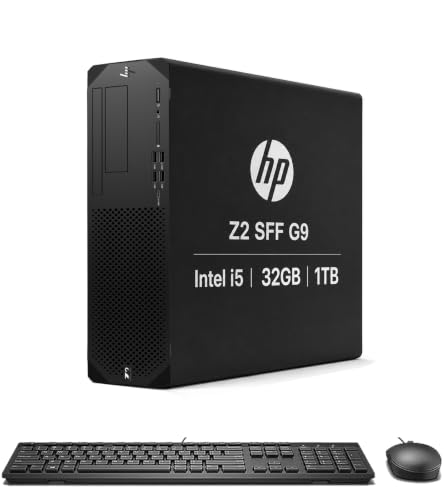
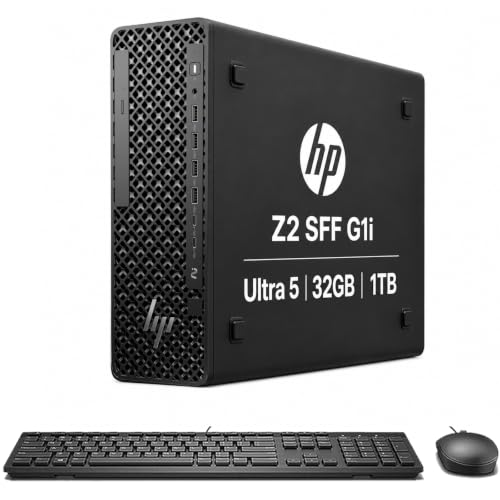
HP Z2 SFF G1i Workstation Desktop, Intel Ultra 5 235, 32GB DDR5, 1TB SSD | Business Small Form Factor, 14-Core, > Ultra 7 155U, Support 8K Display, for Engineer, Designer, 2x DisplayPort, Win 11 Pro
Disclosure: We may earn a commission when you buy through links on this page, at no extra cost to you. As an Amazon Associate I earn from qualifying purchases. Learn more
Highlights
- COMPACT WORKSTATION POWER - The HP Z2 SFF G1i Desktop delivers pro-grade performance for 3D design, modeling, and simulation workloads, positioned above EliteDesk and ProDesk business SFF series with dedicated W880 workstation chipset. Its compact design offers flexible deployment while rigorous MIL-STD 810H testing helps ensure reliable durability. ISV certifications for apps including AutoCAD, Creo, SOLIDWORKS, ANSYS, and MATLAB help deliver dependable performance for critical workflows
- POWERFUL PERFORMANCE - Powered by an Intel Core Ultra 5 235 processor (14 cores, 14 threads, up to 5.0GHz), this desktop is built for fast multitasking and demanding business workloads. Intel Graphics delivers smooth visual performance. Paired with 32GB DDR5 RAM for seamless multitasking and a 1TB PCIe NVMe M.2 SSD for ultra-fast data access and ample storage
- RICH CONNECTIVITY - Stay connected with a versatile selection of ports, including 2x USB-C 3.2 Gen 2x2, 4x USB-A 3.2 Gen 2, 2x USB-A 3.2 Gen 1, 3x USB-A 2.0, 2x DisplayPort 1.4, Ethernet (RJ-45), and a headphone/microphone combo jack. Native multi-display support via DisplayPort 1.4, with a single display resolutions up to 8K for an expanded professional workspace; includes a full-size USB keyboard and mouse for seamless productivity
- OPERATING SYSTEM - Pre-installed with Microsoft Windows 11 Pro, offering enterprise-grade security with BitLocker and Remote Desktop, designed to support demanding professional applications and enhanced by AI Copilot for smarter, more efficient productivity across business and creative tasks
- IDEAL FOR ENGINEERING, DESIGN & BUSINESS - High-performance computing for professionals, creators, and advanced users. Ideal for engineers, architects, and data analysts using CAD, 3D modeling, simulations, and AI-enhanced design workflows. Content creators handle video editing, rendering, multi-layer projects, and AI-assisted content generation. Supports researchers with complex computations, development work. For business, it enables multitasking, remote collaboration, productivity apps like spreadsheets, presentations, video conferencing, plus AI-driven automation
- DISCLOSURE - Brand New Computer has been resealed to upgrade the memory/SSD. Three-year warranty from Issaquah Highlands Tech on upgraded memory/SSD. One-year warranty from HP on remaining components
Why You'll Love It
- The 14 core Intel Core Ultra 5 235 supports demanding business applications and complex professional multitasking
- 32GB of DDR5 memory and a 1TB SSD provide room for active projects, applications, and working files
- Two DisplayPort 1.4 connections support a multi display workspace, with single display resolutions up to 8K
- Windows 11 Pro includes BitLocker, Remote Desktop, and Copilot for business productivity and collaboration
- ISV certifications for AutoCAD, Creo, SOLIDWORKS, ANSYS, and MATLAB support specific professional software workflows
- A compact small form factor design combines extensive USB connectivity with an included keyboard and mouse
Pros
- +14 core Intel Core Ultra 5 processor
- +32GB DDR5 memory and 1TB SSD
- +Two DisplayPort 1.4 connections
- +Windows 11 Pro included
- +Professional software certifications
Cons
- -Intel Graphics rather than listed dedicated graphics
- -Upgraded memory and SSD have a separate warranty
- -Compact chassis may constrain workspace expansion needs
Detailed Review
The HP Z2 SFF G1i workstation desktop is aimed at professionals who need a business computer for engineering, design, and demanding office work without dedicating their workspace to a larger desktop setup. Its combination of a 14 core Intel Core Ultra 5 235 processor, 32GB of DDR5 memory, and a 1TB SSD gives it a clear focus on running professional applications while keeping multiple tasks and working files accessible. The small form factor design also makes it worth considering for offices where desktop placement matters. Rather than being positioned solely as a general productivity machine, it is intended for workflows that can benefit from workstation features and professional software certification.
The processor supports speeds up to 5.0GHz and has 14 cores and 14 threads. Paired with 32GB of memory, that configuration is relevant to users who move between design applications, spreadsheets, development tools, and other demanding business tasks. The 1TB PCIe NVMe M.2 SSD provides storage for applications and project files, while its role as the system drive supports quick access to stored data. Buyers working with CAD projects, modeling tasks, or research files should consider both the available memory and storage in relation to their own workloads, rather than treating the specifications as a guarantee that every complex project will run equally well.
Professional software support is a central part of this desktop's appeal. The seller identifies ISV certifications for AutoCAD, Creo, SOLIDWORKS, ANSYS, and MATLAB, which gives prospective users concrete applications to check against their existing workflow. Intel Graphics handles visual output, and two DisplayPort 1.4 connections allow a multi display workspace. The system also supports resolutions up to 8K on a single display. For someone who works across drawings, data, reference material, or business applications, those display connections can help organize information across screens. The broad selection of USB connections, including USB C, USB A, and Ethernet, adds flexibility for connecting everyday peripherals and a wired network.
Windows 11 Pro comes preinstalled, with BitLocker, Remote Desktop, and Copilot included among the seller's highlighted capabilities. A keyboard and mouse are also included, making the package a straightforward starting point for a desktop workspace. The compact enclosure is positioned for flexible deployment, and the seller states that the design has undergone MIL STD 810H evaluation. Still, this is not a specification sheet for a dedicated graphics card, so buyers whose work depends heavily on specialized graphics hardware should assess that distinction carefully. The memory and SSD have also been upgraded, and the computer has been resealed as part of that process. Those details matter when evaluating the package and its warranty coverage.
Verdict: Choose this workstation desktop if you need a compact Windows 11 Pro system with substantial memory, a 1TB SSD, professional software certifications, and dual display connectivity. If your main requirement is dedicated graphics hardware or a system configured specifically around graphics intensive workloads, compare alternatives that explicitly list the graphics hardware you need before buying.
Specifications
- Brand: HP
- Model: Z2 SFF G1i
- Processor: Intel Core Ultra 5 235
- Processor cores: 14
- Processor threads: 14
- Maximum processor speed: Up to 5.0GHz
- Memory: 32GB DDR5
- Storage: 1TB PCIe NVMe M.2 SSD
- Graphics: Intel Graphics
- Operating system: Windows 11 Pro
- Display connections: 2 DisplayPort 1.4
- Maximum single display resolution: Up to 8K
- USB C: 2 USB C 3.2 Gen 2x2
- USB A: 4 USB A 3.2 Gen 2, 2 USB A 3.2 Gen 1, and 3 USB A 2.0
- Other connections: Ethernet RJ 45 and headphone/microphone combo jack
- Included accessories: Full size USB keyboard and mouse
- Professional software certifications: AutoCAD, Creo, SOLIDWORKS, ANSYS, and MATLAB
Who Should Buy It
A great fit if you:
- Use engineering or design applications such as AutoCAD, Creo, or SOLIDWORKS and want a workstation with relevant software certifications.
- Regularly switch between professional applications, large working files, spreadsheets, and collaboration tools during the workday.
- Want to connect two DisplayPort monitors to organize drawings, reference documents, and active work across a larger desktop workspace.
- Need Windows 11 Pro features such as BitLocker and Remote Desktop for your business computing routine.
- Prefer a compact desktop configuration that includes a keyboard and mouse rather than sourcing those accessories separately.
Consider something else if you:
- Depend on a dedicated graphics card for your particular rendering or modeling workflow, and need a system that explicitly lists that hardware.
- Need a larger workstation configuration with a different expansion layout or hardware arrangement suited to your specific projects.
Before You Buy
Confirm on the listing:
- Check the computer's dimensions against your intended desk or workstation location, especially if the space available for the enclosure is limited.
- Confirm that your preferred monitor connections match the two DisplayPort 1.4 outputs, and check whether your intended display arrangement suits the stated resolution support.
- Verify compatibility with the exact versions of your engineering, design, simulation, or research applications before relying on the listed ISV certifications.
- Review the resealed computer disclosure, included keyboard and mouse, and separate warranty arrangements for upgraded memory and SSD components.
How to compare your options: Start with the applications you use, then compare processor capability, memory, storage, graphics hardware, display connections, and operating system requirements. This configuration offers 32GB DDR5 memory, a 1TB SSD, Intel Graphics, Windows 11 Pro, and two DisplayPort outputs. Give particular attention to graphics requirements and the exact software certification relevant to your work, rather than choosing by processor specifications alone. If your workflow has specific hardware requirements, verify that the complete configuration meets them before purchasing.
Getting the Most From It
Start by planning your desktop layout around the small form factor enclosure and the applications you use most. Connect your display or displays through the DisplayPort 1.4 outputs, and organize your workspace so reference material and active projects are easy to access. If you intend to use a single high resolution display, confirm that its connection and configuration match your intended setup.
Make use of the available USB connections for compatible peripherals. The mix of USB C and USB A ports gives you several connection options, while Ethernet provides a wired network connection. Keep track of which devices are connected so your everyday workspace remains organized around your actual needs.
Set up Windows 11 Pro around your business workflow. Review the available BitLocker and Remote Desktop features if they are relevant to your work, and explore Copilot where it fits your productivity tasks. Check application compatibility and the recommended configuration for each professional tool you plan to use.
Keep your project files organized on the 1TB SSD and review storage use as your collection of working files grows. Follow the computer's supplied care instructions if available, and retain the purchase and upgrade documentation. Because the memory and SSD were upgraded before sale, keep their separate warranty details accessible if you need support.
FAQ
What comes with the HP Z2 SFF G1i?
The package includes the desktop, a full size USB keyboard, and a mouse. Windows 11 Pro is preinstalled, so the listed operating system is part of the configuration.
Can it run CAD and engineering applications?
It is positioned for professional engineering and design work, with stated ISV certifications for AutoCAD, Creo, SOLIDWORKS, ANSYS, and MATLAB. Check the certification and system requirements for the exact application you use.
Can I connect two monitors?
Yes, it has two DisplayPort 1.4 outputs and supports native multi display use. The seller also states support for single display resolutions up to 8K.
Does it have a dedicated graphics card?
The listed graphics are Intel Graphics. If your applications require a dedicated graphics card, confirm the complete hardware configuration or choose a workstation that explicitly lists the required graphics hardware.
What should I know about the warranty?
The computer has been resealed after a memory and SSD upgrade. Issaquah Highlands Tech provides a three year warranty for the upgraded memory and SSD, while HP provides a one year warranty for the remaining components.
Product Details
| Brand | HP |
| ASIN | B0HFRD5SC5 |