Lian Li
Lian Li LANCOOL 216 RGB Black ATX Mid-Tower Case, 2x160mm ARGB Fans
Disclosure: We may earn a commission when you buy through links on this page, at no extra cost to you. As an Amazon Associate I earn from qualifying purchases. Learn more
Highlights
- Mid-tower chassis configurable for air cooling and water cooling
- Airflow optimized front, top and PSU shroud side mesh panels
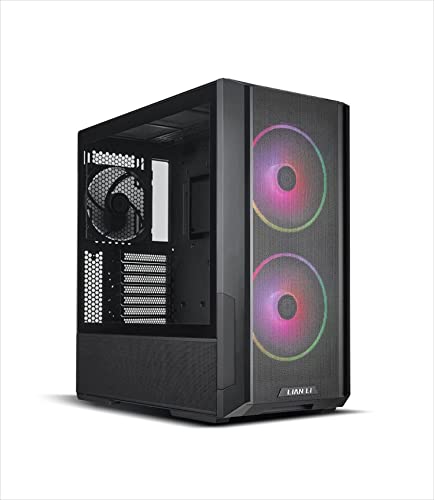
- Equipped with 2 x front 160 PWM fans ARGB and 1 x rear 140mm PWM fan
- Supports 360 radiator at the top, front and a maximum of 10 fans
- Includes rear PCIe fan bracket
Why You'll Love It
- Two front 160mm ARGB PWM fans provide built in airflow and customizable lighting
- A rear 140mm PWM fan adds another airflow point to the case layout
- Mesh across the front, top, and PSU shroud sides supports an airflow focused design
- Top and front 360 radiator support gives builders multiple liquid cooling placement options
- Room for up to 10 fans supports builds that call for additional fan placement
- An included rear PCIe fan bracket adds another option to the cooling configuration
Pros
- +Two front ARGB PWM fans included
- +Separate rear PWM fan included
- +Mesh across three case areas
- +360 radiator support at top and front
- +Support for up to 10 fans
Cons
- -ARGB lighting may not suit lighting free builds
- -Mid tower format may not suit space constrained setups
Detailed Review
The Lian Li LANCOOL 216 RGB is an ATX mid-tower case aimed at PC builders who want a cooling focused layout without having to source every fan separately. Its main attraction is the combination of two front 160mm ARGB PWM fans, a rear 140mm PWM fan, and mesh panels positioned across several areas of the chassis. That makes it worth considering for a build where airflow options and a coordinated lighting setup are important parts of the plan.
The front fan arrangement is a central part of the design. Two 160mm fans are included at the front, and both use PWM control and ARGB lighting. A separate 140mm PWM fan occupies the rear position, giving the case a three fan starting configuration. For a buyer assembling a new PC, those included fans provide an existing layout to work around rather than requiring the entire fan arrangement to be planned from scratch.
Mesh panels at the front, top, and sides of the PSU shroud reinforce the case's airflow oriented design. The layout is also adaptable to different cooling approaches, since the chassis is designed for both air cooling and water cooling. Builders considering liquid cooling have another useful option in the form of 360 radiator support at the top and front. Having those two placement choices makes radiator position a meaningful part of the build planning process rather than limiting the decision to one listed location.
There is also room to expand the fan arrangement, with support for a maximum of 10 fans and an included rear PCIe fan bracket. Those details make the case relevant to builders who want to consider additional cooling hardware beyond the fans supplied with it. However, a larger potential fan count is not a reason to add fans automatically. The sensible approach is to decide which cooling components the planned build needs before choosing additional parts. The ARGB lighting is another design preference to weigh, particularly if a coordinated illuminated appearance is not part of the intended setup.
Verdict: This ATX mid-tower case is a strong candidate for builders who value included PWM fans, mesh panels, and flexible radiator placement. Choose it if those features match your planned cooling configuration, but consider a different case format if a mid-tower layout or ARGB lighting does not suit your build.
Who Should Buy It
A great fit if you:
- You are planning a new ATX PC and want a case with three PWM fans already included.
- You want ARGB lighting built into the front fan arrangement rather than treating lighting as a separate purchase.
- You are deciding between air cooling and liquid cooling and value having more than one radiator placement option.
- You expect to consider additional fans as part of your cooling plan and want room for an expanded configuration.
Consider something else if you:
- You need a smaller case format for your intended setup, making a more compact enclosure a better starting point.
- You prefer a lighting free appearance, so a case without integrated ARGB fans would better match your priorities.
The key is to match the case to the complete build, not simply to the number of cooling options available. Think about your preferred cooling approach, whether you want illuminated fans, and how much room the enclosure can occupy. If those priorities line up with this layout, its included fans and radiator placement choices give you a clear starting point for planning the rest of the system.
Before You Buy
Confirm on the listing:
- Check the case dimensions and measure your intended space to confirm that a mid-tower enclosure suits your setup.
- Verify that the ATX case supports the motherboard and other components you plan to install, including your chosen cooling hardware.
- Check exactly which accessories and fan mounting components are included, especially if you intend to use the rear PCIe fan bracket.
- Review the included fans' connections and control requirements, and confirm how the ARGB lighting will work with your planned system.
How to compare your options: Start with the components you intend to use, then compare case compatibility, radiator placement, included fans, and available fan capacity. The LANCOOL 216 RGB offers two front 160mm ARGB PWM fans, a rear 140mm PWM fan, support for a 360 radiator at the top and front, and a maximum of 10 fans. Give those features priority only where they serve your actual build. If your plans depend on a particular component fit or lighting connection, verify that detail before choosing the enclosure.
Getting the Most From It
Plan the cooling layout before selecting the remaining components. Decide whether your build will use air cooling or water cooling, then consider how the available fan positions and the supported top or front radiator placement fit that plan. This makes it easier to choose components that work together instead of adding cooling hardware without a clear purpose.
Make the most of the included fan arrangement by treating the two front 160mm ARGB PWM fans and the rear 140mm PWM fan as your starting point. Consider additional fans only after reviewing your component choices and intended layout. Although the chassis supports up to 10 fans, that capacity is an option rather than a requirement to fill every available position.
If you plan to use the ARGB lighting, check the relevant connection and control instructions for your chosen system before finalizing the setup. Confirm compatibility rather than assuming that lighting and fan controls will connect in a particular way.
For ongoing care, follow the manufacturer's instructions for cleaning the mesh panels, fans, and other accessible areas. If you change the cooling arrangement later, review the component fit and cable layout again before settling on the revised configuration.
FAQ
What fans come with the Lian Li LANCOOL 216 RGB?
It includes two front 160mm ARGB PWM fans and one rear 140mm PWM fan. That gives you three included fans to account for when planning the rest of your cooling setup.
Can I use a 360 radiator with this case?
Yes, the chassis supports a 360 radiator at the top and front. Check the full component compatibility details before choosing a specific radiator and completing your build plan.
How many fans can the case support?
The stated maximum is 10 fans. You can use that capacity as a planning option, but decide on the actual number and placement based on your intended cooling configuration.
Is this case suitable for water cooling?
Yes, the chassis is configurable for both air cooling and water cooling. Its stated 360 radiator support at the top and front gives liquid cooling builders two placement options to consider.
What should I check before buying?
Confirm the case dimensions, component compatibility, included accessories, and fan and ARGB connection requirements. The listing does not establish every component's fit or connection details, so check those against your planned hardware before purchasing.
Product Details
| Brand | Lian Li |
| ASIN | B0BN3SY5XW |