Logitech
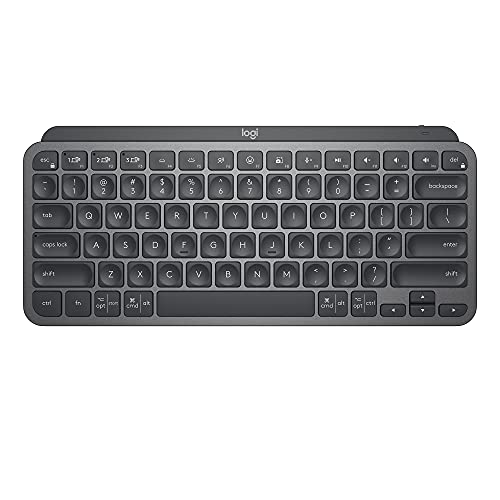
Logitech MX Keys Mini Minimalist Wireless Illuminated Keyboard - Graphite
Disclosure: We may earn a commission when you buy through links on this page, at no extra cost to you. As an Amazon Associate I earn from qualifying purchases. Learn more
Highlights
- Perfect Stroke Typing with Smart Keys (1): Type on keys shaped for your fingertips, with voice to text Dictation (4), Mic Mute/Unmute, and Emoji keys
- Mini Size, Mighty Powerful: A layout designed for effortless precision, with a minimalist form for an ergonomic keyboard that's portable and can travel wherever you get work done
- Smart Illumination: The wireless keyboard's backlit keys light up the moment your hands approach, and automatically adjust to suit changing lighting conditions
- Multi-Device, Multi OS: Pair MX Keys Mini compact keyboard with up to 3 devices on nearly any operating system via Bluetooth Low Energy and switch between them seamlessly
- Multiple Computers, One Flow: Team the slim MX Keys Mini with MX Master 3 or MX Anywhere 3 and type across multiple computers or laptops in one fluid workflow(1)
- USB-C Rechargeable: MX Keys Mini Bluetooth keyboard stays powered up to 10 days on a full charge or up to 5 months with the backlighting turned off(3)
- Plastic parts in MX Keys Mini include certified post consumer recycled plastic (Graphite: 30%, Pale Gray and Rose 12%(5))
- Product carbon footprint: 10.78 kg CO2e;
- Compatible with Googlebook laptops: Unlock the speed, precision and ergonomic comfort needed to power through your heaviest workflows
Why You'll Love It
- Fingertip-shaped keys provide precise typing with dedicated buttons for dictation, mute, and emojis
- Compact minimalist profile saves desk space and packs easily for travel
- Backlit keys light up as hands approach and adapt automatically to room brightness
- Pairs with up to three devices across multiple operating systems using Bluetooth Low Energy
- USB-C rechargeable battery runs up to five months with backlighting turned off
- Pairs with compatible mice to type across multiple computers in one flow
Pros
- +Proximity-sensing automatic backlighting
- +Connects to three devices at once
- +Long battery life without backlighting
- +Dedicated microphone mute and dictation keys
- +Uses post-consumer recycled plastic
Cons
- -Battery life drops significantly with backlighting on
- -Requires Bluetooth Low Energy support on host devices
Detailed Review
A minimalist wireless keyboard needs to balance a compact desk footprint with effortless typing comfort, and the Logitech MX Keys Mini handles that balance directly. Designed for people who move between spaces or want an uncluttered workspace, this model offers a trimmed-down layout that pairs with Googlebook laptops and nearly any operating system over Bluetooth Low Energy. Dedicated shortcut buttons for voice-to-text dictation, mic mute, and emojis bring modern communication tools directly to your fingertips.
Key shape plays a central role in how comfortable this board feels during long writing sessions. The keys feature scooped indentations shaped for your fingertips, which helps guide natural finger placement and precision. Below the surface, proximity sensors detect when your hands approach, illuminating the keys instantly. The backlighting also adjusts itself dynamically as ambient lighting conditions shift around your desk, saving you from manual brightness tweaks throughout the day.
Multi-device versatility makes switching hardware straightforward. The board stores connections for up to three separate devices at once, letting you jump across screens at the press of a key. Furthermore, when teamed up with a companion mouse such as the MX Master 3 or MX Anywhere 3, you can type across multiple computers or laptops in one fluid workflow. That capability turns a compact travel board into a capable command center for multi-machine setups.
The obvious trade-off comes down to how much you rely on the built-in illumination. Running the backlighting cuts the USB-C rechargeable battery life down to about 10 days on a full charge. If you turn the illumination off, that endurance stretches up to 5 months. Buyers who demand weeks of continuous illuminated typing will find themselves plugging in the charging cable far more frequently than those who work under standard room lighting.
Verdict: The Logitech MX Keys Mini is an outstanding choice for remote workers and multi-device multitaskers who value responsive typing in a portable form. If you require a dedicated numeric keypad or weeks of untethered typing with full backlighting, consider a full-sized desktop model instead.
Who Should Buy It
A great fit if you:
- Frequently jump between up to three computers, tablets, or laptops while working on projects throughout the day.
- Want convenient hardware shortcuts for muting your microphone, triggering dictation, and inserting emojis during virtual meetings.
- Work in dim environments and appreciate backlighting that activates automatically whenever your hands move near the keyboard.
- Prefer a compact, portable desk setup that slips easily into a travel bag for working on the go.
Consider something else if you:
- Need an integrated numeric keypad for heavy numerical data entry and accounting tasks, requiring a full-sized office keyboard.
- Lack Bluetooth Low Energy support on your primary computer hardware and require a standard wired USB connection.
Before You Buy
Confirm on the listing:
- Check whether your host computers and tablets support Bluetooth Low Energy connectivity.
- Check what accessories are included in the retail box, such as the specific USB-C charging cable.
- Confirm the exact body color option you prefer, as recycled plastic content varies between Graphite, Pale Gray, and Rose.
- Verify whether your existing mouse is an MX Master 3 or MX Anywhere 3 if you plan to type across multiple screens in one workflow.
How to compare your options: When shopping for a compact wireless keyboard, focus on connection methods, key design, and battery endurance. This model stands out by offering both multi-host pairing across different operating systems and an adaptive proximity backlighting system. Decide whether a ten-day illuminated battery cycle fits your charging routine or if turning illumination off to reach five months of use better matches your habits.
Getting the Most From It
Start by pairing your primary devices using Bluetooth Low Energy, assigning each computer or laptop to one of the dedicated device switching keys for easy access. If you frequently handle virtual calls, familiarize yourself with the top-row shortcuts for muting your mic and activating voice-to-text dictation to streamline your communication.
To stretch your time between USB-C charges, manage the backlighting deliberately. Leaving the smart illumination on is convenient in changing lighting, but toggling it off when you work in bright daylight can extend your total battery life from 10 days up to 5 months.
Keep the keyboard clean by wiping the keycaps with a soft, lint-free cloth as recommended by the manufacturer. Avoid spraying liquids directly onto the keys, and store the unit in a protective sleeve if you pack it into a travel bag alongside other mobile gear.
FAQ
How long does the battery last on a single charge?
The internal battery lasts up to 10 days on a full charge with the backlighting turned on, or up to 5 months if you keep the backlighting off.
How does the keyboard recharge?
It recharges using a standard USB-C connection, allowing you to top up the battery from a compatible port or charger.
How many devices can connect at the same time?
You can pair the keyboard with up to three distinct devices over Bluetooth Low Energy and switch between them smoothly.
Does the keyboard feature backlighting?
Yes, it has smart backlighting with keys that illuminate as your hands approach and automatically adjust their brightness to match ambient light.
Can it work across more than one computer at a time?
Yes, when paired alongside an MX Master 3 or MX Anywhere 3 mouse, you can type across multiple computers or laptops in a single workflow.
Product Details
| Brand | Logitech |
| ASIN | B098JPSVKY |