PHILIPS
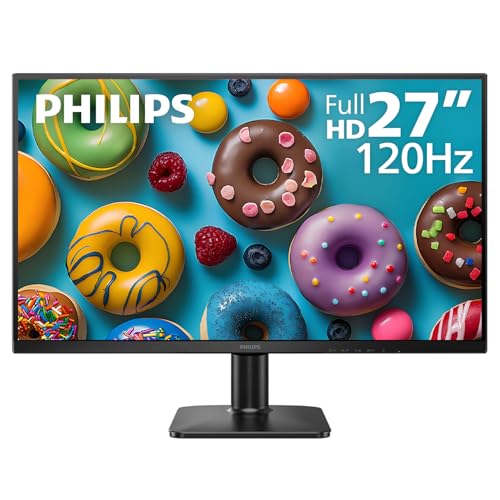
Philips 27 Inch Computer Monitor FHD 120Hz IPS VESA, 27E2N2100
Disclosure: We may earn a commission when you buy through links on this page, at no extra cost to you. As an Amazon Associate I earn from qualifying purchases. Learn more
Highlights
- 120HZ SMOOTH VISUALS: Experience fluid and responsive performance with a high 120Hz refresh rate, delivering smoother motion for work and play compared to standard 60Hz monitors.
- 27” FULL HD IPS DISPLAY: Get crystal-clear visuals and accurate colors with the 1920x1080 resolution IPS panel—ideal for office tasks, entertainment, and casual gaming.
- ULTRA-NARROW BEZELS: Modern 3-sided frameless design maximizes screen space and enables seamless multi-monitor setups.
- MULTIPLE CONNECTIVITY OPTIONS: Includes HDMI, DisplayPort, and VGA inputs, along with audio out—ensuring compatibility with a wide range of devices.
- COMFORT FOR LONG SESSIONS: LowBlue Mode and flicker-free technology help reduce eye fatigue during long hours of productivity or streaming.
Why You'll Love It
- High 120Hz refresh rate delivers fluid motion for everyday office tasks and casual gaming
- Full HD 1920x1080 resolution on an IPS panel ensures accurate colors and clear image quality
- Three-sided frameless design maximizes usable screen area and simplifies side-by-side display setups
- Multiple inputs including HDMI, DisplayPort, and VGA connect smoothly to modern and legacy hardware
- LowBlue Mode and flicker-free technology help reduce eye fatigue during extended viewing periods
- VESA mount support provides flexible mounting choices for desktop arms or wall installations
Pros
- +Smooth 120Hz refresh rate
- +Wide connectivity with HDMI, DisplayPort, and VGA
- +Slim three-sided frameless borders
- +Built-in eye comfort features
Cons
- -Full HD resolution stretched across 27 inches
- -No integrated speakers listed
Detailed Review
A desktop monitor needs to balance clear visual quality, responsive movement, and reliable connections for daily computer work, and the Philips 27E2N2100 targets that sweet spot. Built around a 27-inch IPS panel, it offers a 1920x1080 Full HD resolution suitable for handling general office tasks, streaming media, and casual gaming. The underlying IPS panel technology ensures accurate colors across the screen, making visual content appear natural whether you are drafting documents, editing presentations, or watching videos.
Motion performance is a clear highlight on this display. While basic office screens traditionally operate at 60Hz, this model features a 120Hz refresh rate. That higher refresh rate provides noticeably smoother motion when scrolling through extensive documents, navigating desktop applications, or playing casual games, giving everyday computing a significantly more fluid and responsive feel.
The physical styling supports clean workspaces and versatile arrangements. Its three-sided ultra-narrow bezels reduce border distractions and make the unit well suited for multi-monitor desktop configurations. Around the back, connectivity is generous, featuring DisplayPort, HDMI, and traditional VGA video inputs alongside a dedicated audio out port. This broad interface selection allows easy pairing with modern desktop towers, work laptops, gaming consoles, or older legacy PCs. For comfort during extended workdays or long streaming sessions, built-in flicker-free engineering and LowBlue Mode assist in keeping eye fatigue to a minimum.
Every display design involves compromises. Distributing a standard 1080p Full HD resolution across a 27-inch diagonal means text and fine graphic details will appear less dense compared to higher-resolution panels. Furthermore, while an audio out port is present to route sound to external accessories, the unit does not advertise built-in speakers, so users will rely on separate desktop sound gear or connected headphones for audio.
Verdict: The Philips 27E2N2100 computer monitor delivers dependable color clarity and fluid 120Hz performance for everyday office tasks, media viewing, and casual play. It is a solid match for shoppers wanting broad video connectivity and smooth visual motion, though users who demand ultra-dense pixel resolutions should consider higher-resolution screen options.
Who Should Buy It
A great fit if you:
- Need a fluid 120Hz display for smoother scrolling, everyday productivity, and casual gaming sessions.
- Work across multiple devices and require versatile ports including HDMI, DisplayPort, and legacy VGA connections.
- Plan to build a dual-screen or multi-display workspace that benefits from slim, three-sided frameless bezels.
- Spend long hours at your desk and prefer built-in viewing comfort via LowBlue Mode and flicker-free technology.
Consider something else if you:
- Require higher pixel density for intricate visual editing and would be better served by a 1440p or 4K resolution screen.
- Prefer an all-in-one entertainment setup with integrated internal speakers rather than using external audio devices.
Before You Buy
Confirm on the listing:
- Check which video cables (such as HDMI, DisplayPort, or VGA) are provided directly in the retail packaging.
- Confirm the exact VESA pattern dimensions if you intend to install the screen on an existing arm or wall bracket.
- Measure your desk space to ensure a 27-inch display footprint fits your physical layout comfortably.
- Verify whether your computer output ports support driving the display at its full 120Hz refresh rate.
How to compare your options: When shopping for a general computer monitor, pay close attention to panel type, refresh rate, and physical connectivity. While many basic monitors remain capped at standard 60Hz speeds, this Philips screen delivers a faster 120Hz rate for noticeably smoother motion. Its inclusion of both modern digital inputs and legacy VGA makes it more adaptable to varied hardware setups than single-input alternatives.
Getting the Most From It
To unlock the best performance from your display, verify that your computer operating system display settings are configured to output the full 120Hz refresh rate rather than defaulting to 60Hz. If you connect using HDMI or DisplayPort, this setting can easily be adjusted in your system display properties.
Take advantage of the eye comfort features if you work for extended periods. Turning on LowBlue Mode and relying on the flicker-free technology can help keep visual strain low during evening tasks or long reading sessions.
If you plan to mount the monitor, inspect the VESA mounting area on the back panel to match it with your chosen stand or desk arm. For sound output, plug your favorite external desktop speakers or wired headphones directly into the monitor audio out port when using digital audio over HDMI or DisplayPort.
FAQ
Does this monitor support higher refresh rates than standard office screens?
Yes, it operates at up to 120Hz, which provides fluid motion and responsiveness compared to typical 60Hz office displays.
What video connections are available on this model?
The monitor features HDMI, DisplayPort, and VGA input ports, giving you broad compatibility with modern graphics cards, laptops, and older systems.
Can I mount this display on a monitor arm?
Yes, the display includes VESA mounting support, allowing you to attach it to compatible monitor arms, stands, or wall brackets.
Does the screen include built-in speakers?
The listing does not specify internal speakers, but it does include a dedicated audio out port to connect your own external speakers or headphones.
What features help reduce eye fatigue?
It comes equipped with LowBlue Mode and flicker-free technology designed to provide visual comfort during long hours of productivity or streaming.
Product Details
| Brand | PHILIPS |
| ASIN | B0FKJHX1QM |