Sceptre
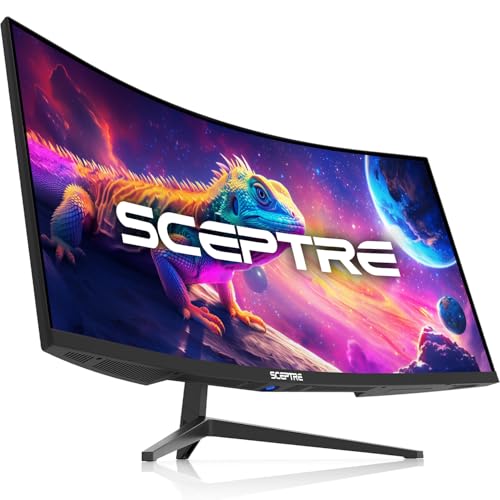
Sceptre 34-Inch Curved Ultrawide WQHD Monitor, 3440 x 1440, R1500, Up to 180Hz/165Hz, DisplayPort x2, 100% sRGB, 1ms, Built-in Speakers, Black (C345B-QUT168 Series)
Disclosure: We may earn a commission when you buy through links on this page, at no extra cost to you. As an Amazon Associate I earn from qualifying purchases. Learn more
Highlights
- WQHD Resolution: At 1 million pixels, Wide Quad HD Resolution (3440 x 1440) display resolution provides you with the next level of refined, and detailed picture over the current 1080P standard.
- 1ms MPRT: Colors fade and illuminate instantly with a 1ms response time, eliminating ghosting and piecing together precise imagery during action-packed scenes and gaming.
- Eye Care
- PBP & PIP - Multitasking Without limites
- Luminous Backcover Lights: A colorful LED light illuminates the back cover of the monitor, delivering a uniquely modern design.
- 21:9 Ultrawide: See more and do more with an ultrawide monitor. 21:9 provides you with 30% more screen space versus the conventional monitor. With an ultrawide resolution of 3440 x 1440, expand your performance and productivity.
Why You'll Love It
- 3440 x 1440 WQHD resolution gives detailed workspace for gaming, multitasking, and viewing content
- The 21:9 ultrawide format creates room for broader work layouts and expanded on screen views
- Refresh rates up to 180Hz/165Hz and 1ms MPRT target responsive, clear looking action
- Picture by Picture and Picture in Picture modes support viewing multiple sources in one workspace
- Two DisplayPort connections provide display connection options for compatible equipment
- A curved R1500 screen, 100% sRGB coverage, built in speakers, and colorful rear lighting round out the feature set
Pros
- +34 inch curved ultrawide screen
- +3440 x 1440 WQHD resolution
- +Up to 180Hz/165Hz refresh rate
- +Picture by Picture and Picture in Picture
- +Built in speakers and rear LED lighting
Cons
- -The 21:9 format may not suit every workspace
- -High refresh rate benefits depend on your intended setup
- -Built in speakers may not suit every listening preference
Detailed Review
The Sceptre C345B QUT168 is a 34 inch curved ultrawide monitor aimed at shoppers who want more room for gaming, multitasking, and detailed on screen work. Its 3440 x 1440 WQHD resolution and 21:9 aspect ratio make the expanded display area the central attraction. Rather than organizing every task around a conventional 16:9 layout, you can consider a wider workspace for keeping different activities visible together. The curved R1500 design adds another defining characteristic for buyers who specifically prefer a curved screen.
Resolution is an important part of the appeal. The 3440 x 1440 panel offers more detailed imagery than the 1080P standard cited in the seller's description, making it relevant to shoppers who want a higher resolution for games, images, and everyday screen work. The 21:9 format is described as providing 30% more screen space than a conventional monitor. That additional width can be useful when arranging multiple windows or keeping more of a wide scene in view. The 100% sRGB specification is also worth considering if color coverage is an important part of your display priorities.
Gaming oriented specifications give this monitor another clear audience. Its refresh rate is listed as up to 180Hz/165Hz, alongside a 1ms MPRT response specification. Together, these features make it worth considering for shoppers who prioritize a high refresh rate and responsive looking motion. The stated figures are product specifications, however, not a guarantee that every connected setup will operate at the highest listed refresh rate. Check the configuration you intend to use before making that a deciding factor.
There are practical extras beyond the main display. Picture by Picture and Picture in Picture modes are intended to help with viewing multiple sources, while two DisplayPort connections provide connection options. Built in speakers offer an integrated audio feature, and colorful LED lighting on the back cover gives the monitor a more distinctive appearance. Eye Care is also included in the seller's feature list, although the description does not identify the specific functions included under that label.
The main trade off is the commitment to a particular screen format. A 34 inch curved 21:9 monitor is most compelling when its extra width suits your work, games, and available desk space. It is less compelling if you prefer a conventional layout or do not expect to benefit from an ultrawide workspace. The refresh rate options and multiple display modes also matter most when they align with your intended equipment and tasks. Verdict: This curved ultrawide monitor is a strong candidate for shoppers who want WQHD detail, a wide workspace, and gaming focused display specifications in one screen. Consider a conventional format instead if you have no need for the extra width or prefer a simpler display arrangement.
Specifications
- Brand: Sceptre
- Model series: C345B QUT168
- Screen size: 34 inches
- Resolution: 3440 x 1440 WQHD
- Aspect ratio: 21:9 ultrawide
- Curvature: R1500
- Refresh rate: Up to 180Hz/165Hz
- Response specification: 1ms MPRT
- Color coverage: 100% sRGB
- Display connections: Two DisplayPort connections
- Audio: Built in speakers
- Display modes: Picture by Picture and Picture in Picture
- Additional features: Eye Care and colorful rear LED lighting
- Color: Black
Who Should Buy It
A great fit if you:
- Want a wide desktop workspace for keeping several windows visible while working through related tasks.
- Play games and place a high priority on a high refresh rate and a responsive display specification.
- Prefer a curved screen and want a 34 inch display with 3440 x 1440 resolution.
- Regularly need to view multiple display sources and would use Picture by Picture or Picture in Picture modes.
Consider something else if you:
- Prefer a familiar screen format and would get more value from a conventional aspect ratio monitor.
- Want a display chosen primarily for a particular feature that matters more to you than ultrawide viewing, such as a different screen size or layout.
Before You Buy
Confirm on the listing:
- Measure your available desk space and check that a 34 inch curved ultrawide screen suits your preferred viewing arrangement.
- Check whether your computer or other intended equipment supports the resolution and refresh rate you want to use.
- Confirm which connections are available on your equipment and whether the included connection accessories, if any, suit your setup.
- Review what comes in the box, the available adjustment or mounting arrangements, and the instructions for power, cleaning, and care.
How to compare your options: Start with screen size, resolution, aspect ratio, and curvature, because these determine whether the display matches your workspace and viewing preferences. Next, compare refresh rate and response specifications against your intended gaming or work use. If you regularly view multiple sources, consider whether Picture by Picture and Picture in Picture are useful to you. Finally, weigh the two DisplayPort connections, built in speakers, 100% sRGB coverage, Eye Care feature, and rear lighting according to which functions you will actually use. Choose based on your priorities rather than the length of the feature list alone.
Getting the Most From It
Start by arranging the monitor around the tasks you do most often. Position the curved ultrawide display so its full width fits naturally into your workspace, then organize your windows to take advantage of the 21:9 format. A wide layout is most useful when you intentionally decide which activities should remain visible together.
For gaming, review the display settings and available connection options before selecting your preferred resolution and refresh rate. The monitor is listed with refresh rates up to 180Hz/165Hz and a 1ms MPRT specification, so check that your chosen configuration makes sense for the equipment you connect.
If you work with multiple sources, explore Picture by Picture and Picture in Picture and decide which arrangement is easier for the task at hand. Use the built in speakers if integrated audio suits your needs, and treat the rear LED lighting as a design feature rather than a requirement for using the display.
For routine care, follow the manufacturer's instructions if provided, including any guidance on cleaning and handling. Review the Eye Care options described in the product documentation, and adjust the display settings to match your preferences instead of assuming one configuration will suit every activity.
FAQ
What resolution does the Sceptre C345B QUT168 support?
It is listed with 3440 x 1440 WQHD resolution. This gives the 34 inch ultrawide screen its stated display detail.
Is this monitor suitable for gaming?
Yes, it is a reasonable option to consider for gaming, with refresh rates up to 180Hz/165Hz and a 1ms MPRT specification. Check your intended setup before relying on the highest refresh rate.
Does it support multiple display sources?
Yes, it includes Picture by Picture and Picture in Picture modes. These options are intended to help you view multiple sources within the display area.
Does it have built in speakers?
Yes, built in speakers are listed as a feature. If audio is a priority, confirm that their capabilities suit your needs before purchasing.
What comes in the box, and will it work with my computer?
The product description identifies two DisplayPort connections but does not establish the complete box contents or compatibility with your specific equipment. Check the included accessories and your computer's supported connections, resolution, and refresh rate before ordering.
Product Details
| Brand | Sceptre |
| ASIN | B0FDVNJ8ST |