TP-Link
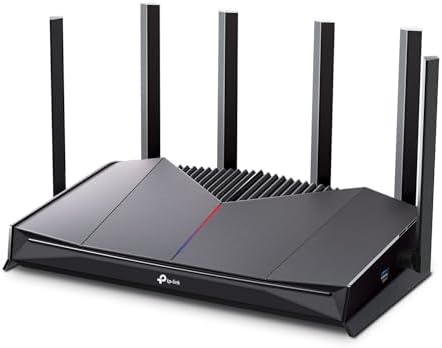
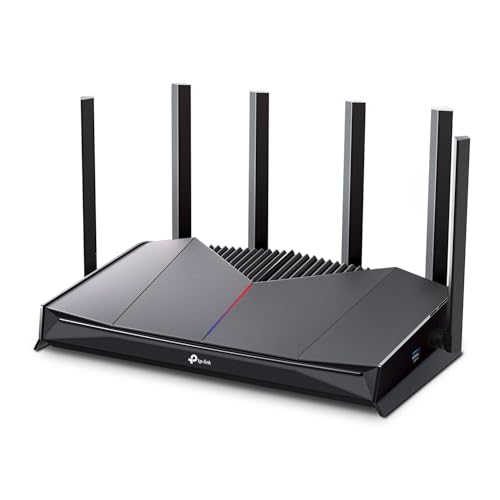
TP-Link Dual-Band BE6500 WiFi 7 Gaming Router 6.5 Gbps (Archer GE400) | 6-Stream, 2 x 2.5G + 3 x 1G, Game Acceleration, Dedicated Gaming Port & Panel, RGB Lighting, Easymesh, Homeshield | No 6 GHz
Disclosure: We may earn a commission when you buy through links on this page, at no extra cost to you. As an Amazon Associate I earn from qualifying purchases. Learn more
Highlights
- 𝐁𝐮𝐢𝐥𝐭 𝐅𝐨𝐫 𝐄𝐯𝐞𝐫𝐲 𝐆𝐚𝐦𝐞𝐫 - The Archer GE400 elevates your gameplay with a dedicated multi-gig gaming port, prioritized game traffic (QoS), and game server acceleration through WTFast. All work together for faster response times and reduced lag.
- 𝐁𝐥𝐚𝐳𝐢𝐧𝐠-𝐅𝐚𝐬𝐭 𝟔-𝐒𝐭𝐫𝐞𝐚𝐦 𝐁𝐄𝟔𝟓𝟎𝟎 𝐆𝐚𝐦𝐢𝐧𝐠 𝐖𝐢𝐅𝐢 - Achieve up to 5765 Mbps (5 GHz) and 688 Mbps (2.4 GHz). Performance varies by conditions, distance to devices, and obstacles such as walls. △ 𝐏𝐥𝐞𝐚𝐬𝐞 𝐧𝐨𝐭𝐞 𝐃𝐮𝐚𝐥-𝐁𝐚𝐧𝐝 𝐑𝐨𝐮𝐭𝐞𝐫 𝐝𝐨𝐞𝐬 𝐧𝐨𝐭 𝐬𝐮𝐩𝐩𝐨𝐫𝐭 𝟔 𝐆𝐇𝐳 𝐁𝐚𝐧𝐝
- 𝐌𝐚𝐱𝐢𝐦𝐢𝐳𝐞𝐝 𝐂𝐨𝐯𝐞𝐫𝐚𝐠𝐞 - Up to 2,600 sq. ft. coverage for up to 90 devices at a time. 6 optimally positioned antennas and Beamforming technology focus WiFi signals toward hard-to-cover areas for stronger coverage.
- 𝐌𝐮𝐥𝐭𝐢-𝐆𝐢𝐠𝐚𝐛𝐢𝐭 𝐏𝐨𝐫𝐭𝐬 - Includes 1x 2.5 Gbps WAN/LAN, 1x 2.5 Gbps LAN, and 3x 1 Gbps LAN ports for high-speed wired connections. Pair with a multi-gig modem to maximize your multi-gig internet plans. All Wi-Fi routers require a separate modem.§
- 𝐎𝐮𝐫 𝐂𝐲𝐛𝐞𝐫𝐬𝐞𝐜𝐮𝐫𝐢𝐭𝐲 𝐂𝐨𝐦𝐦𝐢𝐭𝐦𝐞𝐧𝐭 - TP-Link is a signatory of the U.S. Cybersecurity and Infrastructure Security Agency’s (CISA) Secure-by-Design pledge. This device is designed, built, and maintained, with advanced security as a core requirement.
- 𝐃𝐞𝐝𝐢𝐜𝐚𝐭𝐞𝐝 𝐆𝐚𝐦𝐞 𝐏𝐚𝐧𝐞𝐥 - The intuitive dashboard shows insights into your battle environment, network, and router performance. Control RGB settings, prioritize game traffic, and see which devices, like your PC or console, are accelerated for performance.
- 𝐄𝐱𝐭𝐞𝐧𝐝 𝐘𝐨𝐮𝐫 𝐂𝐨𝐯𝐞𝐫𝐚𝐠𝐞 𝐰𝐢𝐭𝐡 𝐄𝐚𝐬𝐲𝐦𝐞𝐬𝐡 - Easily extend your WiFi coverage by adding EasyMesh-compatible routers, range extenders and wireless powerline adapters, creating a seamless, whole-home network without dead zones as well as preventing drops and lag when moving between signals. Not compatible with mesh WiFi systems like Deco.**
- 𝐓𝐏-𝐋𝐢𝐧𝐤 𝐇𝐨𝐦𝐞𝐒𝐡𝐢𝐞𝐥𝐝 - Keep your network secure and your data private with TP-Link's premium security service. Free features include Network Security, Quality of Service, and basic Parental Controls.*
- 𝐇𝐢𝐠𝐡𝐞𝐫 𝐒𝐩𝐞𝐞𝐝𝐬 𝐰𝐢𝐭𝐡 𝐌𝐮𝐥𝐭𝐢-𝐋𝐢𝐧𝐤 𝐎𝐩𝐞𝐫𝐚𝐭𝐢𝐨𝐧 - Unlock smoother online gaming and faster data transfers by using 2 frequency bands simultaneously for stable internet connections. ⌂
- 𝐄𝐚𝐬𝐲 𝐒𝐞𝐭𝐮𝐩 𝐚𝐧𝐝 𝐔𝐬𝐞 - Set up your Archer GE400 in minutes and manage network settings with the Tether app (Android or iOS) or web interface.
Why You'll Love It
- Prioritizes gaming traffic through QoS, a dedicated gaming port, and WTFast server acceleration
- Combines 5 GHz and 2.4 GHz WiFi bands for a combined BE6500 wireless configuration
- Provides two 2.5 Gbps connections and three 1 Gbps LAN ports for wired devices
- Covers up to 2,600 square feet and supports up to 90 connected devices
- Offers a dedicated gaming dashboard for network insights, traffic control, and RGB customization
- Expands coverage through compatible EasyMesh routers, range extenders, and wireless powerline adapters
Pros
- +Dedicated gaming port and traffic prioritization
- +Two 2.5 Gbps network connections
- +Gaming dashboard with RGB controls
- +EasyMesh expansion support
- +Up to 90 connected devices
Cons
- -No 6 GHz WiFi band
- -EasyMesh does not support Deco systems
- -Requires a separate modem
Detailed Review
The TP-Link Archer GE400 WiFi 7 gaming router is designed for households that want gaming traffic to receive dedicated network attention while keeping other connected devices online. Its main attraction is the combination of a dedicated gaming port, traffic prioritization, and game server acceleration through WTFast. Rather than focusing only on headline wireless speeds, this router also gives gamers a dedicated dashboard for managing network activity and monitoring router performance. It is particularly relevant for households with gaming PCs or consoles that share an internet connection with other devices.
Wireless performance is built around a six-stream, dual-band BE6500 configuration. The advertised maximum speeds reach 5,765 Mbps on the 5 GHz band and 688 Mbps on the 2.4 GHz band. Multi-Link Operation can use both frequency bands simultaneously for internet connections, with the aim of providing more stable connectivity for gaming and faster data transfers. Six antennas and Beamforming technology are intended to direct wireless signals toward devices, including those in harder-to-cover areas. TP-Link gives a coverage estimate of up to 2,600 square feet and support for as many as 90 devices, although actual wireless performance depends on distance, conditions, and obstacles such as walls.
The wired connections are another important part of the design. There is one 2.5 Gbps WAN/LAN port, one additional 2.5 Gbps LAN port, and three 1 Gbps LAN ports. This gives buyers several options for connecting compatible wired equipment, while the multi-gig connections can be paired with a multi-gig modem to take advantage of a multi-gig internet plan. A separate modem is required, so the router should be considered as part of a home network setup rather than a complete modem and router replacement.
Management is centered on the dedicated gaming panel, which displays information about the network, gaming environment, and router performance. Users can prioritize game traffic, see which devices are receiving acceleration, and adjust RGB lighting. Setup and everyday network management are available through the TP-Link Tether app for Android and iOS or through a web interface. HomeShield includes free Network Security, Quality of Service, and basic Parental Controls. EasyMesh compatibility also provides an expansion route through compatible routers, range extenders, and wireless powerline adapters.
The main compromise is its dual-band design. Despite being a WiFi 7 model, the Archer GE400 does not support the 6 GHz band, which matters to shoppers specifically seeking that frequency. EasyMesh also has a compatibility boundary: it does not work with Deco mesh WiFi systems. The separate modem requirement is another consideration when planning a purchase. Verdict: This WiFi 7 gaming router makes sense for gamers who value dedicated traffic controls, multi-gig wired connections, and a customizable gaming dashboard. Shoppers who specifically need 6 GHz WiFi or want to integrate with an existing Deco mesh system should consider a different router.
Specifications
- Model: Archer GE400
- Wireless standard: WiFi 7
- Wireless configuration: BE6500, six-stream, dual-band
- 5 GHz speed: Up to 5,765 Mbps
- 2.4 GHz speed: Up to 688 Mbps
- 6 GHz band: Not supported
- Coverage: Up to 2,600 square feet
- Device capacity: Up to 90 devices
- Antennas: Six optimally positioned antennas
- WAN/LAN ports: One 2.5 Gbps WAN/LAN port
- Additional wired ports: One 2.5 Gbps LAN and three 1 Gbps LAN ports
- Gaming features: Dedicated gaming port, QoS, WTFast game server acceleration, and gaming dashboard
- Wireless technologies: Beamforming and Multi-Link Operation
- Mesh compatibility: EasyMesh, not compatible with Deco mesh WiFi systems
- Management: TP-Link Tether app for Android and iOS, or web interface
Who Should Buy It
A great fit if you:
- Play online games on a PC or console and want a dedicated connection for gaming traffic.
- Have several wired devices and want both 2.5 Gbps and 1 Gbps network connections available.
- Run a household with multiple connected devices and want wireless coverage across a larger area.
- Prefer managing network priorities, connected devices, and lighting through a dedicated gaming dashboard.
- Want the option to expand wireless coverage using compatible EasyMesh equipment.
Consider something else if you:
- Need the 6 GHz frequency band, in which case a tri-band router would be a better fit.
- Already use a Deco mesh system and want direct integration, making a Deco-compatible networking solution more suitable.
Before You Buy
Confirm on the listing:
- Check that dual-band WiFi is sufficient for your needs. This model supports 2.4 GHz and 5 GHz, but not 6 GHz.
- Confirm that your existing modem and internet plan can work with the router's 2.5 Gbps connections if you want multi-gig networking.
- Check your available space against the advertised coverage of up to 2,600 square feet, accounting for your home's layout and obstacles.
- Verify what accessories are included in the box and whether you need to purchase a separate modem.
How to compare your options: Start with the wireless bands and advertised speeds, then consider wired connectivity and gaming controls. The Archer GE400 offers two 2.5 Gbps connections, three 1 Gbps LAN ports, QoS, and WTFast acceleration. Also compare coverage, device capacity, and mesh compatibility against your household requirements. If 6 GHz support or Deco integration is essential, prioritize those requirements before choosing.
Getting the Most From It
Start by choosing the management method that suits you. The Tether app is available for Android and iOS, while a web interface provides another way to configure network settings. Follow the setup instructions and account for the separate modem requirement when preparing your network.
For gaming, connect a compatible PC or console through the dedicated gaming port if that suits your setup. Use the gaming panel to prioritize game traffic and review which connected devices are receiving acceleration. The QoS controls and WTFast feature provide additional options for managing gaming-related network activity.
Make use of the wired connections according to the capabilities of your connected equipment. The two 2.5 Gbps connections and three 1 Gbps LAN ports offer different connection options, while a compatible multi-gig modem can support a multi-gig internet plan.
If wireless coverage needs expanding, consider compatible EasyMesh equipment rather than assuming a Deco system will work. Review HomeShield's available free features and adjust the basic parental controls and network settings to suit your household. You can also customize RGB lighting through the gaming dashboard.
FAQ
Does the TP-Link Archer GE400 support 6 GHz WiFi?
No. It is a dual-band WiFi 7 router that supports 2.4 GHz and 5 GHz, not 6 GHz. Its advertised wireless speeds are up to 688 Mbps and 5,765 Mbps on those respective bands.
Can I use this router with a gaming PC or console?
Yes. It has a dedicated multi-gig gaming port, QoS traffic prioritization, and WTFast game server acceleration. Its gaming panel also shows which devices receive acceleration.
Does the Archer GE400 include a modem?
No. The router requires a separate modem. If you have a multi-gig internet plan, TP-Link recommends pairing it with a multi-gig modem to make use of its multi-gig connections.
Can I expand its wireless coverage with mesh equipment?
Yes. It supports EasyMesh-compatible routers, range extenders, and wireless powerline adapters. However, it is not compatible with Deco mesh WiFi systems.
How do I set up and manage the router?
Use the TP-Link Tether app on Android or iOS, or access the web interface. The dedicated gaming dashboard provides network information, gaming traffic controls, device acceleration details, and RGB lighting settings.
Product Details
| Brand | TP-Link |
| ASIN | B0FTTPB4MQ |