TP-Link
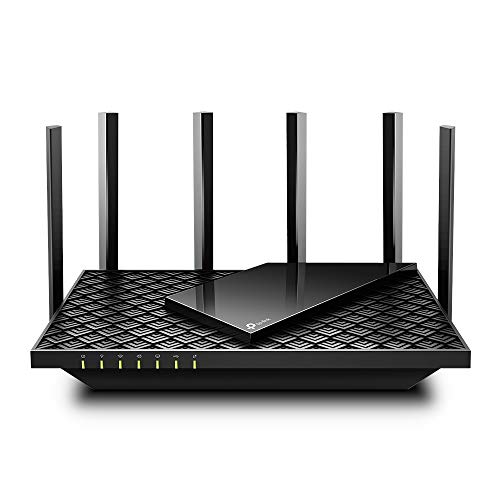
TP-Link Smart WiFi 6 Dual Band Router 4 Gigabit LAN Ports | 802.11AX Router, Beamforming, OFDMA, MU-MIMO, Parental Controls, Dual-Core 900MHz Processor, Works with Alexa (Archer AX10)
Disclosure: We may earn a commission when you buy through links on this page, at no extra cost to you. As an Amazon Associate I earn from qualifying purchases. Learn more
Highlights
- OneMesh Compatible Router - Form a seamless WiFi when work with TP-Link OneMesh WiFi Extenders
- Next-Gen Wi-Fi 6 Technology – The Archer AX10 leverages advanced Wi-Fi 6 features like OFDMA and 1024-QAM to deliver improved efficiency across your entire network. Perfect for high-bandwidth activities like streaming, gaming, and smart home connectivity.
- Next-gen Dual Band router - 300 Mbps on 2. 4 GHz (802. 11n) plus 1201 Mbps on 5 GHz (802. 11ax)
- Connect more devices than ever before - Wi-Fi 6 technology simultaneously communicates more data to more devices using OFDMA and MU-MIMO while reducing lag dramatically
- Powerful Dual-Core 900MHz Processor – Handles multiple data streams simultaneously for reliable performance across your devices. Ensures smooth streaming, online gaming, and video conferencing without buffering or lag.
- More coverage with less interference - achieve the strongest most reliable Wi-Fi coverage with Archer AX10 as it focuses signal strength to your devices using Beamforming technology.
- Backward compatible - Archer AX10 supports all previous 802. 11 standards and all Wi-Fi devices
- Works with all internet service providers, such as AT&T, Verizon, Xfinity, Spectrum, RCN, Cox, CenturyLink, Frontier, etc.( a modem is required for most internet service providers)
Why You'll Love It
- WiFi 6 technology handles more devices at once with less lag, ideal for busy homes
- Dual-core 900MHz processor keeps streaming and gaming smooth without buffering
- Beamforming focuses signal strength to your devices for better coverage
- OneMesh compatible, so you can add a TP-Link extender for a single seamless network
- Backward compatible with all older WiFi devices and internet providers
- Dual-band speeds up to 1201 Mbps on 5 GHz and 300 Mbps on 2.4 GHz
Pros
- +Affordable entry into WiFi 6
- +OFDMA and MU-MIMO for multiple devices
- +Works with Alexa for voice control
- +Four gigabit LAN ports for wired connections
- +Compact and easy to set up
Cons
- -No USB port for shared storage or printer
- -Only dual-band, not tri-band
- -Plastic build feels lightweight
Detailed Review
The TP-Link Archer AX10 is a WiFi 6 dual-band router that brings next-generation wireless technology to a budget-friendly price point. It is designed for households with multiple devices streaming, gaming, video conferencing, and running smart home gadgets all at once. If your current router struggles with buffering or dropped connections when the whole family is online, this router aims to solve that by using WiFi 6 features like OFDMA and MU-MIMO to handle more data traffic efficiently.
The core advantage of the Archer AX10 is its support for WiFi 6 (802.11ax), which delivers combined speeds of up to 300 Mbps on the 2.4 GHz band and 1201 Mbps on the 5 GHz band. In everyday use, that means faster downloads, smoother 4K streaming, and less lag during online gaming. The dual-core 900MHz processor helps keep everything running without stuttering, even when multiple devices are active at the same time. Beamforming technology focuses the WiFi signal toward your connected devices rather than broadcasting it evenly in all directions, which can improve coverage and reliability throughout your home.
Setup is straightforward for a router of this class. The Archer AX10 includes four gigabit LAN ports for wired connections, which is useful for gaming consoles, smart TVs, or desktop computers that benefit from a stable wired link. It works with all major internet service providers (AT&T, Verizon, Xfinity, Spectrum, and others), though you will need a separate modem unless your ISP provides a combined modem-router unit. The router is also compatible with Alexa, so you can use voice commands to manage your network if you have an Alexa device.
There are a few trade-offs to consider. The Archer AX10 is a dual-band router, not tri-band, so if you have an extremely large home with dozens of devices, a tri-band model may offer better performance. It also lacks a USB port, meaning you cannot connect a shared external drive or printer directly to the router. The build is plastic and lightweight, which is expected at this price point, but it feels less substantial than more expensive routers.
Verdict: The TP-Link Archer AX10 is a smart choice if you want to upgrade to WiFi 6 without spending a lot. It handles multiple devices well, offers solid speeds for streaming and gaming, and is easy to set up. Look elsewhere if you need a USB port or a tri-band router for a very large, device-heavy home.
Who Should Buy It
A great fit if you:
- Have a household with several people streaming video, gaming, and video conferencing at the same time and need a router that handles multiple connections smoothly.
- Are looking for an affordable way to upgrade from an older WiFi 5 router to WiFi 6 without paying a premium.
- Want a router that works with your existing internet service provider and all your current devices, including older gadgets that use previous WiFi standards.
- Plan to expand your network later with a TP-Link OneMesh extender for whole-home coverage without switching networks.
Consider something else if you:
- Need a USB port to share a hard drive or printer across your network, as this router does not have one.
- Have a very large home with many walls or floors and require a tri-band router or a mesh system for the best coverage.
- Want the absolute fastest WiFi speeds for a high-end gaming setup with lots of wired peripherals, where a model with more LAN ports might be useful.
Before You Buy
Confirm on the listing:
- Check whether your internet service provider requires a separate modem. Most providers (like Xfinity, Spectrum, AT&T) need a modem, but some offer a combined modem-router unit. This router does not include a modem.
- Measure the space where you plan to place the router. The Archer AX10 is compact, but ensure it has good airflow and is near your modem and main devices for the best wired connection.
- Verify that your internet plan speed is compatible. If you have a gigabit plan, this router can handle it via the wired ports, but WiFi speeds will depend on your devices and environment.
- If you plan to use the OneMesh feature, confirm that the WiFi extender you are considering is listed as OneMesh compatible by TP-Link, as not all extenders work with this system.
How to compare your options: When shopping for a WiFi 6 router in this price range, focus on the number of LAN ports, processor speed, and whether you need USB connectivity. The Archer AX10 offers a solid balance of performance and features for most homes. If you need more wired ports or a USB port, you may want to look at models a step up in price. For very large homes, consider a mesh system instead of a single router.
Getting the Most From It
Placement matters. Put the router in a central location, away from thick walls, metal objects, and large appliances. The beamforming technology works best when the router has a clear path to your devices. Elevate it on a shelf or desk rather than the floor.
Update the firmware. After setup, log into the router's web interface or use the TP-Link Tether app to check for firmware updates. Keeping the firmware current improves performance and security.
Use the parental controls. The router includes parental controls, so take a few minutes to set schedules or block specific websites for kids' devices. This is managed through the app or web interface.
Optimize for your devices. For the best WiFi 6 performance, use devices that also support WiFi 6 (802.11ax). Older devices will still work but won't get the full speed boost. If you have many smart home gadgets, connect them to the 2.4 GHz band for better range.
FAQ
Does this router work with my internet provider?
Yes, it works with all major providers like AT&T, Verizon, Xfinity, Spectrum, RCN, Cox, CenturyLink, and Frontier. You will need a separate modem for most cable and fiber services, as this router does not include a modem.
Can I use this router with my older WiFi devices?
Yes, the Archer AX10 is backward compatible with all previous WiFi standards (802.11 a/b/g/n/ac). Your older phones, laptops, and smart home devices will connect without issues.
Does it have a USB port for a printer or external drive?
No, this router does not include any USB ports. If you need to share a printer or external hard drive over your network, you will need a different router that has USB connectivity.
What is OneMesh and do I need a special extender?
OneMesh lets you create a single seamless WiFi network when you pair this router with a TP-Link OneMesh compatible WiFi extender. Check the product listing of the extender to confirm it supports OneMesh before buying.
How many devices can this router handle?
The router uses WiFi 6 technologies OFDMA and MU-MIMO to communicate with multiple devices simultaneously, reducing lag. While the exact number depends on your usage, it is designed to handle more devices than a typical WiFi 5 router without slowing down.
Product Details
| Brand | TP-Link |
| ASIN | B07ZSDR49S |