
16gb vs 32gb RAM: Which Is Better in 2026?
Disclosure: We may earn a commission when you buy through links on this page, at no extra cost to you. As an Amazon Associate I earn from qualifying purchases. Learn more

16gb vs 32gb ram for a gaming PC: what each amount handles, which workloads need more, and how to decide before you buy a kit.
For anyone building or upgrading a PC, 16gb vs 32gb ram is one of the most common questions, and the right answer has shifted as games and apps have grown hungrier. 16GB still runs plenty of games well, but 32GB gives you breathing room for heavy multitasking, creative work and newer titles. The product table right after this introduction lists memory kits in both capacities.
You will see what each amount handles, which uses really need more, and how to spend your memory budget wisely.





What Happens When Memory Runs Out
RAM holds the data your system is working on right now. When you run out, Windows starts moving data to the much slower storage drive, and everything feels sluggish: games stutter, browser tabs reload and large files take longer to open. More memory does not make a computer faster in itself, but having too little makes it noticeably slower.
The way to judge your need is to watch usage while doing your normal tasks. Open the task manager during a typical session. If you often sit near the limit, a bigger kit will help. If usage stays well below it, extra capacity will sit idle.
Where 16GB Still Works
For general use, office work, web browsing, streaming and many games, 16GB remains workable. It suits budget builds and laptops where cost and battery life count. If you close background programs while gaming and mostly play older or lighter titles, you may never feel a limit.
The weak point is multitasking. A game with a browser, voice chat and a launcher open can leave little headroom, and some recent releases can use a large portion of 16GB on their own, particularly with high texture settings.
Why 32GB Is the Safer Choice
Thirty-two gigabytes is the comfortable choice for a new gaming PC. It gives modern games plenty of space, lets you keep background apps open and cuts the odds of stutter in demanding titles. It also leaves room for several years of software growth, which is the main argument for buying it now rather than later.
Creative and technical work benefits even more. Video editing, large photo files, 3D work, programming with virtual machines and running many browser tabs all use memory freely. In these jobs, going from 16GB to 32GB is one of the most noticeable upgrades you can make.
- 16GB: general use, light gaming, budget builds, laptops with tight budgets.
- 32GB: modern gaming, streaming while playing, content creation, heavy multitasking.
Speed, Latency and Channels
Capacity is not the only number on the label. Speed (such as DDR5 at 6000) and latency (the CL number) affect performance too, though less than most advertising suggests. Always buy memory in a matched kit of two modules to run in dual channel. A single stick halves the available bandwidth and can cut gaming performance noticeably.
Check that the kit is compatible with your motherboard and processor. DDR4 and DDR5 are different and do not fit the same slots. After installing, enable the XMP or EXPO profile in the BIOS, otherwise the memory runs at a slower default speed.
Cost and Upgrade Planning
Memory prices move, so compare the cost per gigabyte when you shop. Sometimes the 32GB kit costs only slightly more than a 16GB one of similar speed, and that makes the choice easy. When the gap is large, consider 16GB now with a plan to add another matched pair later, though mixing kits can reduce speed or stability.
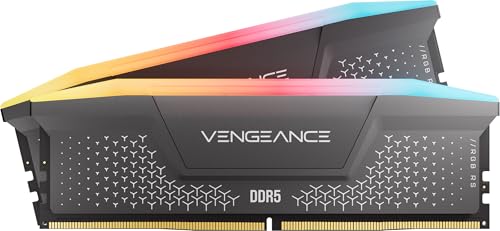
For a full buying guide, see our overview of the best RAM, and our review of a popular Corsair Vengeance RGB DDR5 kit.
How to Check What You Actually Use
You can answer the question with your own data. Open the task manager on Windows, go to the performance tab and choose memory, then play your usual game with your usual background apps running. Note the peak figure in the "in use" bar, and look at the commit total as well, since games can reserve more than they touch.
If you stay under about 12GB with room to spare, 16GB will probably serve you for now. If you regularly climb above 14GB, or you see the system start using the page file and stuttering, move to 32GB. The same exercise works for editing software and virtual machines, which tend to use more than they show at rest.
Remember that the operating system also uses free memory to cache files, so a high number is not always a problem. What matters is whether the system is forced to swap active data to disk.
Laptops, Handhelds and Small Builds
Many laptops use soldered memory that cannot be upgraded, so the capacity you choose at purchase is the capacity you keep. For those machines, favor 32GB if you do creative work or keep many apps open, and 16GB if portability and price come first. Other laptops use removable modules, and an upgrade later is a simple task.
Mini PCs and small desktops follow similar rules, but check the supported maximum and the module type. Laptop memory uses a smaller module format than desktop memory, so a desktop kit will not fit them.
16gb vs 32gb ram: Which Should You Choose?
Choose 16GB if you have a tight budget, play lighter games and mostly browse or work in simple apps. Choose 32GB for a new gaming build, for streaming and recording, for editing, or whenever you want a system that stays smooth for years. If the price difference is small, 32GB is almost always the better buy.
FAQ
Is 16GB enough for gaming?
Yes for most titles, though some newer games can push it, especially with background apps running.
Will 32GB improve my frame rate?
Not directly. It prevents stutter and slowdowns when 16GB would be full, but it will not raise speed in games that already fit.
Should I buy one 32GB stick or two 16GB sticks?
Two matched sticks give you dual channel, which is faster, and are usually the better choice.
Can I mix different RAM kits?
You can, but it may lower speed or cause instability. A single matched kit is the safest path.
In short, 16gb vs 32gb ram favors 32GB for new gaming and creative builds and leaves 16GB for light use and tight budgets, so look at how you use your PC today and the headroom you want next year.


