
2.0 vs 2.1 Speakers: Which Is Better in 2026?
Disclosure: We may earn a commission when you buy through links on this page, at no extra cost to you. As an Amazon Associate I earn from qualifying purchases. Learn more

2.0 vs 2.1 speakers for PC: what a subwoofer adds, what it costs in desk space, and which layout fits music, games and movies.
The debate of 2.0 vs 2.1 speakers is really about one thing: do you want a subwoofer on your floor? A 2.0 system is two speakers and nothing else, while a 2.1 system adds a separate bass unit that fills out low frequencies. The product table right after this introduction shows desk speakers of both kinds.
Below you will find how each layout sounds, what each needs in space and wiring, and which one suits music, games and movies at a desk.

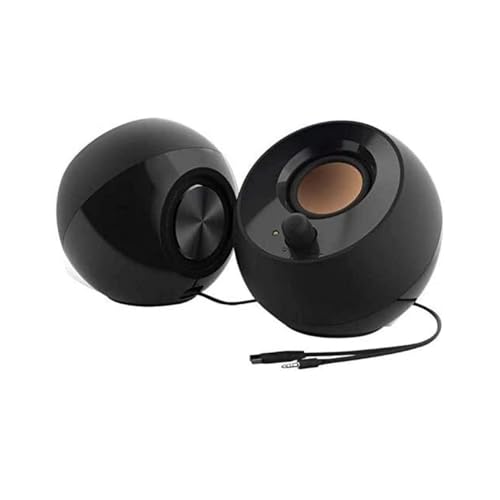


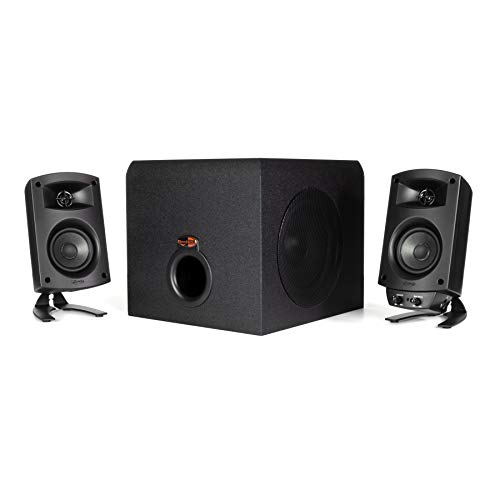
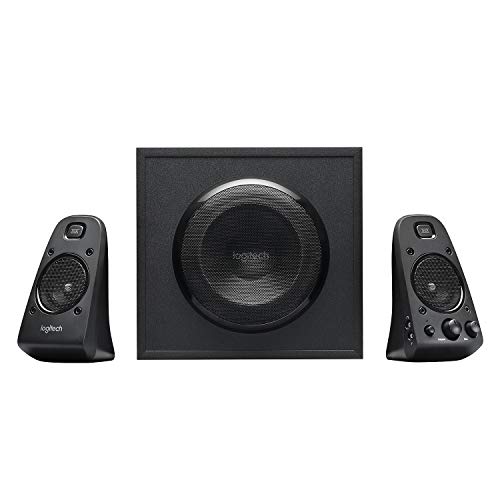
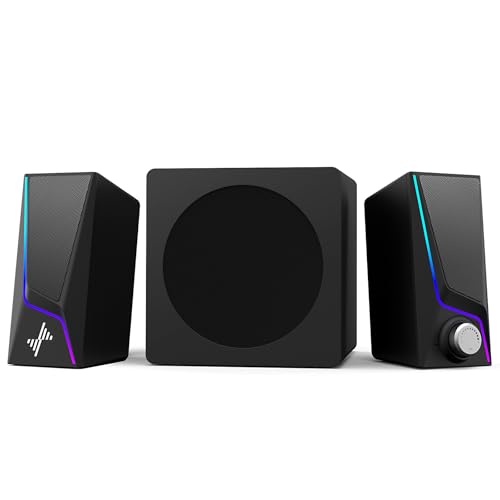

What the Numbers Mean
The first number counts the main speakers, and the second counts the subwoofer. A 2.0 setup has a left and right speaker. A 2.1 setup has the same pair plus a subwoofer, which handles the deepest bass notes. The ".1" refers to the low frequency channel, not a second speaker.
In a 2.1 system the small satellites then do not have to reproduce the lowest frequencies, which lets them focus on mids and highs with less distortion. That is the idea, although how well it works depends on how the system is tuned.
Sound Quality Compared
A good 2.0 pair can sound clear, balanced and detailed, especially for vocals, podcasts and acoustic music. With only two drivers and no crossover to a separate unit, the sound can feel cohesive. The limit is bass: small desk speakers cannot move enough air to produce deep low notes, and the sound may feel light in action games and electronic music.
A 2.1 system adds that missing weight. Explosions, engine sounds and bass lines feel fuller, and movies gain impact. The risk is poor tuning, where an oversized sub booms and drowns the mids. A well-matched 2.1 set blends smoothly, and a poor one makes the sound muddy.
- 2.0 strengths: clarity, simplicity, small size, often cleaner mids.
- 2.1 strengths: deeper bass, bigger sound at low cost, better for movies and games.
Space, Placement and Wiring
Desk space is where 2.0 wins. Two speakers sit on either side of the monitor and that is it. A 2.1 system needs a floor spot or a desk-side position for the subwoofer, plus extra cables linking the sub to the speakers and the power supply.
Placement matters. Put the two main speakers at ear height, angled toward you and forming a triangle. A subwoofer works well on the floor near a wall, though in an apartment you should watch how much the bass travels to neighbors. Most subs have a volume knob, and many have a separate control for bass level.
Connections
Look at the input options. A 3.5mm jack is universal, USB works with laptops and needs no sound card, Bluetooth removes a cable but may add delay for games and video, and optical gives cleaner digital sound from some PCs and consoles. Choose a system that has the ports you actually use.
Power and Volume
Wattage figures on packaging are often "peak" numbers and say little about real loudness. For a desk at close range, even a modest system gets loud enough. What counts is how clean it sounds at the volume you listen at, not the top number.
If you enjoy listening loudly or fill a larger room, a 2.1 system or a larger powered pair designed for bookshelf use will cope better. For background music and calls, simple powered speakers are plenty.
Room, Desk and Listening Distance
Where you sit changes which system makes sense. At arm's length from the speakers, the sound is dominated by the direct output of the drivers and the room matters little. This is the near-field setup that desk speakers are designed for, and it is why even small pairs sound surprisingly good for one listener.
If you listen from a couch several feet away, or want to fill a room, the speakers have to work harder and the room's walls and furniture start to shape the sound. A hard, bare room adds echo and harshness, and a few soft items such as rugs and curtains calm it down. Bass behaves strangely in small rooms, so move a subwoofer around by a foot or two and listen before you settle on a spot.
Adjusting the Sound
Most desk systems have simple controls, and using them well matters. Set the subwoofer level so that it supports the main speakers without being noticed on its own, then adjust to taste for a given source. Turn off any surround effects or enhancers on your computer when you first set up, because they can add odd phase effects that make a good system sound worse.
Consider a small stand or pads under the speakers. Raising the speakers so the tweeters sit at ear level and decoupling them from the desk reduces boxy resonances and helps the stereo image to appear in front of you rather than beside you.
2.0 vs 2.1 speakers: Which Should You Choose?
Choose 2.0 if you
- Have a small desk and prefer a clean, minimal setup.
- Listen to podcasts, voices, acoustic or classical music.
- Share a space where heavy bass would annoy others.
Choose 2.1 if you
- Play action games, watch movies or enjoy bass-heavy music.
- Have room for a subwoofer near the desk.
- Want more impact without buying a larger speaker pair.
For help narrowing the field, our best computer speakers guide covers both layouts, and the Edifier R1280DBS review looks at a popular powered pair.
A Third Option: Better 2.0
Do not assume 2.1 always beats 2.0. A well-built powered bookshelf pair can deliver impressive bass for its size, and some include a sub output so you can add a subwoofer later. This path costs more at the start but gives a system you can grow, and it often sounds more refined than a budget 2.1 kit.
Headphones are another alternative if you need bass without noise. Speakers give a wider, more natural sound, while headphones win for privacy and detail. Many people keep both.
FAQ
Do I need a subwoofer for gaming?
No, but it adds impact in action titles. If you mostly play competitive games with headphones, you may not need it.
Is 2.1 louder than 2.0?
Not necessarily. It sounds fuller because of the bass, but the main speakers may play at similar volumes.
Can I add a subwoofer to a 2.0 system later?
Only if the speakers have a subwoofer output. Check the back panel before you buy.
Will a 2.1 system annoy my neighbors?
It can if the bass is high. Keep the sub level moderate and off a shared wall, or consider isolation pads.
In the end, 2.0 vs 2.1 speakers is a trade between a tidy, clear desk setup and fuller bass: choose 2.0 for space and clarity, and 2.1 when you want the extra low end for games and movies.


