
4000d vs 3500x: Which Is Better in 2026?
Disclosure: We may earn a commission when you buy through links on this page, at no extra cost to you. As an Amazon Associate I earn from qualifying purchases. Learn more
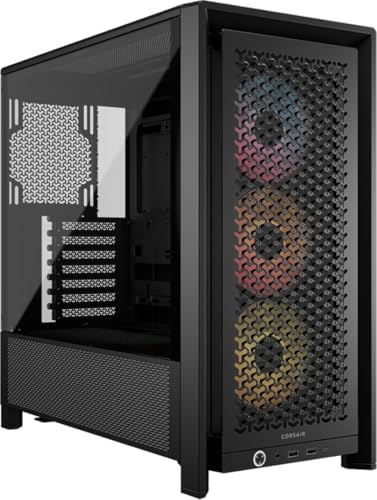
4000d vs 3500x Corsair cases: how airflow and the glass panoramic look differ, what each supports for fans and radiators.
Two Corsair mid-tower cases take opposite approaches, and 4000d vs 3500x shows it clearly: the 4000D is a high-airflow classic with a perforated steel front, while the 3500X is a glass showpiece with panoramic panels. The product table right after this introduction lists these cases and close relatives.
Below you will find how they differ in airflow, display, radiator support, building ease and price, so you can choose the case that suits your parts and your taste.


Design Philosophy
The 4000D family is built around airflow. Its front panel has a three-dimensional perforated pattern that lets air flow in with little restriction, and the steel body is clean and understated. Variants include a version with three pre-installed ARGB fans and a modular Frame version with a fully open design.
The 3500X family is about the view. It uses panoramic tempered glass on the front and side to show off the components, and supports motherboards designed with connectors on the back, which keeps cables out of sight. Airflow comes from side, roof and power supply fan positions rather than a mesh front.
- 4000D: airflow first, subtle styling, easy to keep cool.
- 3500X: display first, glass on two sides, cooling through side and roof.
Airflow and Cooling
A mesh or perforated front lets fans pull in a lot of air, which is why the 4000D family does well at keeping hot components cool without needing many fans. The version with pre-installed fans works out of the box, and the InfiniRail mounting system lets you slide fans to the position you want, with support for larger fans up to 200mm at the front and 140mm in the roof.
The 3500X's glass front blocks direct intake, so cooling relies on fans mounted at the side, roof and base. It can hold up to ten 120mm fans, and radiators up to 360mm in the roof and side, which makes it capable for a liquid-cooled build. Many users find that a glass case with enough fans still runs well, but it demands more planning than a mesh case.
What this means for temperatures
For a hot graphics card and a high-power processor, the 4000D layout is simpler and more forgiving. For a showpiece build with moderate parts, the 3500X can run quietly and look striking. One version of the 3500X ships without fans, while another includes three RX120 fans and a hub.
Compatibility and Radiators
Both cases are mid-towers that take ATX boards, and the 3500X supports sizes from Mini-ITX up to EATX. Both can hold large graphics cards, though you should check the length and thickness of the card. Some 4000D versions list support for dual 360mm radiators, with room for liquid cooling at the front and roof.
Check CPU cooler height as well. The side panel limits how tall a tower air cooler can be, and glass panels may be narrower. Our best PC case guide lists clearance details for popular models.
Building Experience
Corsair's cases are known for tidy cable routing, with channels behind the motherboard tray and tie-down points. The 4000D has an easy layout that suits first-time builders, and removable panels give access from both sides. The Frame version offers a modular design, and you can swap parts such as the motherboard tray and front panel.
The 3500X's glass panels are easy to remove, which helps when working inside. Reverse-connector boards keep the front of the build clean, though standard boards need cables on the visible side, so tidy routing matters more. Plan the cable route before you begin.
Looks, Sound and Dust
A perforated front offers less sound dampening than a closed panel, so a noisy graphics card is easier to hear. Dust filters sit behind the front and under the power supply, and they are easy to clean. A glass case shows dust more easily, and fingerprints are visible, so expect to wipe it regularly.
If your desk is in view, appearance may drive the choice. The 4000D suits those who prefer a quiet look with tempered glass on one side. The 3500X is for people who want a full display of lighting and parts.
Price and Variants
Both families come in several versions at different prices, so compare like with like. The base 3500X without fans is a bargain on the case itself, but you must buy fans. Versions with fans cost more and may save money overall. The 4000D with three fans offers strong value for airflow, and the Frame models trade features for lower price.
There are also relatives: the 3000D Airflow is a more compact, simpler choice, and the 7000D Airflow is a full tower for very large builds. Check the table for what is in stock.
Fans, Lighting and Controls
Both families work with Corsair's lighting and fan control ecosystem, but the details differ. The 4000D versions with pre-installed fans use daisy-chained ARGB connections, and the 3500X with iCUE Link fans uses a hub that simplifies cabling. If you do not want lighting, plain versions or third-party fans work fine.
Fan choice shapes noise as much as the case does. A few quality fans running at low speed beat many cheap ones at high speed. Set a gentle fan curve in the BIOS and let the system ramp up only when temperatures climb.
Storage, Ports and Everyday Use
Look at the front panel. A USB-C port is useful for modern devices, and extra USB-A ports save trips behind the case. Check how many drives each case holds, because both offer a few mounting spots for 2.5-inch drives, and fewer for large hard drives than older cases did.
Think about where the case will sit. A glass side faces you, so choose the orientation that shows the parts, and leave breathing room around the front and side intakes. Placing a case flush against a wall chokes airflow and raises temperatures.
4000d vs 3500x: Which Should You Choose?
Choose the 4000D if you
- Run a hot graphics card or a high-power processor.
- Want strong cooling with few fans and simple building.
- Prefer a clean, understated look.
Choose the 3500X if you
- Want a glass showcase and a hidden-cable look.
- Plan a liquid-cooled build with side or roof radiators.
- Care more about display than maximum airflow.
For inspiration from other makers, see our reviews of the NZXT H6 Flow and the Hyte Y70.
FAQ
Which case has better airflow?
The 4000D family, thanks to its perforated front panel.
Does the 3500X come with fans?
One version has none, and another includes three fans with a control hub. Check the listing.
Can both hold a liquid cooler?
Yes, the 3500X supports 360mm radiators in the roof and side, and some 4000D models support 360mm radiators too.
Which is easier for beginners?
Both are friendly, though the 4000D layout is the simplest.
The takeaway on 4000d vs 3500x is easy: pick the 4000D for airflow and value, and the 3500X when you want a glass showcase with room for liquid cooling.


