
Alienware Area-51 Desktop Review for 2026: Is It Worth It?
Disclosure: We may earn a commission when you buy through links on this page, at no extra cost to you. As an Amazon Associate I earn from qualifying purchases. Learn more

Alienware Area-51 desktop review covering the Core Ultra 9 285K, RTX 5080 and 5090 options, cooling and upgrade path of this flagship gaming tower.
The Alienware Area-51 desktop (model AAT2250) is Dell's premium gaming tower, built around an Intel Core Ultra 9 285K and NVIDIA's top RTX 50 series cards, and this alienware area-51 desktop review explains the hardware, the cooling and airflow design, the expandability and who the high price makes sense for. It is a PC for people who want a complete, well supported flagship system and are willing to pay for it.
The Area-51 name also belongs to Alienware's laptops, so check that a listing says desktop or AAT2250 before you buy.
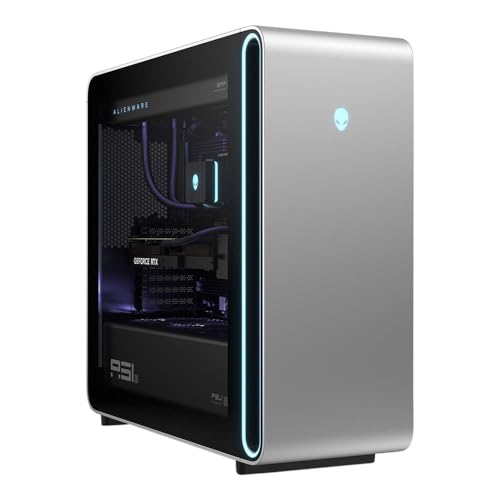


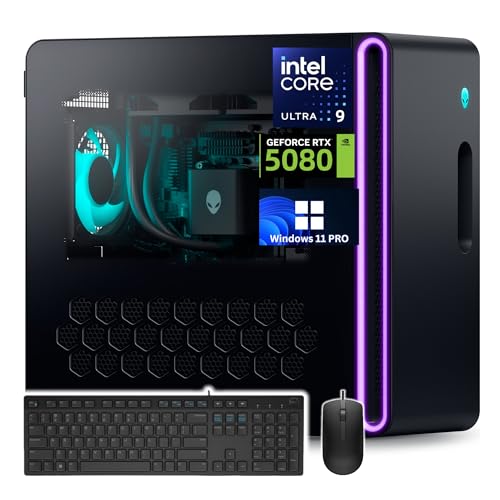
Alienware Area-51 Desktop Review: Specs
The listings describe two main configurations. One pairs the Core Ultra 9 285K, a 24-core processor with a dedicated neural processing unit, with an NVIDIA GeForce RTX 5080 (16GB GDDR7), 32GB of DDR5-6400 memory and a 2TB NVMe PCIe Gen 4 SSD for around $5,800. The other pairs the same processor with an RTX 5090 (32GB GDDR7) for around $8,900.
Both include Wi-Fi 7, Bluetooth 5.4, two Thunderbolt 4 ports and a 2.5GbE network port. Those are the connectivity upgrades that matter for fast home networks, external storage and high refresh monitors.
Cooling and Airflow Design
The desktop uses a 360mm all-in-one liquid cooler for the processor and a positive-pressure airflow design with dual 180mm front fans and 140mm bottom intakes. Dell says the airflow keeps the system up to 45% quieter than previous designs. Positive pressure means more air goes in than out, which keeps dust from drawing in through gaps.
A large radiator and big, slow fans are the right approach for a hot processor and a high-power graphics card, because they move air without a loud whine. It also gives the processor headroom for long creative sessions.
Chassis and Power Supply
The Lunar Silver chassis has a tempered glass side panel and customizable AlienFX RGB lighting. Inside, the listing mentions an industry-standard ATX motherboard and a 1500W Platinum-rated power supply. A standard motherboard and power supply form factor is a major plus, since it means you can upgrade parts later or replace a failed part with common components instead of proprietary ones.
The 1500W power supply leaves room for the RTX 5090, and for adding storage and cards in the future.
Performance in Games and Creative Work
With an RTX 5080, the Area-51 is built for 4K gaming. Dell's listing highlights DLSS 4 with Multi Frame Generation and ray tracing, and the RTX 5090 pushes further for maximum settings at high refresh rates on a 4K monitor. The 24-core processor also suits streaming while gaming, 8K video rendering and heavy simulations.
For 1440p gaming or esports at very high frame rates, this machine is more than enough, which also means it is more expensive than needed for those jobs.
Area-51 Compared With the Aurora
Alienware's other desktop line, the Aurora, costs far less. Aurora desktops list from around $1,700 to $3,900 with RTX 5060 Ti to RTX 5080 graphics and liquid cooling options. The Area-51 adds a larger chassis, stronger cooling, a standard ATX build, a bigger power supply and a path to higher end graphics. See our Alienware Aurora review for the cheaper line.
If the budget is the main limit, an Aurora or a rival such as the HP Omen 35L gives a better price for most gaming needs. Our best gaming pc guide compares more options.
Who the Area-51 Desktop Suits
It suits enthusiasts who want a flagship PC with warranty support and clean engineering, creators who need a powerful and quiet workstation and anyone who wants an easy buy rather than a custom build. It is less suited to buyers who only want to play at 1080p or who prefer to save money by building a PC from parts.
Buying Checklist
- Confirm the listing says Area-51 desktop or AAT2250, not the Area-51 laptop.
- Check the graphics card, since the RTX 5080 and RTX 5090 versions differ by thousands of dollars.
- Check the monitor you plan to use: 4K at 120Hz or higher suits this power level.
- Confirm the warranty and service terms from the seller.
- Make sure your desk and power outlet can handle a large tower and a 1500W supply.
Build It Yourself or Buy It Ready Made
A custom build with similar parts can cost less, especially with a mid-range case and cooler. What you pay for with the Area-51 is the finished system: checked parts, a tidy build, driver setup, a warranty and a single point of support. If you enjoy building PCs and have the time, you may prefer to assemble your own. If you want to power it on and play, the ready-made route saves hours.
Setting Up a Flagship Tower
A system like this needs a little planning. Place the tower where the front intake and bottom vents can draw air, at least a few inches from walls, and avoid carpet under the case. Plug it into a surge protector rated for the load, since the 1500W power supply can draw a lot under a full gaming and rendering workload. Connect the monitor to the graphics card, not the motherboard, so the display uses the RTX card.
After the first boot, run Windows Update, install the latest NVIDIA driver, and open Alienware Command Center to choose a performance profile and set the lighting. If you use a 4K monitor, enable its highest refresh rate in the display settings and check that your cable supports it.
Upgrade Path and Longevity
The standard ATX layout and large power supply are the reason this chassis can stay useful for many years. A future graphics card can drop in, storage can be added and the cooler or fans can be replaced with common parts. A proprietary small tower limits those choices. Over a five-year life, the ability to upgrade just the graphics card often saves more than the price gap between this and a cheaper prebuilt PC.
FAQ
What processor does the Alienware Area-51 desktop use?
The listings show the Intel Core Ultra 9 285K, a 24-core processor with a neural processing unit.
Which graphics cards are available?
The listings show the NVIDIA GeForce RTX 5080 with 16GB of GDDR7 and the RTX 5090 with 32GB of GDDR7.
Is it upgradeable?
Dell lists a standard ATX motherboard and a 1500W power supply, which makes later upgrades easier than in proprietary designs.
Is it good for 4K gaming?
Yes. It is designed for 4K gaming, especially with the RTX 5090.
Final Verdict
This alienware area-51 desktop review ends with a clear conclusion: it is a powerful, quiet and upgradeable flagship tower with a flagship price. Check the exact configuration, compare it with Aurora models and buy it if you want top performance in a ready-made PC.


