
Apple Mac Studio M3 Ultra Review for 2026: Who Needs an Ultra?
Disclosure: We may earn a commission when you buy through links on this page, at no extra cost to you. As an Amazon Associate I earn from qualifying purchases. Learn more

Our apple mac studio m3 ultra review explains what the Ultra chip adds and who really needs its memory and power.
The M3 Ultra version of the Mac Studio is the most powerful desktop Apple has sold in its compact enclosure, and it is built for work that would stall lesser machines. This Apple Mac Studio M3 Ultra review examines who actually needs that much power, what the configurations cost and what to consider before spending that kind of money.
The product table above lists the Ultra configuration alongside other Mac Studio models. The listings are premium machines, so check seller details and warranty terms carefully.

What Ultra Means
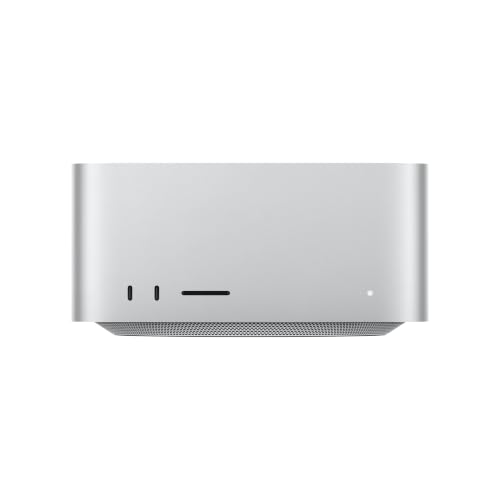
An Ultra chip joins two Max chips so they behave as one, doubling the CPU and GPU resources and the memory bandwidth. The listing in the table describes a 28-core CPU, a 60-core GPU and 256GB of unified memory. This is a workstation in a small body, aimed at film studios, research groups and AI developers.
Memory for Big Models
The headline feature for modern users is memory capacity. A large pool of unified memory lets a single machine load very large AI models that would require several graphics cards on a PC. Researchers and developers value that, even when raw speed is not the highest. Video editors use it for multi-stream 8K timelines and heavy effects.
Performance in Creative Work
In Final Cut, DaVinci Resolve and Logic, an Ultra handles heavy projects with ease. Renders finish quickly and timelines stay smooth with multiple codecs. In 3D tools, the large memory helps with complex scenes, though some renderers favor NVIDIA GPUs on Windows. Check your software's support for Apple silicon before buying.
Cooling, Noise and Power
The Studio's cooling system keeps temperatures steady, and the fan noise remains modest even under load. Power use is far lower than a PC with multiple graphics cards, which saves on electricity and reduces heat in a small room.
Ports and Expansion
Thunderbolt 5 or 4 ports, HDMI, Ethernet and an SD card slot give flexible connections. There are no internal slots, so storage and capture devices attach via Thunderbolt. Plan a fast external drive for large projects.
Is It Worth the Money?
For a studio billing clients for heavy work, the productivity gain pays for itself. For an enthusiast, the Max version or a newer chip often offers most of the benefit for far less. A newer M5 Max model is also in the table at a much lower price, and its newer chip generation is worth weighing against the Ultra for tasks that do not need huge memory.
Who Actually Needs an Ultra
A colorist grading multi-camera 8K projects, a researcher fine-tuning large language models locally, an architect rendering massive scenes and a composer running huge orchestral preset sessions are the typical buyers. Each of these people hits memory and bandwidth limits that smaller chips cannot clear. Most other people, including serious hobbyists, will not feel a difference between an Ultra and a Max in daily work.
Before buying, run your heaviest project on a cheaper Mac or a trial machine and watch memory pressure and CPU use. If neither is maxed out, the Ultra is excess.
Storage and Backup Strategy
High-end machines create high-end files, so plan storage carefully. Internal SSD capacity is expensive and fixed, so many studios buy the middle size and attach a fast Thunderbolt array. Back up with two copies, one local and one offsite, and verify them regularly. A fast network share can let several editors work from the same project.
Living With an Ultra
An Ultra is rarely noticed in daily use, because it spends most of its time idle and quiet. Its value shows during heavy tasks: exports that would take an hour on a laptop finish in minutes, large project files open without hesitation and big datasets stay resident in memory. Place it where you can reach the front ports and keep the vents clear, and let it sleep when not in use to save power.
Warranty and Seller Checks
Listings for Ultra configurations often come from third-party sellers, and prices can vary widely. Confirm that the machine is new, that the warranty is valid and that returns are possible. Ask whether AppleCare can be added. A seller with a long track record is worth a small premium on a machine at this price.
Apple Mac Studio M3 Ultra Pros and Cons
Pros: massive memory option, very strong multi-core performance, quiet cooling, and a compact size. Cons: a very high price, no upgrades, an older chip generation than the newest Max, and limited software that uses all the cores.
Alternatives
For AI workloads, the ASUS Ascent GX10 review and HP Z2 Mini G1a review cover compact competitors, and the best AI PC guide lists more. Windows workstations with NVIDIA cards remain better for GPU rendering.
Connecting Monitors and Storage
The Ultra supports several high-resolution displays at once, so a two- or three-screen layout is straightforward. Use Thunderbolt cables with the correct rating for displays and fast drives, and avoid long unrated cables that cause dropouts. For storage, a small Thunderbolt SSD for active projects and a large RAID or network drive for archives is the standard pattern in editing houses.
If you plan to run the Studio headless as a render or AI server, set it to wake for network access, assign a fixed address and enable remote management. That keeps the machine useful when you are away from the desk.
Common Questions From Buyers
People ask whether to wait for a newer Ultra. Apple updates the Ultra less often than the Max, so waiting can mean a long time. They ask whether the M3 Ultra is still current, and for large memory tasks it remains very capable. Others ask about resale. Studios hold their value well, which softens the price of an expensive configuration.
FAQs
Is the M3 Ultra faster than the M4 Max?
In multi-core work, often yes. In single-core tasks, the newer Max can be faster.
Can it run large AI models?
Its large unified memory makes it unusually good for that, depending on the configuration.
Is it quiet?
Yes, for its class. Fans are soft under load.
Can I add memory later?
No. It is fixed at purchase.
Final Verdict
This Apple Mac Studio M3 Ultra review concludes that the Ultra is a remarkable compact workstation for people who truly need its memory and multi-core strength. Everyone else should look at the newer Max models in the table and keep the savings. If anything in this apple mac studio m3 ultra review still leaves you unsure, the return window is your safety net.
Prices and availability can change, so check the product page before ordering.

