
Apple Mac Studio M4 Max Review for 2026: Is the Max the Sweet Spot?
Disclosure: We may earn a commission when you buy through links on this page, at no extra cost to you. As an Amazon Associate I earn from qualifying purchases. Learn more

Our apple mac studio m4 max review explains what the M4 Max delivers for video, audio and development work.
The M4 Max Mac Studio is the sweet spot for many professionals: strong enough for demanding video and audio work, quiet enough for a recording room and far less expensive than the Ultra version. This Apple Mac Studio M4 Max review explains what the chip delivers, how to configure it and when a newer or older model is the better buy.
The product table above lists a high-memory M4 Max configuration with the newer M5 Max and M3 Ultra models. These are premium machines, so compare seller details and prices carefully.

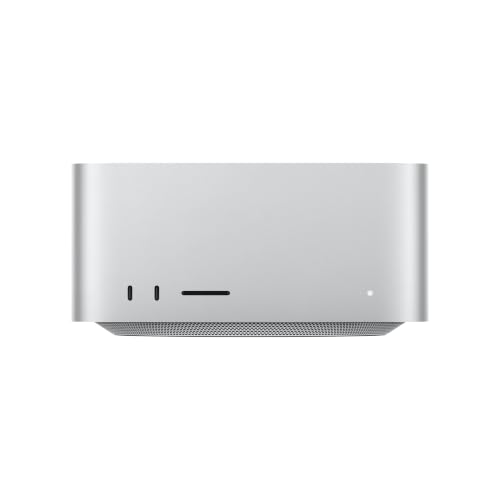
What the M4 Max Offers
The listing in the table describes a 16-core CPU, a 40-core GPU and 128GB of unified memory. That is a heavy-duty configuration for creative professionals, and the memory pool is large enough for big photo catalogs, complex audio sessions and long 4K or 6K timelines. It sits below the Ultra in raw multi-core throughput but keeps the same quiet cooling.
Video, Audio and Photo Work
For video editors, the Max handles multi-camera 4K projects, color grading and effects in real time. Music producers can run enormous plug-in chains and sample libraries without audio dropouts. Photographers working on large RAW files will see fast previews and exports. The Studio is rarely the bottleneck, which is the best praise a workstation can earn.
AI and Development Work
Developers benefit from fast compile times and plenty of memory for containers and virtual machines. Local AI work is a growing use, and the memory pool allows medium-sized models to run on a single machine. For the very largest models, the Ultra's extra memory is more suitable.
Ports and Displays
Thunderbolt ports, an HDMI output, Ethernet and an SD card slot cover most needs. Multiple external displays are supported, and high-resolution monitors work well. Think about which ports you will use daily and whether the front panel suits your desk.
M4 Max or the Newer M5 Max?
The table also lists a Mac Studio with the M5 Max chip at a lower starting price. A newer chip generation brings efficiency and speed gains, so unless you need a specific high-memory M4 Max configuration, the newer model deserves a close look. Compare memory, storage and warranty on each listing.
Building a Complete Setup
A Studio needs company. Start with a good display: a 5K monitor suits photo and design work, while a 4K reference monitor is fine for video. Add a Thunderbolt SSD for active projects and a large hard drive or network storage for archives. Keep a second backup somewhere else, because a studio machine holds your income.
Audio people should add an interface that connects over Thunderbolt or USB-C, and editors benefit from a control surface and a decent pair of speakers. The Studio's front ports make it easy to plug in a card reader or a headset without crawling behind the machine.
Who Should Choose the M4 Max
Choose it if you edit video professionally, produce music with large sessions, develop software with heavy builds or run medium-sized AI models locally. Choose something smaller if your work fits on a Mac mini, and choose the Ultra only when your projects are clearly stalling the Max. Many freelancers find this middle option the best long-term value.
Buying Tips for High-Memory Listings
Configurations with large memory are often sold by third-party sellers and priced high. Confirm that the machine is new, that the listing matches the chip and memory you want, and that the seller offers returns. Ask about AppleCare before you pay, and keep the invoice for warranty claims. Compare the price against ordering directly from Apple, since built-to-order machines can be cheaper.
Software Readiness
Check that your key applications support Apple silicon natively. Most major creative tools do, and Rosetta handles older software with modest slowdown. Plug-ins and drivers for audio hardware occasionally lag, so verify them before switching a working studio to a new machine.
Living With the Studio
Day to day, the machine fades into the background. It wakes quickly, stays cool, and you notice it mostly when a render finishes sooner than expected. It does not have a power button on the top, so many people tuck it on a shelf and let it sleep. A small stand or a mount under the desk keeps cables short and frees the surface.
Because the Studio is silent, it suits recording rooms, living rooms and shared offices where a loud PC would be unwelcome. Pair it with a quiet external drive or an SSD, since a noisy hard drive spoils the effect.
Apple Mac Studio M4 Max Pros and Cons
Pros: strong performance, large memory options, quiet operation and a compact body. Cons: a premium price, fixed memory and storage, and no included peripherals or display.
Alternatives
Look at our best AI PC guide, the HP Z2 Mini G1a review and the ASUS Ascent GX10 review for compact Windows and Linux machines that compete on local AI work.
Common Questions From Buyers
Buyers often ask whether to wait for the next chip. A new generation always arrives eventually, and a Studio that suits your work today will keep suiting it for years, so buy when the machine solves a problem you have now. Others ask whether to buy extra storage from Apple. External Thunderbolt SSDs are cheaper and nearly as fast, so most people take the mid-size internal drive and add external storage as projects grow.
Heat and Power Use
Even under long renders, the Studio draws far less power than a traditional workstation, and the fans stay calm. That makes it a good fit for small apartments where a tower would heat the room. Keep a short gap behind the machine for airflow, and avoid stacking drives on top of it.
FAQs
Is the M4 Max enough for 8K video?
It can handle 8K with good planning, but heavy 8K workflows benefit from an Ultra.
Can I use more than one display?
Yes. The Studio supports several external monitors.
Is 128GB of memory necessary?
Not for most users. It helps with large models and heavy projects.
Does it include a keyboard and mouse?
No.
Final Verdict
This Apple Mac Studio M4 Max review sums up a powerful, quiet and flexible workstation for professionals. Choose the memory you need, consider the newer M5 Max model in the product table, and pair the Studio with good storage and monitors. If anything in this apple mac studio m4 max review still leaves you unsure, the return window is your safety net.
Prices and availability can change, so check the product page before ordering.

