
Apple Mac Studio Review for 2026: Is It Worth the Price?
Disclosure: We may earn a commission when you buy through links on this page, at no extra cost to you. As an Amazon Associate I earn from qualifying purchases. Learn more

Our apple mac studio review explains chip options, memory choices and who should choose Apple's compact workstation.
The Mac Studio sits between the Mac mini and the Mac Pro, and for many creative professionals it is the Mac that makes the most sense. This Apple Mac Studio review covers what the compact desktop offers, who it suits, and how to choose between its chip options without paying for power you will not use.
The product table above lists the Mac Studio models currently available, from the newest Max chip to older high-memory configurations. These are premium machines, so compare prices carefully and check what each listing includes.
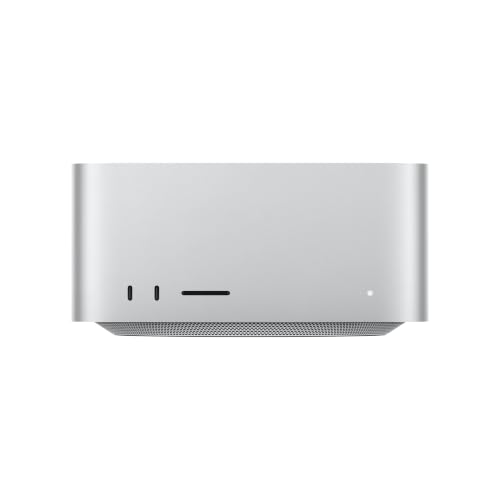

A Compact Workstation
The Mac Studio is a square aluminum box slightly taller than a Mac mini, with a big cooling system inside and a generous port selection on the front and back. It was designed for people who find the Mac mini limiting and the Mac Pro excessive. Studios use it under a monitor or beside an audio rack, and its silence makes it popular for recording spaces.
Chip Options
The Studio comes with Max and Ultra class chips. The Max chips are the best fit for most professionals, with strong processor and graphics performance for video editing, music production and development. The Ultra chips double the resources and suit large 3D scenes, multi-stream 8K work and huge machine-learning models, at a much higher price. Listings in the table include an M5 Max, an M4 Max and an M3 Ultra configuration.
Memory Is the Key Choice
Memory is shared between the processor and the graphics, and it cannot be upgraded. A comfortable choice for creative work is a middle option, while heavy video, 3D and AI users should buy the highest amount they can afford. Running out of memory slows the machine far more than a slower chip would.
Ports and Connectivity
The front has an SD card slot and USB-C ports, which suit photographers and video editors. The back has Thunderbolt ports, HDMI, Ethernet and more. Multiple displays are supported, with the number depending on the chip. A Studio comfortably runs a large desk of monitors and drives.
Cooling and Noise
The large fan and heat sink keep the Studio quiet even under heavy loads. Fans spin up during long renders, but the sound is a soft whoosh, not a roar. This is an important reason it is chosen over mini PCs in recording and editing rooms.
Who Should Buy It
Video editors, photographers, music producers, developers and designers who need more than a Mac mini will find it ideal. It also suits small studios that want a quiet workstation with strong ports. If you only edit light projects, a Mac mini or MacBook Pro may be enough.
Choosing Between Max and Ultra
If you are unsure, start with the Max. It handles 4K and most 6K editing, large audio sessions with plenty of plug-ins, big code builds and serious Photoshop and Lightroom libraries. The Ultra becomes sensible when your projects stall a Max, such as long 8K timelines, heavy simulation or local language models that need more memory than a Max can hold.
Spending on memory rather than on the Ultra tier is often the better move, because running out of memory makes any machine crawl.
Building the Rest of the Desk
A Studio is only as good as what you attach. Pair it with a color-accurate monitor, a fast Thunderbolt SSD for projects and a reliable backup drive. Audio producers should add a quality interface, and editors benefit from a hardware control surface. Keep the Studio near the front of the desk so that the card slot and USB ports are reachable.
The Mac Studio supports several displays at once, so a two-monitor layout, one for the timeline and one for previews, is easy to set up.
Setup and Maintenance Tips
Place the Studio on a flat surface with space around the vents. Install updates promptly, run backups with Time Machine and keep external drives labeled. Dust the vents occasionally with a soft brush. If you move it between rooms, power it down and carry it by the base, since it is heavier than it looks.
Living With a Studio
In daily use, the Mac Studio is a quiet, dependable workhorse that rarely demands attention. It wakes instantly, starts apps quickly and runs cool, so it can sit under a desk or on a shelf. Many studios keep it on all day for background renders and file sharing, and the power draw is low enough that the electricity bill is a non-issue.
Apple Mac Studio Pros and Cons
Pros: strong performance, quiet cooling, excellent ports, small size and long support. Cons: a high price, fixed memory and storage, no included display or peripherals, and no built-in battery.
Alternatives
If you want Windows or Linux, compact workstations and AI mini PCs offer similar performance, as our Apple Mac Studio alternative page shows. Our best desktop computer guide, Dell Tower Plus review and HP OmniDesk review cover conventional desktops.
Common Questions From Buyers
People often ask whether the Studio is overkill for a single creative professional. For a freelancer who edits video every day, the answer is usually no, because time saved on exports adds up. Others ask whether to pair it with the Studio Display or a third-party monitor. The Apple display matches the machine in style and ports, but third-party 4K and 5K monitors often cost less, so compare before deciding.
Getting Started With a New Studio
Unpack the machine, connect a display and input devices, then sign in to your Apple account. Use Migration Assistant to bring over files from an older Mac, and set up Time Machine on the first day. Install your key applications, check that plug-ins work on Apple silicon and test your displays at their native refresh rate.
FAQs
Is the Mac Studio worth it over the Mac mini?
For heavy creative work, yes. For everyday tasks, no.
Does it include a monitor?
No. You need a display, keyboard and mouse.
Can I upgrade it?
No. Memory and storage are fixed at purchase.
Can it be used for gaming?
Some titles run, but it is not a gaming platform.
Final Verdict
This Apple Mac Studio review concludes that the Studio is the right choice for demanding creative work in a compact, quiet package. Choose the Max chip with plenty of memory for most jobs and the Ultra only if your projects need it. Compare the models in the product table before buying. If anything in this apple mac studio review still leaves you unsure, the return window is your safety net.
Prices and availability can change, so check the product page before ordering.

