
ASUS ROG Thor 1200 Review for 2026: 1200W Platinum Power Supply
Disclosure: We may earn a commission when you buy through links on this page, at no extra cost to you. As an Amazon Associate I earn from qualifying purchases. Learn more

This asus rog thor 1200 review covers the ROG Thor Platinum III 1200W PSU: ATX 3.1, PCIe 5.0 ready, GaN MOSFETs, OLED display and who should buy it.
The ASUS ROG Thor 1200W is a premium power supply built for high-end gaming PCs that use a power-hungry graphics card. This asus rog thor 1200 review explains what the unit offers, what the features mean in practice, and whether you need this much wattage.
The full listing name is ROG Thor Platinum III 1200W. ASUS also lists Thor models at other wattages and efficiency grades, so check the full name when you compare prices.

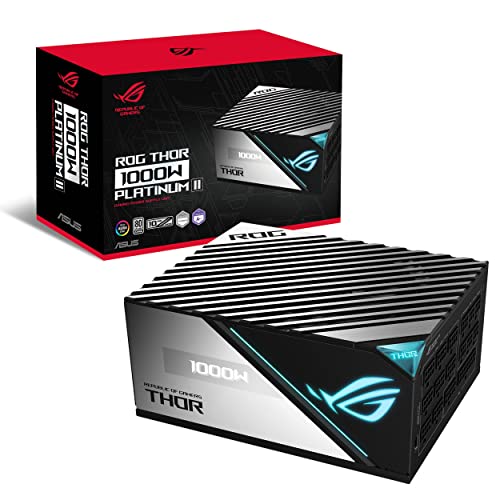


What Is Inside the Thor Platinum III
The product listing describes a 1200W fully featured gaming power supply with 80 Plus Platinum certification, ATX 3.1 support and PCIe 5.0 readiness. It uses GaN MOSFETs, a newer switching technology that helps improve efficiency and reduce heat. Aura Sync RGB lighting is included for builders who want the supply to match the rest of the case.
ATX 3.1 and PCIe 5.0 readiness matter because modern graphics cards use the 12V-2x6 power connector. A supply that supports the standard natively avoids adapters and gives you a cleaner cable run. Always use the cable supplied with the supply and push the connector in fully.
The Magnetic OLED Display and Turbo Mode
The signature feature is an OLED display on the side of the unit that shows live power draw. It attaches magnetically, so you can rotate it to face the glass panel of your case. It is not essential, yet it is a handy way to see how many watts a game really pulls.
The listing also mentions Turbo Mode and a GPU-first design. Turbo Mode adjusts fan behavior, and the GPU-first layout places the graphics card connectors where they are easy to reach and give the card cleaner power delivery. Both are quality-of-life features aimed at enthusiast builds.
Do You Need 1200 Watts?
Many gaming PCs run perfectly on 750W to 1000W. A 1200W unit makes sense when you plan to pair a flagship graphics card with a high-end processor, add several drives and cooling pumps, or leave headroom for a future upgrade. Power supplies also run most efficiently and quietly when they are not working at their limit.
If your system uses a mid-range graphics card, buying 1200W is simply extra cost. Add up your components using a power calculator from the card and processor makers, then choose a supply with comfortable headroom rather than the largest number.
Thor 1200W Compared With Nearby Models
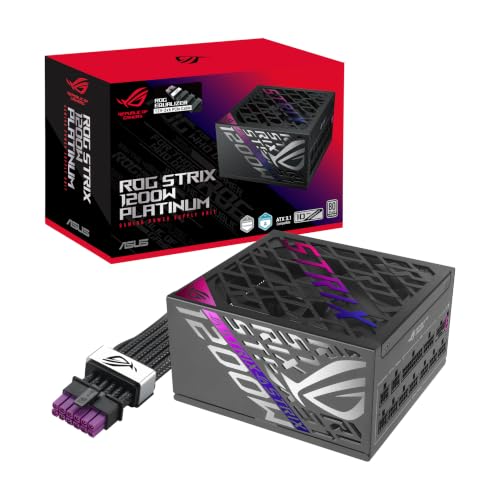
ASUS also sells Thor models at other wattages, such as a 1000W Platinum II, a 1000W Platinum III and a 1600W Titanium. The ROG Strix 1200W Platinum is a lower-priced 1200W option from the same brand. The ROG Loki SFX-L 1200W Titanium is a compact option for small cases.
- Choose Thor for the display, RGB and premium build.
- Choose Strix if you only want 1200W of Platinum efficiency.
- Choose Loki when the case only accepts an SFX-L supply.
Installing a High-Wattage Supply
Check that your case has room before you buy, because large supplies are often longer than a basic unit. Plan the cable route first, connect the graphics card with dedicated cables rather than splitting one lead, and avoid sharp bends at the connector. A modular design keeps unused cables out of the airflow path.
Keep the supply fan intake clear of dust and give the case a regular clean. A good power supply is a part you can move from build to build, which is one reason many builders spend more here than on other components. Our best power supply guide, the Corsair RM1000x review and the Corsair RM850x review show other proven options.
Efficiency, Noise and Heat
An 80 Plus Platinum rating means the unit converts wall power to PC power with very little waste at typical loads. Less waste heat lets the fan spin slower, which is why high-efficiency supplies often stay quiet during light work and gaming. GaN components add to this by running cooler for the same output.
Fan behavior is worth checking in your case. Place the supply with the fan facing a vented panel if the case allows it, and keep dust filters clean. A supply that gets enough fresh air lasts longer and stays quieter.
Warranty and Long-Term Value
Premium power supplies usually come with long warranties, and that coverage is part of the price you pay. Read the warranty length on the exact listing and register the unit when you receive it. Because the supply feeds every part of the PC, buying a reputable unit protects your more expensive components from instability and failures.
Buying Tips
Compare the full product name, because ASUS sells several Thor supplies with similar names. The generation number, wattage and efficiency grade all differ between them. Check that the listing says new condition, and keep the packaging in case you need to return it. Before ordering, measure the space in your case and confirm your motherboard and graphics card connectors match the cables supplied.
Finally, think about the next two or three builds. A supply with ATX 3.1 support can follow you into a future system, which spreads its cost over many years.
Frequently Asked Questions
Is the ROG Thor 1200W good for an RTX 5090 build?
A 1200W Platinum supply with ATX 3.1 and PCIe 5.0 readiness is a strong match for a very high-end graphics card. Check the card maker's recommended wattage for your exact model.
What does the OLED display show?
It shows the power the supply is delivering in real time. The display attaches magnetically so you can position it for your case window.
Is 80 Plus Platinum worth paying for?
Platinum units waste less power as heat than lower tiers, which can mean lower noise and slightly lower running cost. The saving is small for a typical gaming schedule, so choose it for build quality as much as efficiency.
Does it include the 12V-2x6 cable?
The listing says ATX 3.1 and PCIe 5.0 ready. Check the box contents on the listing to confirm that a 12V-2x6 cable is included.
Final Verdict
The Thor 1200W is a well-featured power supply for builders with top-tier graphics cards and a window case. If that is you, this asus rog thor 1200 review considers it a premium, future-proof choice. If your build is more modest, a lower wattage unit will do the same job for less.


