
ASUS TUF Gaming VG27AQM5A Review for 2026: 27-Inch 1440p 300Hz Monitor
Disclosure: We may earn a commission when you buy through links on this page, at no extra cost to you. As an Amazon Associate I earn from qualifying purchases. Learn more

This asus tuf gaming vg27aqm5a review explains the 27-inch 1440p 300Hz Fast IPS panel, 0.3ms response, ELMB Sync, built-in speakers and who gets value from it.
The ASUS TUF Gaming VG27AQM5A is a competitive-grade 1440p monitor that does not cost flagship money. It combines a 27-inch Fast IPS panel with a 300Hz refresh rate and a very fast response time. This asus tuf gaming vg27aqm5a review explains what the monitor does well, where it stops, and who it suits.
TUF is ASUS's value gaming line, so expect sensible features rather than premium extras. The model code can look confusing, and the sections below also show how it compares with similar TUF monitors.


Panel, Resolution and Refresh Rate
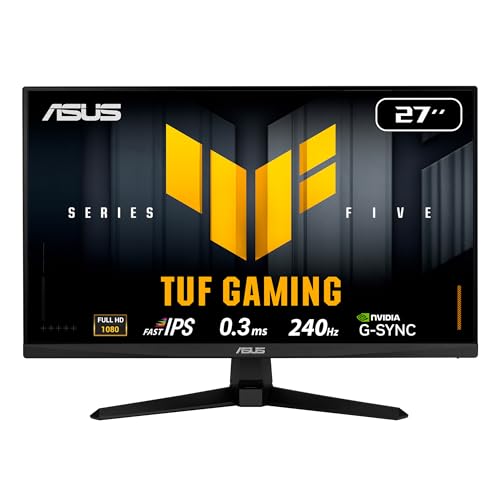
The monitor has a 27-inch QHD panel with a 2560 x 1440 resolution and a refresh rate of 300Hz. ASUS uses Fast IPS technology to reach a response time of 0.3ms (GTG) at minimum. At 27 inches, 1440p is sharp without demanding a flagship graphics card, and 300Hz is smooth enough to see in fast shooters, particularly if you can reach very high frame rates.
To use the full 300Hz you need a capable graphics card and a processor that can feed it. Even if you cannot reach 300 frames per second, the monitor is a fine choice because a high refresh rate also lowers the delay between your input and the picture.
Motion Clarity
ELMB Sync is the headline motion feature. It lets the Extreme Low Motion Blur function run together with variable refresh rate, so you can reduce blur and avoid tearing at the same time. The monitor is also listed as G-SYNC, and it supports FreeSync, which means it works with both NVIDIA and AMD graphics cards.
Shadow Boost brightens dark areas in games to make enemies and details easier to see without washing out bright scenes. Competitive players like it in dark maps.
Color and Image Quality
The panel covers 95 percent of the DCI-P3 gamut, which is wide for a gaming monitor in this class and gives vivid colors in games and video. It is not a professional color monitor, though it is more than good enough for editing photos casually. As with any IPS panel, blacks look gray in a dark room compared with OLED or VA, which is the main trade-off at this price.
Features and Convenience
The monitor includes built-in speakers, which are useful for a quick setup though not a replacement for a headset. DisplayWidget Center lets you change settings with a mouse instead of the monitor buttons. ASUS lists a three-year warranty and a free three-month Adobe Creative Cloud subscription offer. It is also marketed for console use on PS5 and Xbox, though consoles will not reach 300Hz.
How It Compares With Other TUF Monitors
The TUF Gaming VG27AQL5A is a 27-inch 1440p model at 210Hz with 130 percent sRGB coverage and costs less. The VG27AQ3A runs at 180Hz for a lower price still. The VG279QM5A is a 1080p 240Hz option, and the VG27UQ1A is a 4K 160Hz model for people who want sharper images. The VG27AQM5A is the fastest 1440p model in the TUF family listed, so it is for people who prioritize speed.
Who Should Buy It
Competitive players with a strong graphics card, and anyone who wants a very smooth desktop experience, will enjoy this monitor. If you play mostly single-player games, a 180Hz or 210Hz model saves money with little visible difference, and the savings can go toward a better graphics card. If you want a larger picture, see our best gaming monitor guide, the AOC Q27G3XMN review and the Samsung Odyssey G5 review.
Hardware Needed to Use 300Hz
A monitor this fast only shows its value when the computer can deliver frames. In popular esports games, a mid-range graphics card and a recent processor can reach several hundred frames per second at 1440p, so the monitor is well matched to those games. In demanding new releases you will see lower frame rates, and variable refresh rate keeps the picture smooth anyway. If your graphics card is older, consider a cheaper 144Hz or 180Hz model and put the money toward an upgrade.
Setup Tips for the Best Picture
Use a DisplayPort cable for the full refresh rate, and set the monitor to 300Hz in the Windows display settings, since it often defaults to a lower value. Enable adaptive sync in your graphics driver, then cap your frame rate a few frames below the maximum for the cleanest motion. In games with a brightness slider, set it so details in dark areas are visible without crushing the picture, and use Shadow Boost only in games that need it.
Everyday Desk Use
For work, 27 inches at 1440p gives a comfortable amount of space for two windows side by side, and text is clear. The stand adjusts for height and tilt so you can set the screen at eye level. A high refresh rate also makes the mouse cursor and scrolling feel noticeably smoother, which is a small pleasure that many users appreciate even outside games.
Console Use
ASUS markets the monitor for PS5 and Xbox, and the HDMI input works for that. Consoles output up to 120Hz at 1440p on supported models and games, so the monitor will run well below its maximum there. If you game mostly on a console, a 144Hz or 165Hz monitor gives the same experience for less money.
Seller Notes
You may see two different listings for the same model, one from the manufacturer and one from a reseller using a long product code. The reseller listing can cost more and may come with different support. Choose the official listing when the price is similar, confirm the condition is new and keep the packaging so a return stays simple if you find a stuck pixel or backlight issue in the first weeks.
Frequently Asked Questions
Is the VG27AQM5A good for esports?
Yes. A 300Hz refresh rate, 0.3ms response and ELMB Sync make it a strong competitive monitor.
Does it support G-SYNC?
The listing says G-SYNC, and it also supports FreeSync, so it works with both major graphics card brands.
Does it have speakers?
Yes. It has built-in speakers, though a headset gives better sound.
Is 300Hz noticeable?
It is noticeable if your hardware can run games at very high frame rates. Otherwise a 180Hz or 210Hz model gives similar everyday feel.
Final Verdict
The VG27AQM5A is one of the best-value fast 1440p monitors. This asus tuf gaming vg27aqm5a review recommends it for competitive players. Check the seller and warranty before you order.


