
ASUS TUF Gaming Z890-Plus Review for 2026: Intel Core Ultra Gaming Motherboard
Disclosure: We may earn a commission when you buy through links on this page, at no extra cost to you. As an Amazon Associate I earn from qualifying purchases. Learn more

This asus tuf gaming z890-plus review explains the LGA 1851 socket, 16+1+2+1 power stages, four M.2 slots, WiFi 7, Thunderbolt 4 and who should build around it.
The ASUS TUF Gaming Z890-PLUS WiFi is ASUS's value-minded way into the Intel Z890 platform, with strong power delivery, four M.2 slots and WiFi 7 at a price below ROG. This asus tuf gaming z890-plus review explains what the board offers, how it compares with nearby models and who should buy it.
It targets Intel Core Ultra Series 2 desktop processors on the LGA 1851 socket. If you plan to build around a Core Ultra chip, this is a mid-range option worth knowing.



Platform and Processor Support
Z890 is Intel's top consumer chipset for Core Ultra Series 2, and it supports overclocking on unlocked processors. The board uses DDR5 memory and is described as ready for advanced AI PCs, which refers mostly to marketing around the new processors and the AI tools in the firmware. For gaming, the useful part is solid memory support, fast storage and strong power delivery.
Power Delivery
ASUS lists 16+1+2+1 power stages rated at 80A, an eight-layer PCB, ProCool power connectors, alloy chokes and durable capacitors. That is a substantial design for a TUF board. It is more than enough for a Core Ultra 7 or Core Ultra 9 processor in gaming and in heavy workloads such as rendering and streaming.
Cooling and Thermal Design
Large heatsinks cover the VRMs, M.2 slots and the chipset, and the board includes hybrid fan headers with Fan Xpert 4 and AI Cooling II. These tools let you set fan curves from one place and use ASUS's automatic tuning. Good cooling headroom matters on Z890 because the processors can draw a lot of power in all-core loads.
Storage, Expansion and Ports
There are four M.2 slots and PCIe 5.0 support for the graphics card. Connectivity includes Thunderbolt 4 over a Type-C port, a useful extra at this level, plus Wi-Fi 7 and 2.5Gb Ethernet. Thunderbolt 4 is useful for fast external drives and docks, which is a plus for creators who also game.
How It Compares
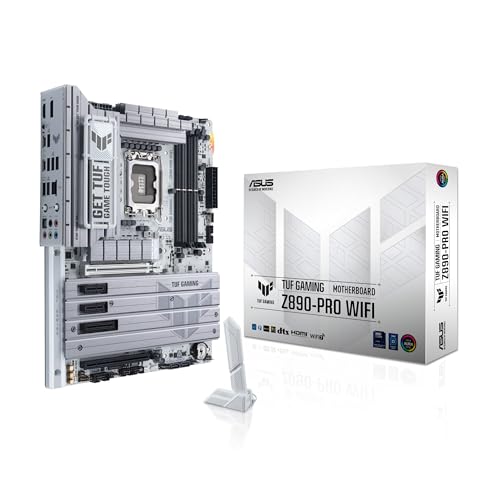
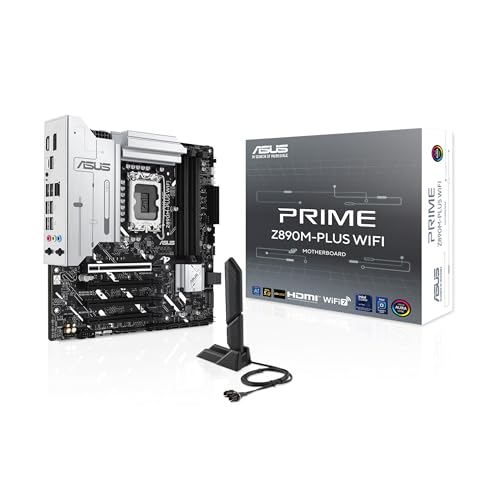
The TUF Gaming Z890-PRO WiFi adds two USB4 ports and a stronger feature set for more money. The Prime Z890M-PLUS WiFi is a micro-ATX board for smaller cases. ROG Strix Z890-A, Z890-E and Z890-H boards offer more premium features and costs. For most gamers, the Z890-PLUS offers the best balance in the family, and ROG matters mainly if you want extra ports and lighting.
Who Should Build Around It
This board suits gamers and streamers who choose Intel Core Ultra, and creators who want Thunderbolt 4 without paying for a flagship. Skip it if you want the cheapest possible Intel build, since B860 boards are the budget route, or if you prefer AMD. Our best motherboard page, the Gigabyte B850 AORUS Elite review and the MSI MAG X870 Tomahawk review cover related options.
Z890 or a Cheaper Intel Chipset?
Intel also sells B860 boards for Core Ultra, and they cost less because they trim overclocking support, lanes and ports. If you plan to use a locked processor and a single graphics card with one or two drives, a B860 board such as the TUF Gaming B860-PLUS WiFi can do the job for less. Choose Z890 if you want to overclock, use several fast drives, use Thunderbolt and keep the board through multiple upgrades.
Memory and Overclocking
DDR5 memory is the only option, and a 32GB kit is a good starting point for gaming and creative work. Use the memory profile in the BIOS to reach the kit's rated speed, then leave any extra tuning for later. ASUS's AI tools can suggest overclock settings for the processor, though many people get the best experience by enabling the memory profile and leaving the processor at its default behavior.
Building and BIOS Tips
Install the processor carefully on the LGA 1851 socket and use the cooler designed for that socket, since cooler brackets differ between generations. Update the BIOS to the latest version before your first long session, because early firmware often improves memory compatibility and stability. Set a custom fan curve in the BIOS or in Fan Xpert 4 to balance noise and cooling for your case.
Case, Cooler and Power Supply
An ATX case with good airflow is the best match, and a quality tower cooler or all-in-one liquid cooler suits Core Ultra chips. The eight-pin power connectors on the board are rated for high-power processors, so pair them with a good power supply. If you plan to add a high-end graphics card, make sure the supply has the correct graphics power cable.
Sellers, Retail Boxes and Warranty
Some listings carry names such as Sparepart, which indicates a replacement part, and may not include the retail accessories or the usual warranty path. For a new build, choose a standard retail listing from ASUS or a reputable seller, check that it says new condition and keep your receipt. Boards are easier to return in the first few weeks, so test your build soon after it arrives.
Everyday Use and Software
Beyond the hardware, the board ships with ASUS software for fan control, lighting and networking. AI Networking II can prioritize game traffic on the wired and wireless connections, and the BIOS is easy to navigate with a mouse, which helps first-time builders. Keep the firmware current, install only the utilities you need and you will have a quiet, stable base for years of gaming and creative work.
Final Checks Before Ordering
Confirm the socket matches your processor, the memory type is DDR5, and the case is a standard ATX size. Check the listing for new condition and read the warranty text. Order early enough to test the board before any return window closes, and keep the original box and accessories until the build is stable.
Frequently Asked Questions
What processors does the Z890-PLUS support?
It supports Intel Core Ultra Series 2 desktop processors on the LGA 1851 socket.
Does it have WiFi 7?
Yes. The listing mentions Wi-Fi 7 and 2.5Gb Ethernet.
Does it have Thunderbolt 4?
Yes. A Thunderbolt 4 Type-C port is listed.
How many M.2 slots are there?
Four M.2 slots are listed, covered by heatsinks.
Final Verdict
The Z890-PLUS is a strong mid-range Intel board. This asus tuf gaming z890-plus review recommends it for most Core Ultra gaming builds. Check the seller and warranty before you order.


