
ASUS vs ASRock Motherboard: Which Brand Is Better for Your Build?
Disclosure: We may earn a commission when you buy through links on this page, at no extra cost to you. As an Amazon Associate I earn from qualifying purchases. Learn more

This asus vs asrock motherboard guide compares price, power delivery, features, BIOS and support, so you can choose between premium ASUS boards and value ASRock models.
ASUS and ASRock sit at opposite ends of the motherboard market in many ways. ASUS builds a wide range from budget boards to flagship ROG models, and ASRock is known for aggressive pricing and a focus on value. This asus vs asrock motherboard comparison explains where each brand shines so you can choose for your build and budget.
The product table lists current boards from both brands on AMD AM5, AM4 and Intel platforms. The sections below explain how the lineups differ and what to check before you buy.


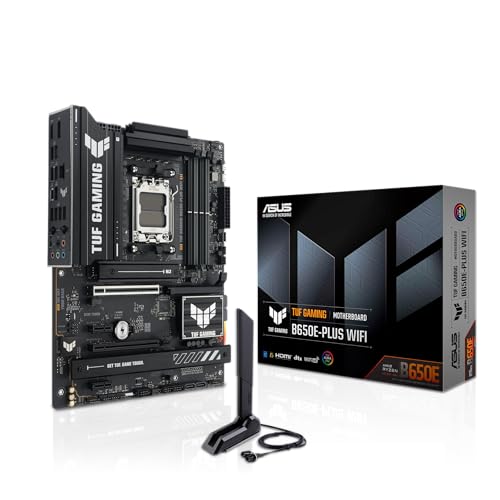


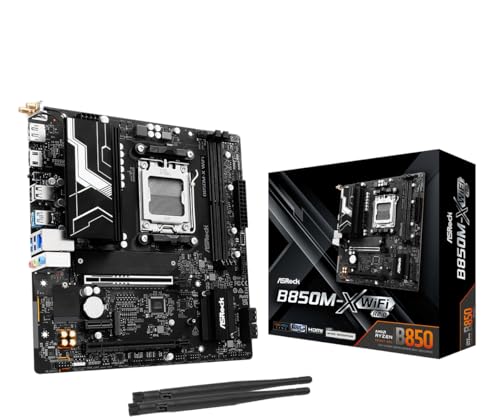

How the Two Lineups Are Organized
ASUS divides its range into ROG for enthusiasts, TUF Gaming for durable mid-range boards, Prime for simple value boards and ProArt for creators. Within ROG you will find Strix, Crosshair and Maximus models, from sensible to extreme. ASRock uses names such as Steel Legend for stylish mid-range boards, Pro for practical models, PG Riptide for AM4 and Nova for high-end Intel boards, with micro-ATX versions in each line.
Price and Value
ASRock usually wins on price. In the table, ASRock AM5 boards such as the B650M-HDV and B650M-HM.2+ cost less than an ASUS TUF board, and the B850 Steel Legend WiFi undercuts a comparable TUF B850-PLUS WiFi. ASUS charges a premium for its software, its BIOS polish and its brand reputation. If you only need a stable platform for a mid-range processor, ASRock gives more for the money.
Power Delivery and Stability
Power design matters most with high-end processors. ASUS lists the TUF B850-PLUS with 14+2+1 power stages rated at 80A and the ROG Strix X870-A with 16+2+2 stages. ASRock boards also list robust designs, but cheaper models use simpler power sections that are fine for mid-range chips and less suited to heavy overclocking. For a Ryzen 7 or Core i5 build, either brand is fine. For a flagship processor, step up to a higher-tier model from either brand.
BIOS and Software
ASUS has a polished BIOS with an easy mode, strong fan controls and BIOS Flashback on many boards, which lets you update firmware without a processor installed. ASRock has improved its BIOS and offers a clean interface, with fewer extras. ASUS also provides Armoury Crate and Aura Sync for lighting and tuning, which some users find helpful and others find heavy.
Connectivity and Features
Both brands offer WiFi, 2.5G Ethernet and multiple M.2 slots on mid-range boards. ASUS often adds Thunderbolt or USB4 headers, more USB-C ports and heatsinks on every M.2 slot. ASRock includes many of the same features at a lower price, with a few skipped at the bottom of the range. Check the specific model for the number of M.2 slots, rear USB ports and the type of WiFi, because those details change between boards.
Platform Choices
Both brands cover the main AMD and Intel sockets. For AMD AM5, ASUS offers TUF B850-PLUS and X870-PLUS, and ASRock offers B850 Steel Legend and B850M-X. For AM4, ASUS offers ROG Strix B550-F Gaming WiFi II, and ASRock offers B550 PG Riptide. For Intel LGA 1700, ASRock's B760 Pro RS and B760M Pro RS give budget options, and ASUS's TUF Z790-Plus WiFi is a stronger step up.
Reliability and Support
Both brands carry standard warranties, and both have large service networks. Reputation varies by region and by individual board, so read recent feedback for the exact model. A reputable seller and a clear return policy matter more than the badge, because boards can be damaged in transit or have a bent socket pin.
Which Brand Should You Choose?
Choose ASRock when you want the lowest price for a stable mid-range build. Choose ASUS when you want a polished BIOS, more features, better heatsinks and a stronger upgrade path. For high-end builds, ASUS has more flagship options. See our best motherboard guide, the ROG Crosshair X870E Hero review and the Gigabyte B850 AORUS Elite review for more options.
- Choose ASRock for budget AM5 and LGA 1700 builds.
- Choose ASUS for extra features and premium models.
- Match the socket to your processor before anything else.
Form Factor and Case Fit
Both brands sell full ATX boards and smaller micro-ATX boards. ATX boards have more slots and ports and suit standard mid-tower cases. Micro-ATX boards, such as the ASRock B650M Pro X3D WiFi and B850M-X WiFi, save space and money, and they work well in compact cases when you need only one graphics card and a couple of drives. Check your case supports the size you pick, and make sure there is room for your cooler and memory.
Memory and Storage Support
AM5 and recent Intel boards use DDR5 memory, while AM4 boards use DDR4. ASRock lists high memory speeds in its titles, such as 7200+ or 8200+ with overclocking, which are useful numbers for enthusiasts, though many builds run at standard profiles. ASUS lists M.2 slot counts and heatsinks more prominently, which matters for people planning several fast drives. For most gamers, two M.2 slots and a 32GB memory kit are enough.
Upgrade Path
The AM5 socket supports several Ryzen generations, so a board bought today can accept a newer processor later with a BIOS update. ASUS's BIOS Flashback feature makes that update safer. Intel's LGA 1700 platform is at the end of its life, which makes ASRock's B760 boards a cost-effective choice for a final upgrade rather than a long-term foundation. Choose AM5 if you want the longest runway.
How to Read a Motherboard Listing
Focus on the socket, chipset, size, memory type, number of M.2 slots, WiFi standard and power stages. Ignore marketing language about AI and future readiness unless it is tied to a specific feature. Look at buyer feedback for notes on BIOS stability, memory compatibility and coil whine, and confirm that the listing says new condition from a reputable seller.
Frequently Asked Questions
Is ASUS better than ASRock?
ASUS tends to offer more features and a polished BIOS, while ASRock tends to offer lower prices. The better choice depends on your budget.
Which is cheaper?
ASRock boards usually cost less at the same chipset tier.
Do both support Ryzen 9000?
Yes. AM5 boards from both brands list support for Ryzen 9000, 8000 and 7000 series processors.
Does the brand affect gaming speed?
Not directly. Speed depends on the processor, memory and graphics card.
Final Verdict
ASRock wins on value and ASUS wins on features. For any asus vs asrock motherboard choice, start with the socket and budget, then compare the exact models. Check the seller and warranty before you order.


