
ASUS vs Gigabyte Motherboard: Which Brand Should You Choose?
Disclosure: We may earn a commission when you buy through links on this page, at no extra cost to you. As an Amazon Associate I earn from qualifying purchases. Learn more

This asus vs gigabyte motherboard guide compares TUF, ROG and AORUS boards on price, power delivery, M.2 slots, WiFi and warranty so you can choose the right one.
ASUS and Gigabyte are two of the biggest motherboard makers, and their gaming lines compete closely at almost every price. This asus vs gigabyte motherboard guide explains how the ranges line up and what separates the brands, so you can choose without paying for features you will not use.
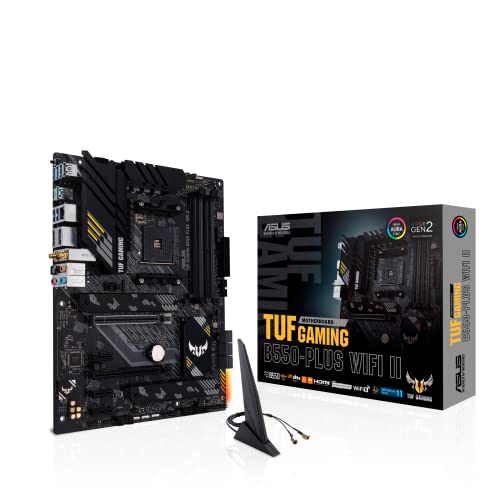
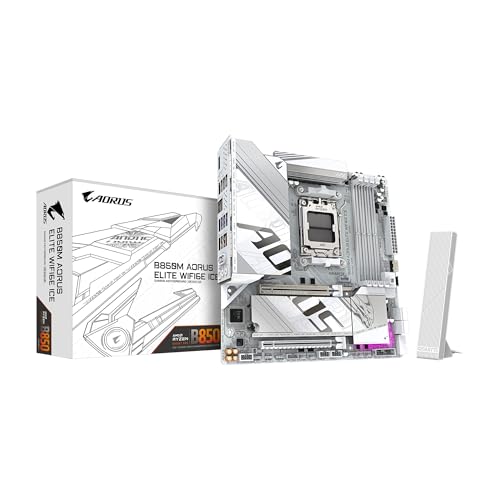
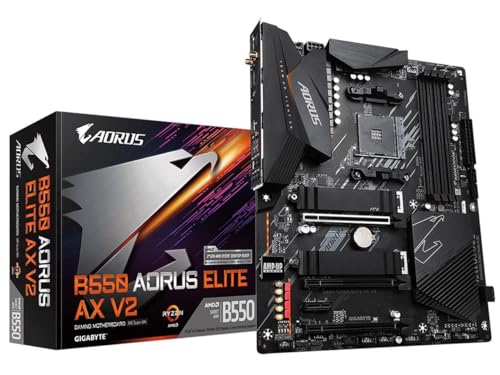
The table lists current boards from ASUS TUF and ROG and from Gigabyte AORUS on AM5, AM4 and Intel sockets. Match the socket to your processor first, then use the sections below to pick the brand.





Understanding the Lineups
ASUS uses ROG Strix and Crosshair for enthusiast boards, TUF Gaming for durable mid-range boards and Prime for budget models. Gigabyte uses AORUS Master, Pro, Elite and Gaming for gaming boards, with Elite being the popular middle tier, and a white ICE finish on some models. In both brands, the more expensive tiers add stronger power delivery, more M.2 slots and faster networking.
Pricing and Value
At mid-range prices the two are close. The TUF Gaming B850-PLUS WiFi and the Gigabyte B850 AORUS Elite WIFI7 are both ATX AM5 boards at comparable prices, and Gigabyte's B850M AORUS Elite is a lower-priced micro-ATX option. For older platforms, Gigabyte's Z790 AORUS Elite AX and B550 AORUS Elite AX V2 compete directly with ASUS's TUF Z790-Plus WiFi and TUF B550-PLUS WiFi II. Prices change often, so compare current listings.
Power Delivery
ASUS lists 14+2+1 stages at 80A on the TUF B850-PLUS and 18+2+2 stages on the ROG Strix X870E-E. Gigabyte lists 14+2+2 on the B850 AORUS Elite and 14+2+1 on the B650 AORUS Elite AX. These designs are all strong enough for current mid-range and high-end Ryzen processors, so power delivery rarely separates the brands at the same tier. Look at the tier more than the brand.
Features and Connectivity
Both brands now ship WiFi 7 and 2.5G networking on mid-range AM5 boards, with USB4 on higher models. Gigabyte's X870E AORUS Master lists four M.2 slots, USB4, WiFi 7 and 5GbE networking. ASUS offers similar premium features on ROG boards, such as the Crosshair X870E Hero. Many ASUS boards add BIOS Flashback and Thunderbolt-ready headers, while Gigabyte boards focus on clean layouts and large heatsinks.
BIOS, Software and Tuning
ASUS has a polished BIOS with an easy mode and extensive fan and overclock controls. Gigabyte's BIOS is also complete, and its AORUS software handles lighting and fans. Experience varies by board and release, so read recent feedback about BIOS stability for the exact model. Whichever brand you choose, update the BIOS before installing a new processor and keep firmware current.
Platform and Upgrade Path
For long-term value, AM5 is the safest choice because it supports Ryzen 9000, 8000 and 7000 processors, and both brands have a wide AM5 range. AM4 boards such as the B550 models suit budget builds with older Ryzen chips. For Intel LGA 1700, both brands offer Z790 boards that are good deals on a platform nearing the end of its life.
Which Brand Should You Choose?
Choose ASUS if you want the broadest range, a polished BIOS and options from budget to extreme. Choose Gigabyte if you want a strong mid-range board with competitive pricing and a clean design. At the same price tier, the best choice often comes down to which board has the ports and M.2 slots you need. Read our best motherboard page, the Gigabyte B850 AORUS Elite review and the ROG Crosshair X870E Hero review for details.
- Choose ASUS for BIOS Flashback and a wide range of tiers.
- Choose Gigabyte for strong mid-range value and white ICE options.
- Compare the exact M.2 count, USB ports and WiFi standard.
Looks, Lighting and Case Builds
Appearance plays a bigger role than it used to, since many cases have glass panels. Gigabyte offers the white ICE finish on boards like the B850M AORUS Elite and the X870E AORUS Pro ICE, which suits all-white builds. ASUS offers white and black variants across TUF and ROG, along with BTF boards that move connectors to the back for cleaner cable routing. If your build is a showcase, check the color and the lighting zones before you decide.
Size Options
Both brands offer ATX and micro-ATX boards. Gigabyte's B850M AORUS Elite and B850M Gaming X are examples of compact AM5 boards, and ASUS offers TUF B850M-PLUS boards in similar sizes. Micro-ATX boards cost less and fit small cases, but they have fewer slots and ports. If you plan to add several drives or capture cards, an ATX board gives more room.
Memory and Storage Planning
For AM5 and recent Intel boards, DDR5 is standard. Look at the number of M.2 slots and whether they have heatsinks, because fast drives run hotter. Gigabyte's X870E AORUS Master lists four M.2 slots, and ASUS's TUF B850-PLUS lists three with heatsinks on every slot. For most gamers, two or three slots are plenty.
Common Mistakes to Avoid
Do not buy a board before checking socket compatibility with your processor. Do not assume that a higher price means better gaming speed, since the graphics card and processor decide frame rates. Avoid listings from unknown sellers with no warranty, and avoid bundles that raise the price without a clear benefit. Finally, update the BIOS before you install the latest processor, particularly on boards bought from older stock.
Warranty and Support
Both brands offer standard warranties through their own service networks, and experiences vary by country. Keep your receipt, register the board and take photos of the socket before installing a processor. If a board arrives with bent pins or damage, return it quickly rather than trying to repair it, since that can void support.
Frequently Asked Questions
Is Gigabyte as good as ASUS?
At the same tier the two are similar. ASUS offers a broader range, and Gigabyte offers strong mid-range value.
Which has better WiFi?
Both offer WiFi 7 on current mid-range AM5 boards. Check each model to confirm.
Do both support Ryzen 9000?
Yes. AM5 boards from both list Ryzen 9000, 8000 and 7000 support.
Which is easier to build with?
Both are straightforward. BIOS Flashback on many ASUS boards helps with updates.
Final Verdict
ASUS and Gigabyte are closely matched, so choose by the board's features. For any asus vs gigabyte motherboard decision, compare the exact models and the seller's warranty before you order.


