
ASUS vs MSI Motherboard: Which Brand Is Better for Gaming?
Disclosure: We may earn a commission when you buy through links on this page, at no extra cost to you. As an Amazon Associate I earn from qualifying purchases. Learn more

This asus vs msi motherboard guide compares ROG, TUF, MEG, MPG and MAG boards on power delivery, price, BIOS and features to help you pick the right board.
Two brands dominate gaming motherboard shopping: ASUS and MSI. Both offer boards for every budget and platform, and both are good choices when you pick the right tier. This asus vs msi motherboard guide explains how the lines match up, where each brand is strongest and how to choose for your build.
The product table lists boards from ASUS ROG and TUF and from MSI MAG, MPG and PRO on AM5, AM4 and Intel sockets. Start with your processor socket, then use the comparison below.


Reading the Product Names
ASUS orders its lines as ROG Maximus and Crosshair at the top, ROG Strix next, TUF Gaming for value and durability, and Prime for basic boards. MSI orders its lines as MEG for flagship boards, MPG for performance, MAG for mainstream gaming and PRO for basic models, with Gaming Plus boards as lower-priced gaming options. Learning the order helps because a MAG Tomahawk and a TUF Plus board target the same buyer, and a MEG or MPG board lines up with a ROG Strix or Crosshair.
Price and Value
MSI often undercuts ASUS at the same tier. The MSI B850 Gaming Plus WiFi and the MAG B850 Tomahawk MAX WiFi price below many ROG Strix B850 boards, and MSI's budget PRO boards offer an inexpensive way to build on AM4 or LGA 1700. ASUS counters with a wider range and heavier feature sets at higher tiers. If your budget is tight, MSI is the safer bet for savings.
Power Delivery and Cooling
Power design depends on the tier. ASUS lists 14+2+2 stages on the ROG Strix B850-A, 16+2+2 on the Strix X870-A, 18+2+2 on the Crosshair X870E Hero and 18+2+1+2 on the Strix Z890-E. MSI lists 80A smart power stages on the MAG B850 Tomahawk MAX and MPG B850 Edge TI, and 60A stages on the Gaming Plus X870 boards. Those are all capable for mainstream processors. For flagship chips and overclocking, choose a higher tier from either brand.
Features and Connectivity
ASUS boards tend to add USB4 or Thunderbolt headers, more USB-C ports and extra M.2 heatsinks at each tier. MSI boards often include similar features on the MAG and MPG lines at lower prices, with fewer extras on the PRO line. WiFi 7 appears on many current boards from both brands. Check each model for the exact number of M.2 slots, the rear USB ports and the WiFi version.
BIOS and Software
Both brands offer capable BIOS menus with an easy mode and advanced controls. ASUS has strong fan controls and BIOS Flashback on many boards, and MSI offers a similar update tool on some models, along with a clean layout. Check the listing for the exact feature. Both bring companion software for lighting and monitoring. The software is optional, and many builders use only the BIOS and standard Windows tools.
Platform Choice
For the longest upgrade path, choose an AM5 board because it supports Ryzen 9000, 8000 and 7000 processors. Intel Z890 boards from both brands support Core Ultra Series 2. AM4 boards such as the ROG Strix B550-F and MSI B550M PRO-VDH suit budget builds with older Ryzen chips, and Intel B760 boards from MSI are cost-effective for LGA 1700 builds.
Which Brand Should You Pick?
Pick MSI when price is a priority and you want strong mid-range features. Pick ASUS when you want a polished experience, more premium tiers and the widest range. Compare the exact models and pay attention to the VRM, M.2 slots and ports. See our best motherboard guide, the MSI MAG X870 Tomahawk review and the ROG Crosshair X870E Hero review for more.
- Pick MSI for lower prices at the same tier.
- Pick ASUS for the broadest range and premium features.
- Check socket, VRM, M.2 slots and WiFi before the brand.
Examples by Budget
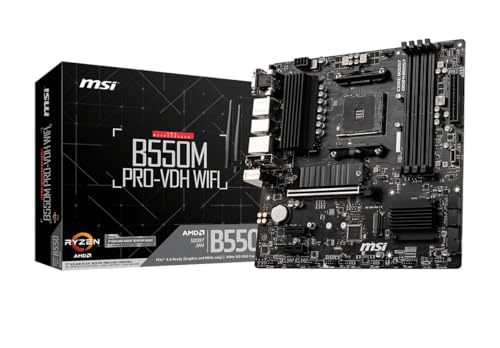
On a tight budget, MSI's B550M PRO-VDH WiFi on AM4 or its PRO B760-P WiFi on LGA 1700 give a working platform at a low price. In the middle of the market, MSI's MAG B650 Tomahawk WiFi and B850 Gaming Plus WiFi compete with ASUS's TUF Gaming B850-PLUS and the Strix B850-A. At the high end, ASUS's ROG Crosshair X870E Hero and Strix Z890-E meet MSI's MPG X870E Carbon and MEG Z890 ACE. In each band, the best choice depends on the ports you need.
Memory and Storage Details
DDR5 is the standard on current AM5 and recent Intel boards, and the MSI B760 Gaming Plus listing explicitly states DDR5 memory only, so be careful if you plan to reuse DDR4. Look at the M.2 slot count, particularly if you plan to add several fast drives. ASUS lists heatsinks across all slots on many TUF and ROG boards, and MSI includes heatsinks on most mid-range and above boards as well.
Case and Cooling Fit
Most of these boards are ATX, and they fit standard mid-tower cases. If you want a smaller case, look for micro-ATX versions such as the MSI B550M PRO-VDH. Make sure your cooler's mounting hardware matches the socket, since AM5 and LGA 1851 use different brackets from earlier sockets.
Warranty and Sellers
Buy from sellers who clearly state new condition and manufacturer warranty. Boards are delicate, and socket damage is the most common reason for returns, so inspect the pins or contacts before you install a processor. Keep your receipt and the original box for the first few weeks. If a board does not post, test with minimal parts before you assume it is faulty, and update the BIOS if a new processor will not boot.
Frequently Asked Questions
Is MSI better than ASUS for motherboards?
Neither is clearly better. MSI often costs less, while ASUS offers a wider range and more premium features.
What is the MSI equivalent of TUF?
The MAG line is the closest, with models like the MAG B850 Tomahawk MAX WiFi.
Which has better VRMs?
It depends on the tier. Compare the stage count and amperage listed for each exact model.
Do both support Ryzen 9000?
Yes. AM5 boards from both brands support Ryzen 9000, 8000 and 7000 series processors.
Final Verdict
MSI wins on price and ASUS wins on range. For any asus vs msi motherboard decision, compare exact models and the seller's warranty before you order.


