
Audio Interface Buying Guide: How to Choose the Right One in 2026
Disclosure: We may earn a commission when you buy through links on this page, at no extra cost to you. As an Amazon Associate I earn from qualifying purchases. Learn more

Audio Interface Buying Guide: how to pick inputs, preamps and connections for streaming, podcasting and music.
This audio interface buying guide helps you pick the right box for recording, streaming or podcasting without paying for features you will not use. An audio interface is the part that turns microphone and instrument signals into clean digital audio and feeds sound back out to headphones and speakers, and it matters more than most people expect.
Below you will find what to look for in inputs, preamps, connections, monitoring and software, plus advice for three common situations. The product table lists audio interfaces in stock now, from simple one-input boxes to multi-channel units, so you can match the checklist to real options.





Audio Interface Buying Guide: What the Box Does
A computer's built-in audio is designed for casual listening, not recording. It has noisy preamps, weak microphone inputs and delays that make recording awkward. An interface fixes those problems with proper microphone preamps, phantom power for condenser microphones, instrument inputs and low-delay monitoring.
It also gives you a clean headphone output and balanced outputs for studio speakers, which is useful even if you only listen to music.
How Many Inputs Do You Need
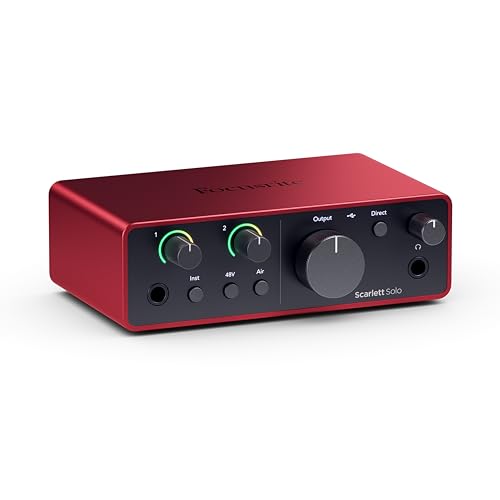
This is the first and most important decision. A single-input interface, such as the Focusrite Scarlett Solo, suits a solo podcaster, streamer or singer. A two-input interface, such as the Scarlett 2i2 or MOTU M2, suits interviews, duets, a singer plus a guitar, or stereo recording.
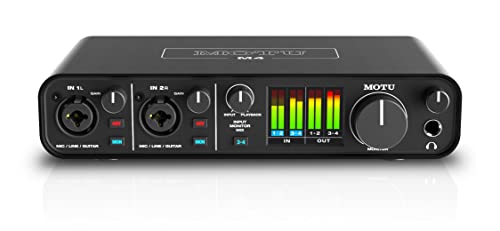
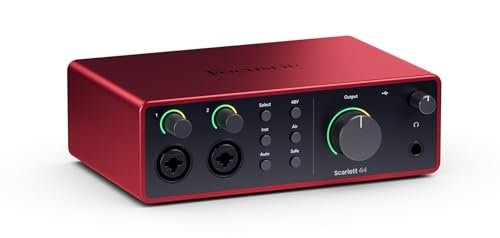
Four or more inputs, such as the Scarlett 4i4, MOTU M4 or Audient iD24, suit small bands, drum recording or extra synths. Buy a little more than you need now, but do not overspend on channels you will never connect.
Preamps and Sound Quality
The preamp makes the signal from your microphone loud enough to record, and a good one is quiet and clean. Even entry-level interfaces now have solid preamps, so the difference shows up mostly with quiet dynamic microphones that need a lot of gain.
If you plan to use a hungry dynamic microphone like a Shure SM7B, look at the gain figures and reviews, and consider a model known for strong preamps or add an inline booster.
Connections and Compatibility
Most interfaces connect over USB-C, which works with Windows and Mac and with many tablets and phones. Thunderbolt interfaces, such as the Universal Audio Apollo series, offer lower delays and more power but cost much more. Check the computer ports you have, and use the cable that comes in the box.
Check whether the interface needs a driver on Windows and whether it works with your recording software. Class-compliant interfaces work without a driver on Mac and with many apps on tablets.
Monitoring and Outputs
Look for a headphone output with enough volume for your headphones, a direct monitoring knob so you hear yourself without delay, and outputs for studio speakers. If you stream, loopback is useful, because it lets you mix computer audio into your broadcast or recording.
Software and Extras
Many interfaces bundle software, such as a recording program, plugins and sound libraries. Treat these as a bonus rather than the reason to buy, but they can save money if you are starting from scratch.
Best Choices by Situation
Streaming and podcasting
Choose a one- or two-input interface with loopback and a simple layout, such as the Scarlett Solo, Scarlett 2i2 or Audient iD4.
Home music recording
Choose a two- to four-input interface with good preamps and low delay, such as the MOTU M2 or M4 or the Universal Audio Volt 276.
Small studios and bands
Choose an interface with eight or more inputs, such as the Audient iD24 for a compact studio or the Solid State Logic SSL 12 for larger sessions.
Common Mistakes
- Buying more channels than you will use.
- Forgetting phantom power for a condenser microphone.
- Ignoring the computer ports you have.
- Buying a cheap unit with poor driver support.
For more help, see our guides on how to choose an audio interface, how to set up an audio interface, whether is an audio interface worth it and the best audio interface.
Setting Up Your First Interface
Install the driver if the maker asks for one, connect the interface with the supplied cable, and choose it as the input and output device in your recording software. Plug in the microphone, raise the gain until the loudest part of your voice sits comfortably below the top of the meter, and use direct monitoring so you hear yourself with no delay.
Keep cables short, avoid running power cables next to microphone cables and use a front-panel USB port on the computer rather than a crowded hub. Those small habits remove most of the hum and dropouts that new users run into.
Accessories You Will Need
An interface is only part of a recording setup. You will want an XLR cable, a microphone stand or arm, a pop filter and a pair of closed-back headphones for recording. If you plan to mix, add studio monitor speakers and isolation pads.
Budget for these when you plan the purchase. A modest interface paired with good cables, a stable stand and a decent microphone will sound better than a premium interface with poor accessories.
Budget Tiers in Plain Terms
Entry boxes with one or two inputs cover most solo creators and cost little. Mid-priced interfaces add more inputs, better converters and stronger software bundles. Premium units add DSP effects, more channels and Thunderbolt connections. Decide which tier matches your sources today, buy that, and leave the rest for an upgrade later when you really outgrow the box.
FAQ
Do I need an audio interface for a USB microphone?
No. A USB microphone has its own interface built in, and an audio interface is for XLR microphones and instruments.
Can I use one interface with a laptop?
Yes. Most interfaces are bus-powered over USB-C and work well with laptops.
How much should I spend?
Entry-level boxes start low and perform well. Spend more for extra inputs, better preamps or lower delay.
Will an interface improve my headphones?
It usually gives a cleaner, louder headphone output than a laptop, which can help with higher-impedance headphones.
Final Verdict
The right interface is the one with enough inputs, a clean preamp and the connections your computer has. Use this audio interface buying guide to count your inputs first, then compare the options in the product table and choose the box that fits your setup and budget.
Prices and availability can change, so check the product page before ordering.


